GPT Image 2 review is one of the most searched AI image tool topics since its launch on April 21, 2026. After weeks of hands-on testing — generating marketing assets, movie posters, multilingual product cards, and character-consistent story sequences — the verdict is clear: GPT Image 2 is a genuine leap forward in AI image generation. But is it the right tool for your workflow? Let’s break it down.
👉 Try GPT Image 2 free on XMK →
What Is GPT Image 2?
GPT Image 2 (model ID: gpt-image-2) is OpenAI’s third-generation native image model, succeeding GPT Image 1 (March 2025) and GPT Image 1.5 (December 2025). Unlike the earlier DALL·E series — which was built on diffusion architecture and bolted onto ChatGPT as a separate plugin — GPT Image 2 is built directly into the GPT architecture. Its defining technical breakthrough is the integration of O-series reasoning: the model researches, plans, and self-checks before rendering a single pixel.
Key technical specs at a glance:
Native resolution: Up to 2048×2048; 4K available via API (beta)
Aspect ratio range: 3:1 (ultra-wide) to 1:3 (ultra-tall), including native 16:9 and 9:16
Text rendering accuracy: 99% in English, 90%+ in Chinese, Japanese, Korean, Hindi, Bengali, and Arabic
Batch generation: Up to 8 consistent images per prompt in Thinking Mode
Web search integration: The model can look up real-world references before generating
Knowledge cutoff: December 2025
Image Arena score: Record-breaking +242 points over the nearest competitor
GPT Image 2 Review: Key Strengths
1. Text Rendering That Actually Works
If you have ever spent hours in Photoshop fixing garbled AI-generated text, GPT Image 2 will feel like a revelation. The model achieves 99% text accuracy in English — not just getting the letters right, but compositing them naturally into the image with correct sizing, perspective, and style matching the overall composition.
This matters enormously for real production workflows: movie posters, restaurant menus, product packaging, social media banners, infographics, and editorial layouts all demand legible, well-placed text. Previous models consistently produced frequent misspellings and awkward text placement in these exact use cases.
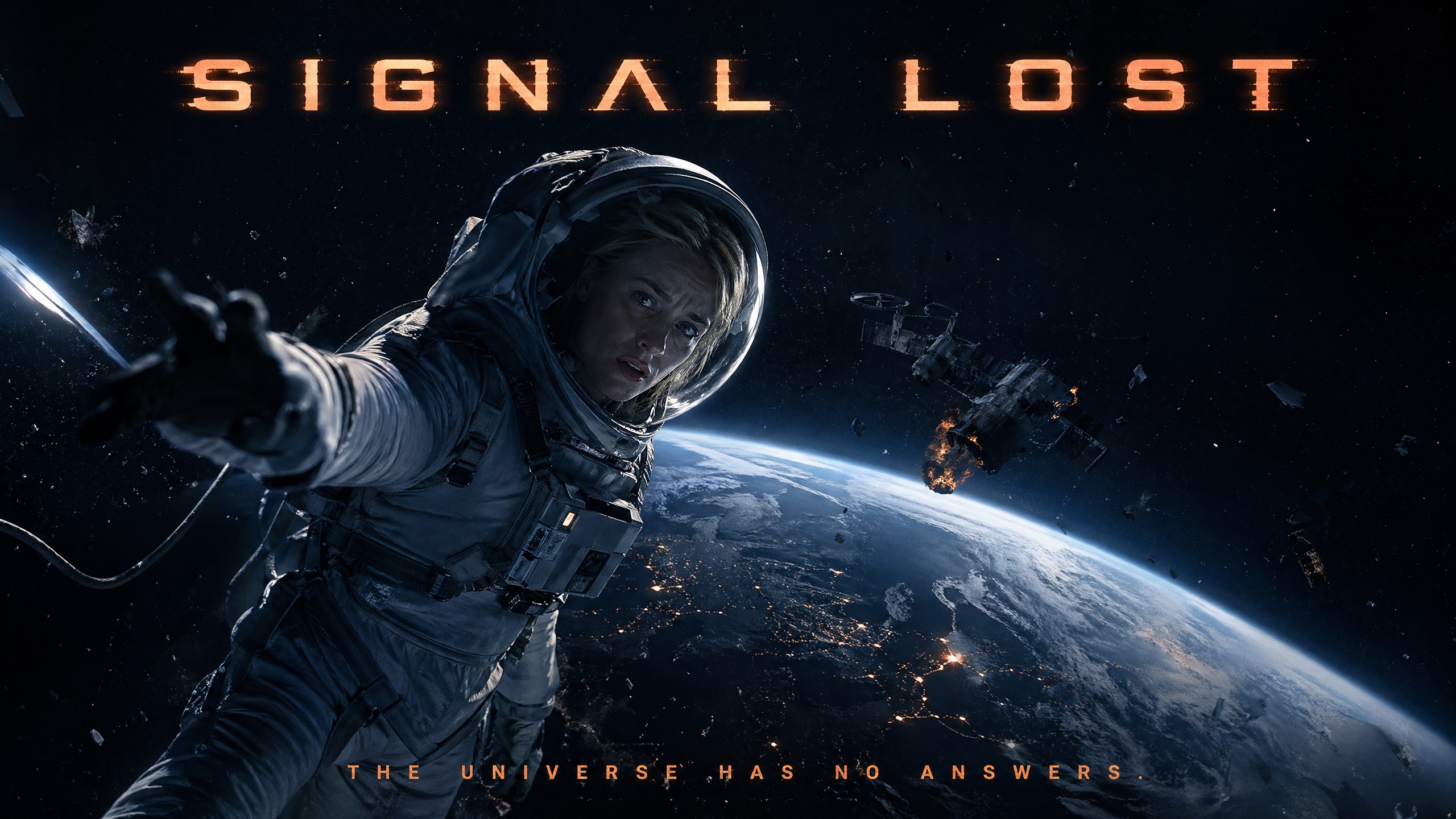
Example prompt:
A cinematic movie poster for a sci-fi thriller. Title: “SIGNAL LOST” in bold futuristic sans-serif at the top. A young White woman astronaut floating in deep space, Earth visible below. Dark navy background, glowing orange accents. Tagline at the bottom: “The universe has no answers.” Photorealistic, IMAX quality.
The result: clean title typography, correct tagline, properly integrated into the composition — with zero Photoshop cleanup required.
2. Character Consistency Across Scenes
One of the hardest problems in AI storytelling is keeping a character looking the same across multiple images. GPT Image 2’s Thinking Mode addresses this directly — generating up to 8 images from a single prompt while maintaining visual continuity across the same face, costume, and lighting style.
For AI comic creation, brand mascot development, and narrative storyboarding, this is a significant practical upgrade. When paired with reference images, the likeness preservation is among the best available in any general-purpose model.
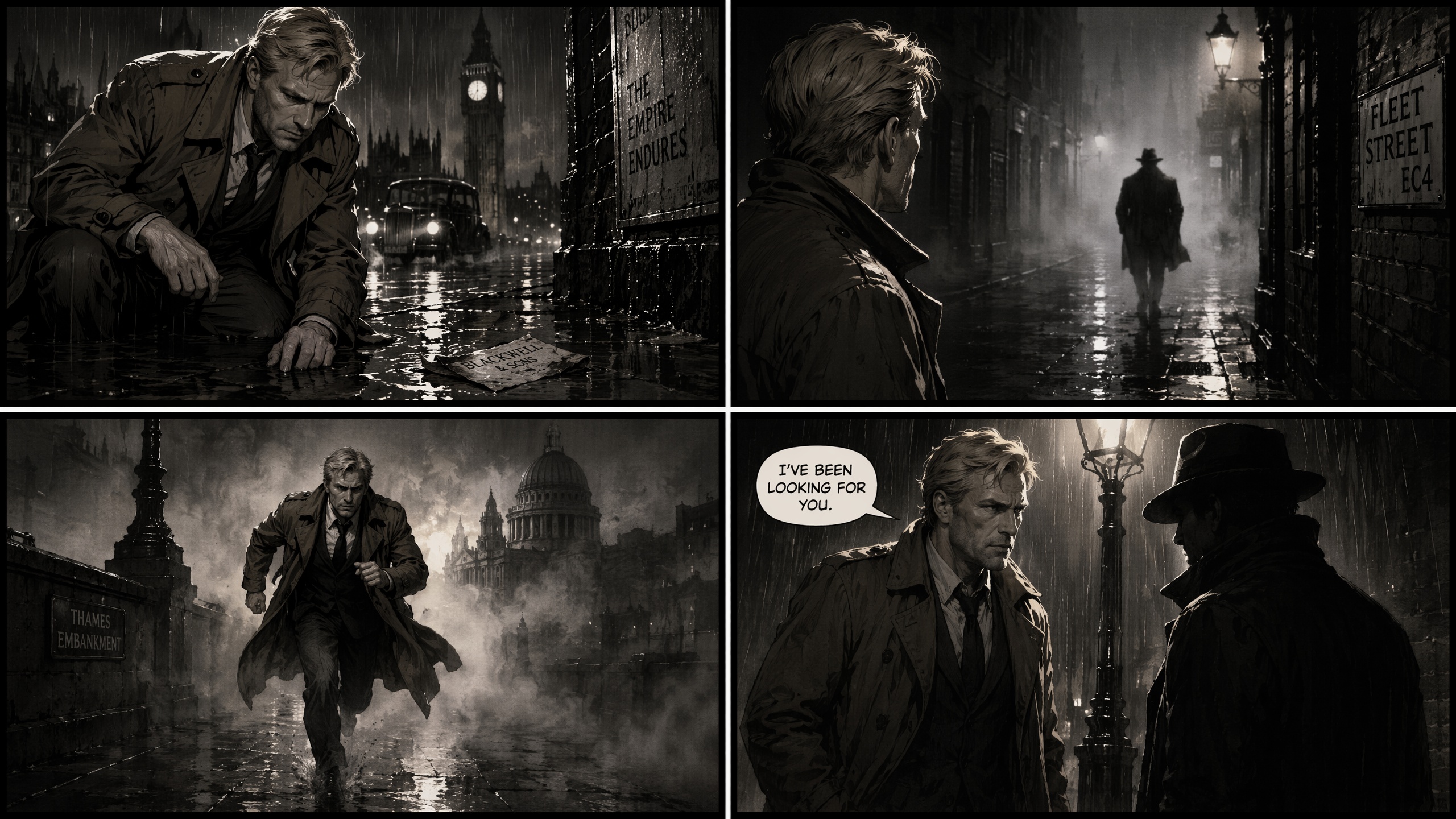
Example prompt:
A 4-panel comic strip. A blonde White male detective in his 40s, wearing a brown trench coat, investigating a rainy London street at night. Panel 1: He spots a clue on the ground. Panel 2: He looks up at a suspicious figure. Panel 3: He runs through the fog. Panel 4: He confronts the figure under a lamppost. Film noir style, high contrast.
Note: Cross-image consistency without a reference image remains imperfect for independent generations. If you need the same character to appear identically across separate sessions, reference images or supplementary tooling are still recommended.
3. Style Reference That Goes Beyond “Prompt Roulette”
Uploading style reference images in GPT Image 2 genuinely influences the output — not just superficially, but in terms of color grading, lighting temperature, compositional structure, and tonal mood. This moves the creative workflow from guesswork to intentional direction.
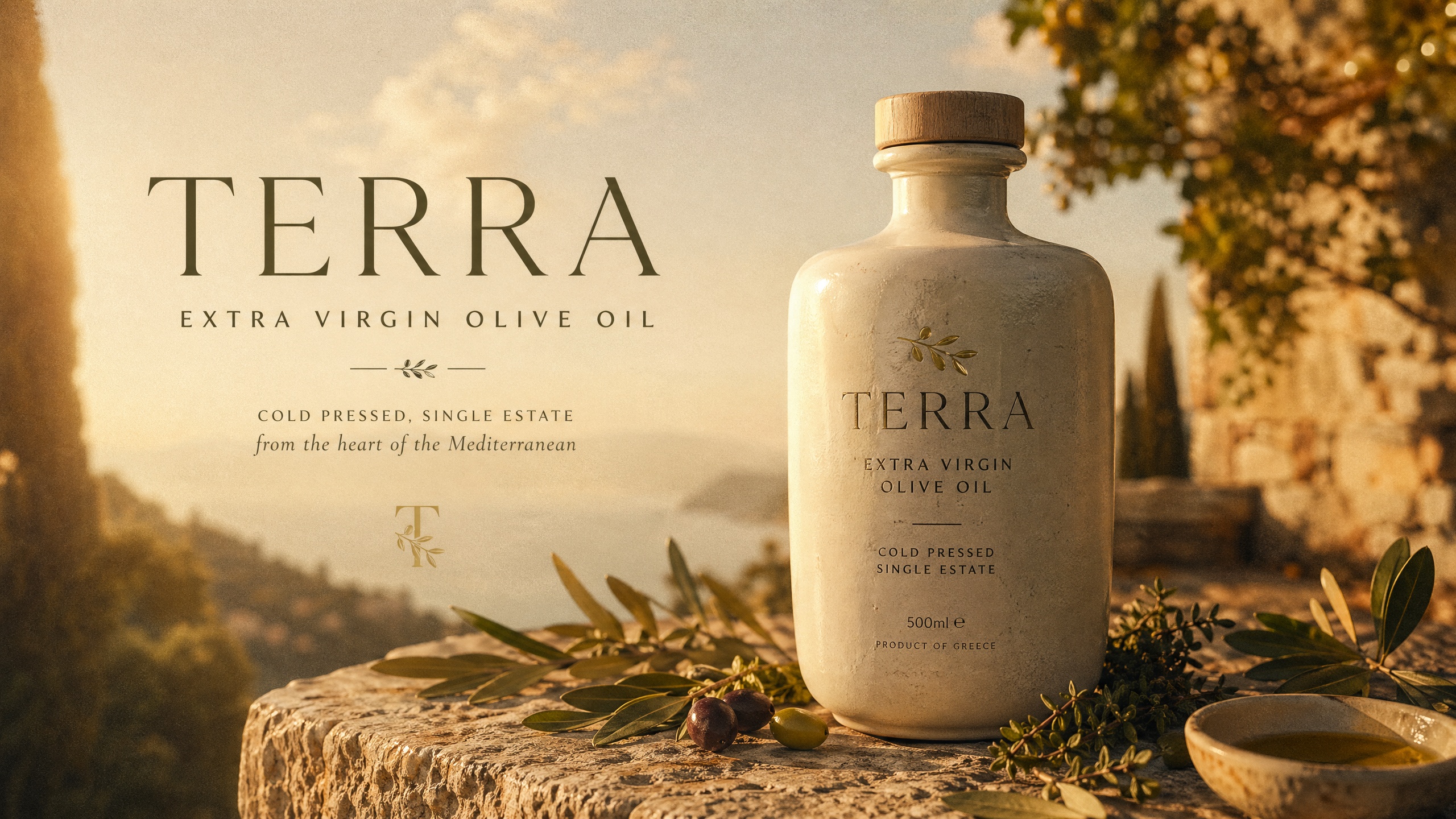
Example prompt (with style reference uploaded):
Using the uploaded style reference, create a product advertisement for a premium olive oil brand. Feature a ceramic bottle on a rustic stone surface, golden afternoon light, Mediterranean herbs scattered around. Include the brand name “TERRA” in elegant serif typography. Match the color grading and film grain from the reference.
4. Complex Creative Problem Solving
This is the model’s secret weapon. GPT Image 2 excels at prompts that would break other models: multi-element compositions, data-driven infographics, live-referenced product shots, and layout-heavy designs where spatial logic matters.
The built-in reasoning means it can interpret instructions like “place the headline in the upper-left third, leave negative space on the right for copy, make the product the focal point” and actually execute that layout — rather than generating something visually pleasing but compositionally wrong.
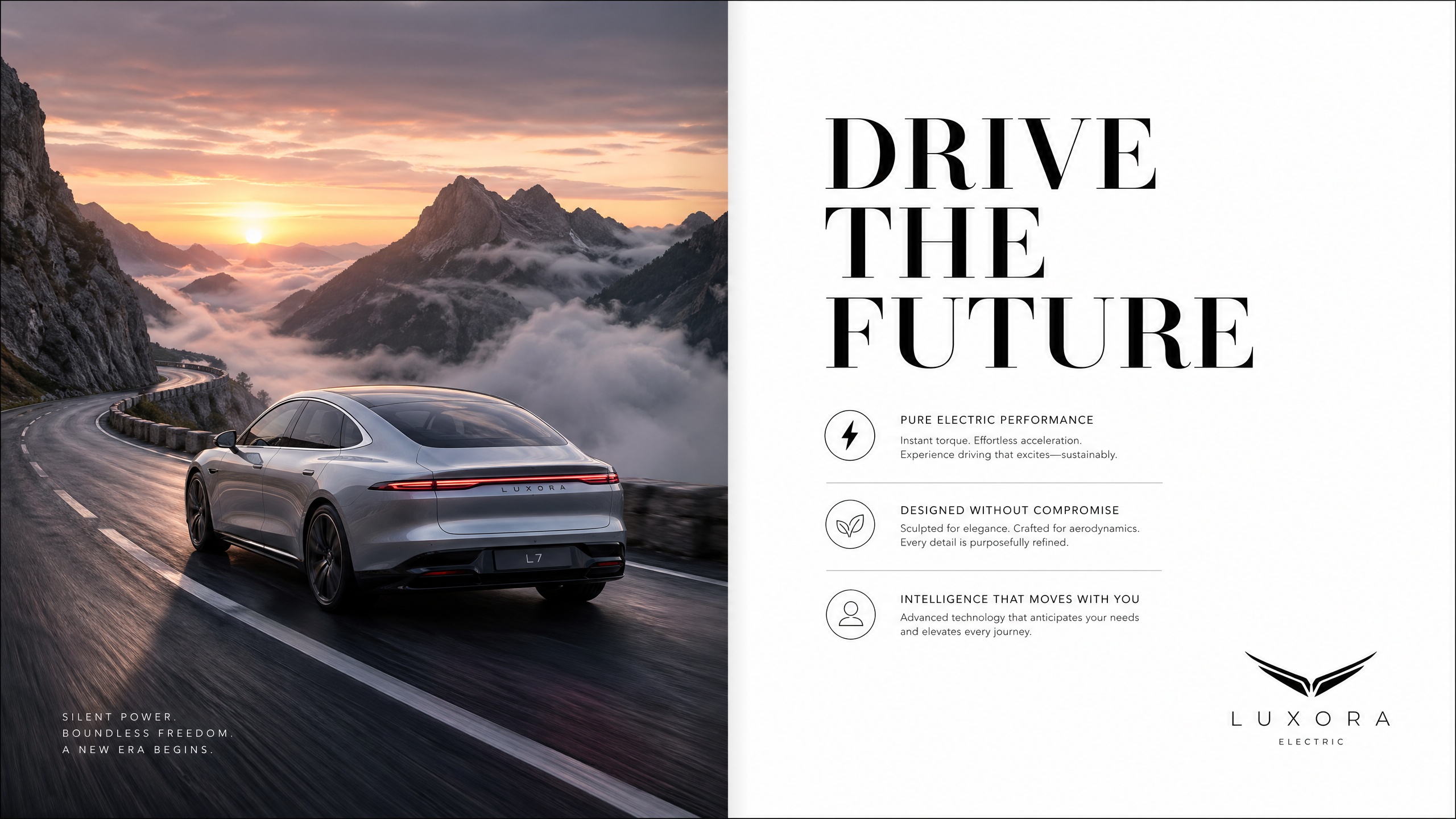
Example prompt:
A magazine-style double spread layout for a luxury electric car brand. Left page: full-bleed photo of a silver sedan on a mountain road at dawn, dramatic fog. Right page: white background, large headline “DRIVE THE FUTURE” in bold black serif, three feature bullet points in smaller text, car logo bottom right. Clean editorial design.
5. Conversational Editing Within the Same Session
One of GPT Image 2’s most practical workflow advantages is its conversational editing capability. Generate an image, then follow up with natural language refinements — and the model applies targeted changes rather than starting from scratch.
“Make the sky more dramatic — add storm clouds on the right side.”
“Shift the subject to the left third of the frame.”
“Change the text on the label from ‘Summer Edition’ to ‘Limited Edition 2026’. Keep the same font and color.”
This iterative loop dramatically reduces the number of full regenerations needed to reach a final production-ready asset.
How to Use GPT Image 2
The fastest way to get started with GPT Image 2 is directly on XMK — no API setup, no installation, no sign-up friction. The entire workflow lives in one focused workspace.
Step 1: Describe Your Idea
Type your prompt into the workspace in plain English. Be specific about subject, lighting, mood, and any text that needs to appear in the image. If you want GPT Image 2 to preserve a specific identity, product shape, or visual style, upload up to 10 reference images alongside your prompt — the model will blend them into a single coherent output.
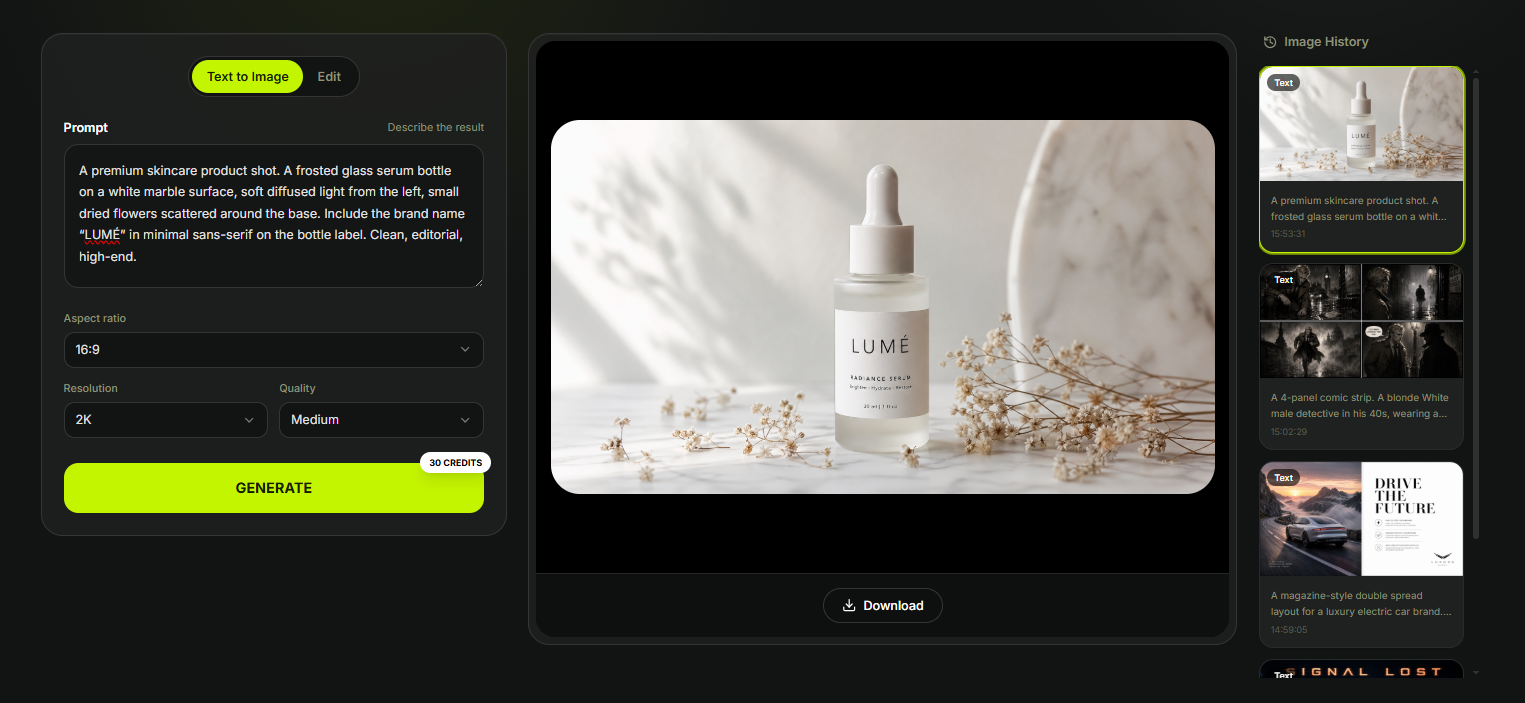
Example prompt:
A premium skincare product shot. A frosted glass serum bottle on a white marble surface, soft diffused light from the left, small dried flowers scattered around the base. Include the brand name “LUMÉ” in minimal sans-serif on the bottle label. Clean, editorial, high-end.
Step 2: Set Output Options
Before generating, choose your aspect ratio, resolution, and quality level:
Resolution: 1K, 2K, or 4K — use 1K for fast iteration and 2K/4K for production-ready deliverables
Quality: Low, Medium, or High — credits scale accordingly (4K High costs 150 credits per image)
Step 3: Generate and Review
Hit generate. The result appears in the workspace alongside your image history, so you can compare iterations side by side without losing previous outputs.
Step 4: Refine with Natural Language
If the result needs adjustment, describe the change directly in plain English — no re-prompting from scratch required:
“Shift the bottle slightly to the right and add a soft shadow beneath it.”
“Change the label text from ‘LUMÉ’ to ‘LUMÉ No.3’. Keep the font and layout.”
“Make the background warmer — add a faint golden tone to the marble.”
GPT Image 2’s Character Lock feature preserves subject identity across edits, so the product, character, or brand element stays visually consistent as you refine the scene.
Step 5: Download
Once the image is final, download it directly from the workspace. All generated images are available in your image history for re-access at any time during your session.
GPT Image 2 vs. Nano Banana 2: Honest Head-to-Head Comparison
The most relevant matchup in AI image generation right now is GPT Image 2 vs. Nano Banana 2 — OpenAI’s reasoning-powered model against Google DeepMind’s speed-optimized Gemini 3.1 Flash Image. Here is an honest breakdown based on real-world testing and published benchmarks as of April 2026.
What Is Nano Banana 2?
Nano Banana 2 (officially: Gemini 3.1 Flash Image) is Google DeepMind’s latest image generation model, released on February 26, 2026. It combines the advanced capabilities of Nano Banana Pro with the speed of Gemini Flash — making it the fastest high-quality AI image generator currently available. It is free through the Gemini app for up to 20 images per day, supports up to 14 reference objects and 5 characters per generation, outputs native 2K resolution (upscalable to 4K), and includes real-time web search grounding via Google Search.
Feature-by-Feature Comparison
Feature | GPT Image 2 | Nano Banana 2 |
|---|---|---|
Architecture | LLM-style token generation + O-series reasoning | Gemini 3.1 Flash (diffusion + reasoning) |
Text rendering accuracy | ✅ 99% English, 90%+ multilingual | ✅ Strong, precise for short text |
Prompt adherence | ✅ Excellent — spatial logic, layout, structure | ✅ Good — better on visual atmosphere |
Photorealism & aesthetics | ⚠️ Strong but functional | ✅ Cinematic lighting, richer textures |
Character consistency | ✅ Up to 8 images per prompt (Thinking Mode) | ✅ Up to 5 characters, 14 reference objects |
Generation speed | ⚠️ 40–60s (complex prompts) | ✅ 10–15s — 2–3× faster |
Multi-image from one prompt | ✅ Up to 8 (Thinking Mode) | ⚠️ One at a time |
Web search grounding | ✅ Yes (Thinking Mode) | ✅ Yes (Google Search, real-time) |
In-image translation | ❌ Not available | ✅ Translate text within image |
AI provenance watermark | ❌ Not advertised | ✅ SynthID + C2PA Content Credentials |
API access | ✅ Official API | ✅ Gemini API |
Free tier | ⚠️ Rate-limited in ChatGPT | ✅ 20 images/day free via Gemini |
Pricing (API) | $0.006–$0.211/image | ~$0.067/image |
Best for | Text-heavy production assets, complex layouts | Fast iteration, photorealistic lifestyle shots |
Where GPT Image 2 Wins
Text precision in complex layouts. In direct comparison tests, GPT Image 2 is the only model that rendered every element of a dense infographic layout correctly — from headlines to small-print numbers — with 100% correct spelling and zero character bleeding. Nano Banana 2 follows layout structure well and adds visual polish, but falls short on dense multilingual or multi-element typographic compositions.
Multi-panel story consistency. In testing with an 18-panel comic prompt, GPT Image 2 delivered the full visual sequence with character continuity, believable environmental details, and a coherent narrative arc. Nano Banana 2 produced a polished script document instead of rendered panels — missing the core creative requirement entirely.
Bilingual poster accuracy. When tasked with a bilingual office safety poster in English and Hindi, GPT Image 2 produced a fully readable, professionally formatted result in both languages. Nano Banana 2 repeated the layout three times in a single image and omitted the Hindi descriptions.
Where Nano Banana 2 Wins
Photorealism and cinematic aesthetics. For lifestyle product shots, portrait photography, and environmental scenes where lighting, texture, and atmosphere matter most, Nano Banana 2 produces more visually dramatic and tactilely realistic results. GPT Image 2 outputs are structurally accurate but can feel more functional than cinematic.
Generation speed. Nano Banana 2 renders complex prompts in roughly 10–15 seconds, compared to 40–60 seconds for GPT Image 2. For rapid ideation and iterative concept exploration, this difference is significant and compounds quickly across a full working day.
Accessibility and cost. Nano Banana 2 is free for 20 images per day through the Gemini app. GPT Image 2 via API costs $0.006–$0.211 per image depending on quality. For high-volume social content on a budget, Nano Banana 2 offers the better ROI.
In-image translation. Nano Banana 2 can regenerate an image with its text localized into another language — a unique capability GPT Image 2 does not currently offer.
Head-to-Head Verdict
Both models are genuinely excellent, and the right choice depends entirely on your use case. Choose GPT Image 2 when text accuracy is non-negotiable, when you are producing complex multi-element layouts, when you need character consistency across 8+ images, or when output must be production-ready on the first attempt. Choose Nano Banana 2 when speed and iteration volume matter, when you need cinematic photorealism for lifestyle or editorial shots, when you want free access at reasonable quality, or when in-image translation is part of your workflow.
The smartest approach in 2026 is model-per-job: GPT Image 2 for text-heavy production assets, Nano Banana 2 for high-speed aesthetic generation.
Where GPT Image 2 Falls Short
Photorealism without references. Cinematic prompts without a style reference image can sometimes produce results that look more like high-quality concept art than true photorealism. Attaching a reference image significantly closes this gap.
Background artifacts. In complex composited scenes — especially when combining character references with stylized backgrounds — occasional background inconsistencies can appear.
Cost at scale. At high-quality API settings, costs accumulate quickly for teams iterating on hundreds of images. The recommended workflow is to prototype at low quality ($0.006/image) and only render final outputs at high quality.
Speed. GPT Image 2 generates one image at a time by default (up to 8 in Thinking Mode) and is slower than fast-iteration tools. If you need to explore dozens of concepts rapidly, the per-generation latency can feel sluggish.
Artistic range. The model’s comfort zone skews toward clean, editorial, and commercial aesthetics. Getting genuinely raw, painterly, or highly experimental outputs requires significantly more prompting effort.
Who Should Use GPT Image 2?
Marketing teams and content creators generating ad creatives, social assets, and branded content will find GPT Image 2’s text rendering and prompt fidelity a genuine competitive advantage — the most reliable model for production-ready marketing assets currently available.
Designers and art directors benefit from style reference support and complex layout execution that makes it a genuine tool for creative direction, not just ideation.
Developers building AI-powered products get a full REST API, multi-image batch support, and web search integration — the most capable programmable image generation model currently available.
AI storytellers and filmmakers working on comics, storyboards, and narrative visual sequences gain meaningful character consistency across 8 images from a single prompt.
Frequently Asked Questions
Is GPT Image 2 free?
Yes — GPT Image 2 is available on ChatGPT’s free tier via Instant Mode, with rate limits that reset every few hours. For consistent access and Thinking Mode features, ChatGPT Plus at $20/month is recommended for regular creative work.
What is the knowledge cutoff of GPT Image 2?
GPT Image 2’s knowledge cutoff is December 2025. This means the model may not accurately render products, brands, or public figures that became prominent after that date without a reference image. For anything post-December 2025, always provide a visual reference alongside your prompt to ensure accuracy.
How does GPT Image 2 handle text inside images?
With 99% accuracy in English and 90%+ accuracy in Chinese, Japanese, Korean, Hindi, Bengali, and Arabic. This is the model’s single biggest technical advantage — it renders multi-word phrases, punctuation, mixed-case text, and non-Latin scripts with correct sizing and natural compositing into the scene.
What is Thinking Mode in GPT Image 2?
Thinking Mode activates GPT Image 2’s built-in O-series reasoning for complex prompts. It allows the model to plan layouts, generate up to 8 coherent images from one prompt, and search the web for real-world references before generating. It is available to ChatGPT Plus, Pro, Business, and Enterprise subscribers.
Is GPT Image 2 better than DALL-E 3?
Yes — significantly. GPT Image 2 outperforms DALL-E 3 across every major dimension: text rendering, prompt adherence, image quality, resolution, and creative problem-solving. DALL-E 2 and DALL-E 3 API endpoints were officially retired on May 12, 2026. All developers should migrate existing integrations to gpt-image-2.
Is GPT Image 2 better than Nano Banana 2?
It depends on the task. GPT Image 2 leads on text precision, complex layout execution, and multi-panel character consistency. Nano Banana 2 leads on generation speed, photorealistic aesthetics, and cost-efficiency for high-volume workflows. For production assets where accuracy is critical, GPT Image 2 wins. For fast iteration and lifestyle imagery, Nano Banana 2 is the better choice.
Can I use GPT Image 2 for commercial projects?
Yes. Generated images on XMK can be used for commercial projects according to the platform terms that apply to your account and plan. Always verify the latest terms at xmk.com/terms before using generated images in client-facing or revenue-generating contexts.
What resolution does GPT Image 2 output?
On XMK, GPT Image 2 supports 1K, 2K, and 4K output with Low, Medium, and High quality controls. 4K High quality costs 150 credits per image. Aspect ratios range from 3:1 to 1:3, with native support for 16:9 and 9:16.