GPT Image 2 + HappyHorse 1.0 is the AI workflow behind every hyper-realistic NBA courtside clip, F1 paddock reaction, and fake “live TV” sports moment flooding TikTok and X right now. As of April 2026, HappyHorse 1.0 leads the Artificial Analysis Image-to-Video Arena at 1413 Elo — 48 points ahead of Seedance 2.0 and well above Kling 3.0 (1241). Paired with GPT Image 2’s 1512 Elo on the image generation arena, this combination is the highest-scoring image-to-video stack publicly available.
This guide covers the real benchmark data behind the hype, the exact five-layer prompt structure viral creators use, both halves of the prompt chain (image + motion), a step-by-step workflow, real examples with full prompts, and an honest head-to-head against Kling 3.0 and Seedance 2.0.
What Is GPT Image 2?
GPT Image 2 is OpenAI’s latest-generation image synthesis model, scoring 1512 Elo on the Artificial Analysis image arena. It represents a genuine leap in three areas that matter most for broadcast-style content creation:
Identity-consistent character generation — preserves facial features from a reference image across complex scenes with best-in-class accuracy
Broadcast-accurate graphics overlays — renders realistic scoreboards, lower-thirds, live indicators, and network bugs (ESPN, F1 TV, Sky Sports) with up to 99% typography accuracy
Cinematic compression simulation — mimics telephoto lenses, motion blur, digital noise, and interlacing artifacts characteristic of real live TV footage
Large-scale scene composition — fills backgrounds with contextually accurate crowds, staff, equipment, and props at up to 4096×4096 resolution
The result is images that look like genuine screenshots pulled from a live sports broadcast — not AI generations.
→ Generate broadcast-quality images with GPT Image 2
What Is HappyHorse 1.0?
HappyHorse 1.0 is an AI image-to-video animation model that currently holds the #1 position on the Artificial Analysis I2V Arena at 1413 Elo — meaningfully higher than its own text-to-video score (1333 Elo), which illustrates exactly why the image-to-video approach produces more realistic output than text-to-video. Its core capabilities include:
Micro-expression animation — subtle, realistic facial movements including blinks, slight smiles, and nervous eye shifts
Natural motion synthesis — breathing motion, gentle head movement, postural micro-adjustments
1080p / 30 FPS video output — maintains the full visual fidelity of the GPT Image 2 source frame
Fast render times — a 10-second 1080p clip renders in approximately 32–38 seconds
End-to-end, the GPT Image 2 + HappyHorse 1.0 workflow produces a finished 10-second 1080p clip in roughly 60–90 seconds — significantly faster than Kling 3.0 Pro Mode (2–5 minutes per clip).
→ Animate your images with HappyHorse 1.0
Why GPT Image 2 + HappyHorse 1.0 Feels More Real Than Pure AI Video
Most AI video models try to do everything in a single pass: characters, motion, lighting, camera work, broadcast graphics, and facial expressions — all generated from one text prompt. That’s exactly why they fail at broadcast realism. The model must invent the entire visual world from scratch, resulting in identity drift, unnatural motion, and that subtle “AI look” no amount of resolution can fix.
GPT Image 2 + HappyHorse 1.0 solves this with a division of labor. GPT Image 2 locks identity, lighting, composition, and broadcast graphics at the keyframe level. HappyHorse 1.0 only has to solve the motion problem on top of an already-perfect still. This is the structural reason image-to-video pipelines dominate the realism leaderboards — and why HappyHorse 1.0’s I2V Elo (1413) is 80 points higher than its T2V Elo (1333).
There’s also a deeper psychological reason these clips go viral. People trust imperfect realism more than perfect AI cinematics. Humans have spent decades watching live sports broadcasts, so their pattern-recognition for “real TV” is extremely well-calibrated. A clip that looks like Sky Sports F1 coverage triggers a “this is real” response before the viewer consciously evaluates it. That moment of uncertainty in the first two seconds dramatically increases watch time, replays, comments, and shares — exactly the signals TikTok, Reels, Shorts, and X reward most.
Real Performance Data
Metric | GPT Image 2 | HappyHorse 1.0 |
|---|---|---|
Arena Elo | 1512 (image generation) | 1413 (I2V, no audio) |
Output Resolution | Up to 4096×4096 | 1080p / 30 FPS |
Avg. Generation Time | 15–112 sec | ~32–38 sec (10s clip) |
Best Aspect Ratios | 1024×1536 / 1536×1024 | 16:9 + 9:16 |
Text / Graphics Accuracy | ~99% typography accuracy | Lip-sync in 6 languages |
Step-by-Step Workflow: From Prompt to Broadcast Video
Step 1 — Define the Broadcast Context (Director’s Brief First)
The strongest GPT Image 2 + HappyHorse 1.0 videos always begin with a clear creative brief before any prompt is written. Lock these four decisions:
What type of broadcast? (NBA playoff, F1 final lap, UFC walkout, NFL sideline, tennis grand slam)
What emotion should the scene capture? (tension, joy, nervous anticipation, focused intensity)
What network style are you simulating? (ESPN, Sky Sports, F1 TV, NBC Sports)
What lens style? (telephoto sideline, paddock long-lens, courtside cut, press box wide)
Step 2 — Write a 5-Layer GPT Image 2 Prompt
Viral broadcast prompts follow a consistent five-layer structure:
Layer | Purpose | Example |
|---|---|---|
Output declaration | Defines the scene type | “Ultra-realistic ESPN NBA playoff broadcast screenshot…” |
Subject description | Appearance, wardrobe, emotion, pose | “Long silky black hair, tight white top, natural candid smile…” |
Broadcast environment | Crowd, lighting, depth, surroundings | “Slightly out-of-focus courtside spectators, arena lighting…” |
Graphics overlays | Scorebug, lower-third, watermark, timers | “ESPN/ABC watermark, playoff scorebug, shot clock, lower ticker…” |
Camera language | Lens type, compression, depth of field | “Telephoto sports broadcast lens, compression artifacts, interlacing grain…” |
Generate 4–10 variations via GPT Image 2 and select the strongest keyframe.
Step 3 — Animate in HappyHorse 1.0 (Keep Motion Subtle)
The single biggest mistake beginners make is requesting too much motion. The most realistic GPT Image 2 + HappyHorse 1.0 clips use only:
subtle blinking
slight breathing motion
minimal head movement
small eye shifts
ambient background activity
Subtle realism beats dramatic animation almost every time. Upload your keyframe to HappyHorse 1.0. Expect a 10-second 1080p render in roughly 32 seconds.
Step 4 — Optimize for Each Platform
Platform | Format | Optimal Length |
|---|---|---|
TikTok / Instagram Reels / YouTube Shorts | 9:16 vertical | Under 8 sec |
X / Twitter | 16:9 landscape | Under 10 sec |
YouTube landscape | 16:9 | 10–15 sec |
Caption strategy: frame it as a “real broadcast moment” — that ambiguity is what drives replays and comments.
Try the full GPT Image 2 + HappyHorse 1.0 stack now:
Generate the keyframe with GPT Image 2 →
Animate it with HappyHorse 1.0 →
Real Creation Examples with Full Prompts
Example 1: F1 Paddock Broadcast — Final Lap Tension
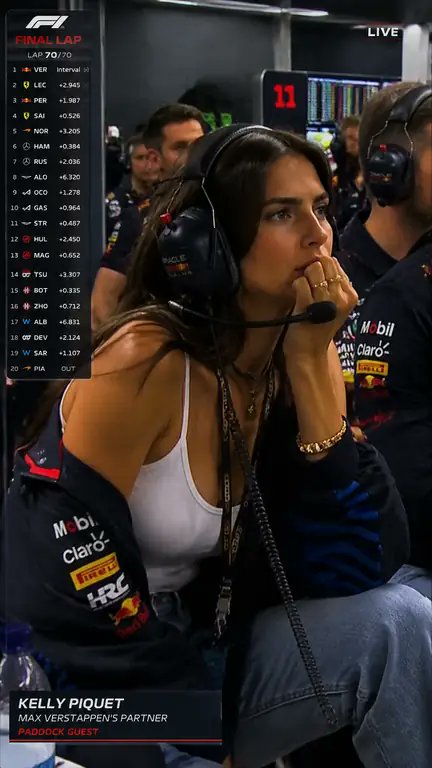
GPT Image 2 Prompt:
Ultra-realistic F1 live TV broadcast screenshot, identity preserved exactly from reference image. Young woman sitting in the VIP paddock / team garage during a Formula 1 race, shown on the official live race broadcast as the girlfriend of an F1 driver. It is the final lap, and she is listening to the team radio through a professional racing headset, watching the garage monitors nervously, leaning forward with one hand near her mouth, proud tense expression.
She wears a fitted white tank top, oversized racing team jacket draped over her shoulders, large black team-radio headset with boom mic, gold jewelry, soft glam makeup. A slim paddock pass hangs naturally from her neck.
Add realistic F1 broadcast graphics: “FINAL LAP” banner, lap counter showing final lap, driver timing tower on the left, small F1-style logo bug, “LIVE” indicator, lower-third identifying her as driver partner / paddock guest. No fake oversized badge, no selfie angle.
Team staff, headsets, garage screens, mechanics, and race equipment blurred around her. Telephoto broadcast camera from across the garage, compression artifacts, digital noise, bright paddock lighting, natural skin texture, no smoothing, 8k quality.
HappyHorse 1.0 Motion Prompt:
subtle blinking, slight breathing motion, nervous eye movement, gentle headset adjustment, ambient garage background activity
Prompt breakdown — why it works:
Opens with an explicit output declaration (“Ultra-realistic F1 live TV broadcast screenshot”) to anchor the model
Specifies exact F1 broadcast graphics by name: “FINAL LAP” banner, timing tower, F1 logo bug, LIVE indicator — generic descriptions produce generic graphics
Uses telephoto camera language and compression artifact terms to simulate real broadcast encoding rather than a clean render
“Natural skin texture, no smoothing” counteracts the model’s tendency toward over-processed AI skin
Example 2: ESPN NBA Playoff — Courtside Reaction Cut
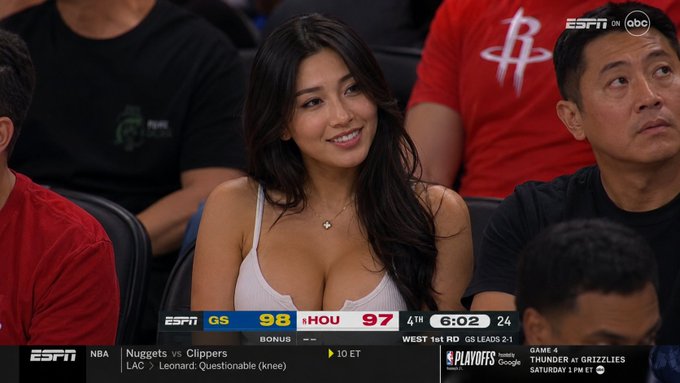
GPT Image 2 Prompt:
Hyper-realistic screenshot from a live NBA game broadcast on ESPN. The camera cuts to a stunning mixed-race Asian woman in her 20s sitting courtside. She has long silky black hair, soft Eurasian facial features, glowing skin, deep expressive eyes, and an effortlessly attractive smile. She wears a stylish tight low-cut white top and delicate jewelry. She looks naturally beautiful and unaware that the broadcast camera is focused on her.
The image should feel exactly like a real televised NBA moment captured during a live game. Include authentic ESPN broadcast graphics: scorebug, timer, shot clock, lower ticker, ESPN/ABC watermark logos, playoff graphics, and realistic arena lighting. Surround her with slightly out-of-focus spectators in courtside seats.
Visual style: authentic TV broadcast color grading, subtle motion blur, slight compression artifacts, interlacing grain, shallow depth of field, cinematic sports broadcast lens. Natural candid expression, not posed. 16:9 aspect ratio. Ultra realistic, indistinguishable from a real ESPN live broadcast screenshot.
HappyHorse 1.0 Motion Prompt:
natural smile shift, subtle blinking, slight posture adjustment, soft hair movement, ambient crowd motion in background
Prompt breakdown — why it works:
Names ESPN specifically — network-branded prompts generate far more accurate broadcast overlays than generic “sports broadcast graphics”
“Unaware that the broadcast camera is focused on her” signals the model to avoid posed expressions — HappyHorse 1.0 animates natural candid expressions far more convincingly than staged ones
Compression artifact and interlacing grain terms are what separate clips that look like real TV from clips that look like AI
Advanced Realism Tricks Most Creators Miss
Add imperfection deliberately. Terms like “compression artifacts,” “digital noise,” “interlacing grain,” and “broadcast blur” dramatically raise perceived realism. Perfect AI visuals consistently look more obviously artificial. Imperfection is the signal.
Use telephoto camera language precisely. “Telephoto sports broadcast lens,” “long-range paddock camera,” “sideline camera compression,” and “shallow depth of field” simulate the authentic optical characteristics of live sports cinematography — not studio photography.
Avoid overly cinematic prompt language. Real broadcasts are reactive and imperfect. Prompts that read like film set directions (“dramatic golden-hour lighting,” “perfectly composed”) produce outputs with an obvious AI-cinematic look.
Let identity carry the clip. GPT Image 2’s reference-driven identity preservation is currently best-in-class. Use a reference image whenever you need consistent character identity across multiple GPT Image 2 + HappyHorse 1.0 clips in a series.
Keep HappyHorse 1.0 motion minimal. A single well-placed blink is more convincing than 10 seconds of head movement. The goal is “person caught on camera,” not “animation demo.”
GPT Image 2 + HappyHorse 1.0 vs. Kling 3.0 vs. Seedance 2.0
Feature | GPT Image 2 + HappyHorse 1.0 | Kling 3.0 | Seedance 2.0 |
|---|---|---|---|
I2V Arena Elo | 1413 (#1) | 1241 | 1355 |
Max Resolution | 1080p / 30 FPS | Native 4K / 60 FPS | 2K / 24 FPS |
10s Clip Render Time | ~32–38 sec | 2–5 min (Pro Mode) | ~30 sec (Fast tier) |
Cost per 10s clip | Low | ~$1.68 (audio on) | $1.40–$3.03 |
Identity Preservation | ✅ Best-in-class (reference image) | ⚠️ Moderate | ⚠️ Moderate |
Broadcast Graphics Accuracy | ✅ Network-accurate | ⚠️ Variable | ⚠️ Variable |
Max Clip Duration | 3–15 sec | 15 sec | 4–15 sec |
Best Use Case | Broadcast-realism short-form | 4K cinematic long-form | Multi-reference remix |
GPT Image 2 + HappyHorse 1.0 wins on image-to-video realism, broadcast accuracy, identity preservation, and iteration speed. It is the highest-scoring stack on the Artificial Analysis leaderboard for short-form, character-driven, broadcast-style content.
Kling 3.0 wins on resolution and long-form storyboarding. If you need native 4K at 60 FPS for a TV commercial or multi-shot narrative, Kling 3.0 Pro is the right tool — but at significantly longer render times and higher cost.
Seedance 2.0 wins on multi-reference control. Its omni-reference system (supporting up to 9 images, 3 videos, and 3 audio clips) is unmatched for template-based or remix-heavy workflows. But on raw image-to-video Elo, it sits 58 points below HappyHorse 1.0.
For viral broadcast-realism — the dominant short-form AI aesthetic right now — GPT Image 2 + HappyHorse 1.0 is the strongest publicly available combination on the leaderboards.
Who Should Use GPT Image 2 + HappyHorse 1.0?
This workflow is built for a wide range of creators and professionals:
Sports fan content creators — building viral reaction clips, final-lap countdowns, and playoff reaction content
AI influencers and TikTok creators — producing broadcast-realism content that consistently outperforms obvious AI art in engagement
Entertainment and celebrity fan pages — generating immersive “live TV” moments for fan accounts
Marketing teams and brand studios — creating aspirational lifestyle content at a fraction of traditional production cost
Music video editors — using broadcast simulation for artist coverage and performance clips
Filmmakers and storyboard artists — using broadcast-accurate pre-visualization for pitch decks and concept reels
Social media managers — producing high-engagement short-form video without expensive production infrastructure
Frequently Asked Questions
Why does GPT Image 2 + HappyHorse 1.0 outperform pure text-to-video models?
Because GPT Image 2 handles identity, lighting, composition, and broadcast graphics at the keyframe level, leaving HappyHorse 1.0 to solve only the motion problem. This is precisely why HappyHorse 1.0 scores higher on image-to-video (1413 Elo) than text-to-video (1333 Elo) — the same gap appears across every top model on the Artificial Analysis arena.
Is GPT Image 2 + HappyHorse 1.0 better than Kling 3.0 or Sora 2?
For cinematic 4K long-form output, Kling 3.0 and Sora 2 remain powerful. For short-form broadcast realism and identity-preserved social content, GPT Image 2 + HappyHorse 1.0 produces more believable results according to the Artificial Analysis blind-test leaderboard — and renders roughly 4–6x faster than Kling 3.0 Pro Mode.
How fast is the GPT Image 2 + HappyHorse 1.0 workflow end-to-end?
A finished 10-second 1080p clip takes roughly 60–90 seconds from keyframe generation to animated output — significantly faster than Kling 3.0 Pro Mode (2–5 minutes per clip).
Does HappyHorse 1.0 support native 4K output?
No. HappyHorse 1.0 caps at 1080p / 30 FPS. For 4K at 60 FPS, Kling 3.0 Pro is the only current option. However, 1080p is fully sufficient for TikTok, Instagram Reels, YouTube Shorts, and X — every major short-form platform.
Can GPT Image 2 + HappyHorse 1.0 preserve the same character identity across multiple clips?
Yes. GPT Image 2’s reference-driven identity preservation is currently best-in-class, making the GPT Image 2 + HappyHorse 1.0 stack ideal for serialized character content — recurring personas, fan accounts, and series-based social content.
Do I need to upload a reference photo for identity preservation?
Yes — for consistent facial identity across generations, a clear, high-quality reference image is required. Without one, GPT Image 2 generates a new character each time. With a reference, identity consistency is excellent.
What types of content perform best with GPT Image 2 + HappyHorse 1.0?
Sports broadcasts (NBA, F1, UFC, NFL), celebrity-style candid moments, courtside and paddock reactions, fashion-event coverage clips, and documentary-style broadcast footage consistently generate the highest engagement on TikTok, X, and Reels.
Why do broadcast graphics sometimes look inaccurate?
Specificity is everything. Generic prompt language produces generic graphics. Always name the exact network (ESPN, Sky Sports, F1 TV), specify the exact graphic type (scorebug, lower-third, logo bug), and describe placement relative to the scene. Network-specific prompt language produces dramatically more accurate overlay graphics.
Final Verdict
The reason GPT Image 2 + HappyHorse 1.0 is dominating social feeds right now isn’t just the visual quality. It’s because this workflow understands something fundamental about viral content: people trust imperfect realism more than perfect AI cinematics. Instead of chasing Hollywood-grade generation, creators are generating believable broadcast moments — and believable moments consistently outperform cinematic AI on every modern short-form platform.
The benchmark data agrees: 1413 Elo for HappyHorse 1.0 on the I2V arena, 1512 Elo for GPT Image 2 on the image arena. No comparable publicly available stack scores higher for this use case.