If you have been comparing AI video tools lately, you may have hit a confusing wall. Google's Gemini Omni Flash and NVIDIA's Cosmos 3 both make videos from a text prompt. They both take images and video as input. They both output moving footage with sound. So they should be rivals, right?
Here is the twist: they are not really competing at all. One is called a "video generator." The other is called a "world model." That naming is not marketing fluff — it points to two completely different jobs. Pick the wrong one for your project and you will waste time, money, and a lot of frustration.
This guide is a plain-English pick-the-right-tool guide. We will explain what each one is really for, why the names differ, where they overlap, and how to choose without falling into the common traps. No jargon dumps — just the stuff that helps you decide. If you mostly want to make creative videos, you can also jump straight to a tool like XMK's Gemini Omni Flash page and start testing.
Let's clear up the confusion.
The one-sentence answer
Gemini Omni Flash makes videos that look right.
NVIDIA Cosmos 3 makes videos that behave right.
That is the whole gemini omni flash vs nvidia cosmos 3 story in a nutshell. One cares about how the final clip looks to a human eye. The other cares about whether the motion, gravity, and collisions in the scene are physically correct, because a robot or a self-driving car is going to learn from it.
Everything else in this guide is just unpacking that one line.
Why is one called a "video generator" and the other a "world model"?
This is the question that trips everyone up, so let's slow down here. The world model vs video generator difference is the key to the whole comparison.
A video generator (Gemini Omni Flash) is built to please human eyes. Its goal is a clip that looks good, feels smooth, and matches your prompt. If a ball bounces in a way that looks cool but is not physically perfect, that is fine — a viewer on YouTube will never notice or care. The model is graded on "does this look great," not "is this physically exact." That is why it is fast, easy, and great for social videos, ads, and stories.
A world model (NVIDIA Cosmos 3) is built to teach machines. Its goal is a clip where the physics are actually correct, because the "viewer" is not a person — it is a robot or a self-driving car learning from the footage. If a box falls, it has to fall at the right speed, land the right way, and not pass through the floor. NVIDIA describes Cosmos 3 as a model that understands motion, causality, and physics, not just pixels. It is made for physical AI: training robots, simulating warehouses, generating driving scenarios.
So the names are honest.
"Video generator" = make a video for people to watch.
"World model" = simulate a small slice of the real world for a machine to learn from.
Same raw output (a video), totally different purpose behind it.
A simple way to remember it: a video generator is a talented painter, a world model is a physics tutor. Both can draw you a falling apple. Only one of them cares whether the apple falls at 9.8 meters per second squared.
The physics question: gemini omni flash vs nvidia cosmos 3 physics simulation
Since physics is the real dividing line, let's look closer, because this is where the gemini omni flash vs nvidia cosmos 3 physics simulation gap is widest.
What Cosmos 3 does with physics. It treats physics as the point. Built on a two-tower design, it first reasons about the scene — what objects are there, how they should move, what happens next — and then generates footage that follows those rules. The output is meant to hold up as training data, where a wrong bounce or a floating object would teach a robot the wrong lesson. This is physics simulation: the model is trying to get the rules of the real world right.
What Omni Flash does with physics. It treats physics as a side effect of looking realistic. It has learned from huge amounts of video what motion usually looks like, so most clips feel believable. But it is not running a physics check. If a scene looks convincing, the job is done — even if a slow-motion replay would show something slightly off. This is visual generation: the model is trying to get the look right, and "looks physically plausible" is good enough.
This is the heart of physics simulation vs visual generation. One aims for correct. The other aims for convincing. For a TikTok clip, convincing wins every time — it is faster and prettier. For training a robot arm, only correct will do, because a robot that learns from "convincing but wrong" will fail in the real world.
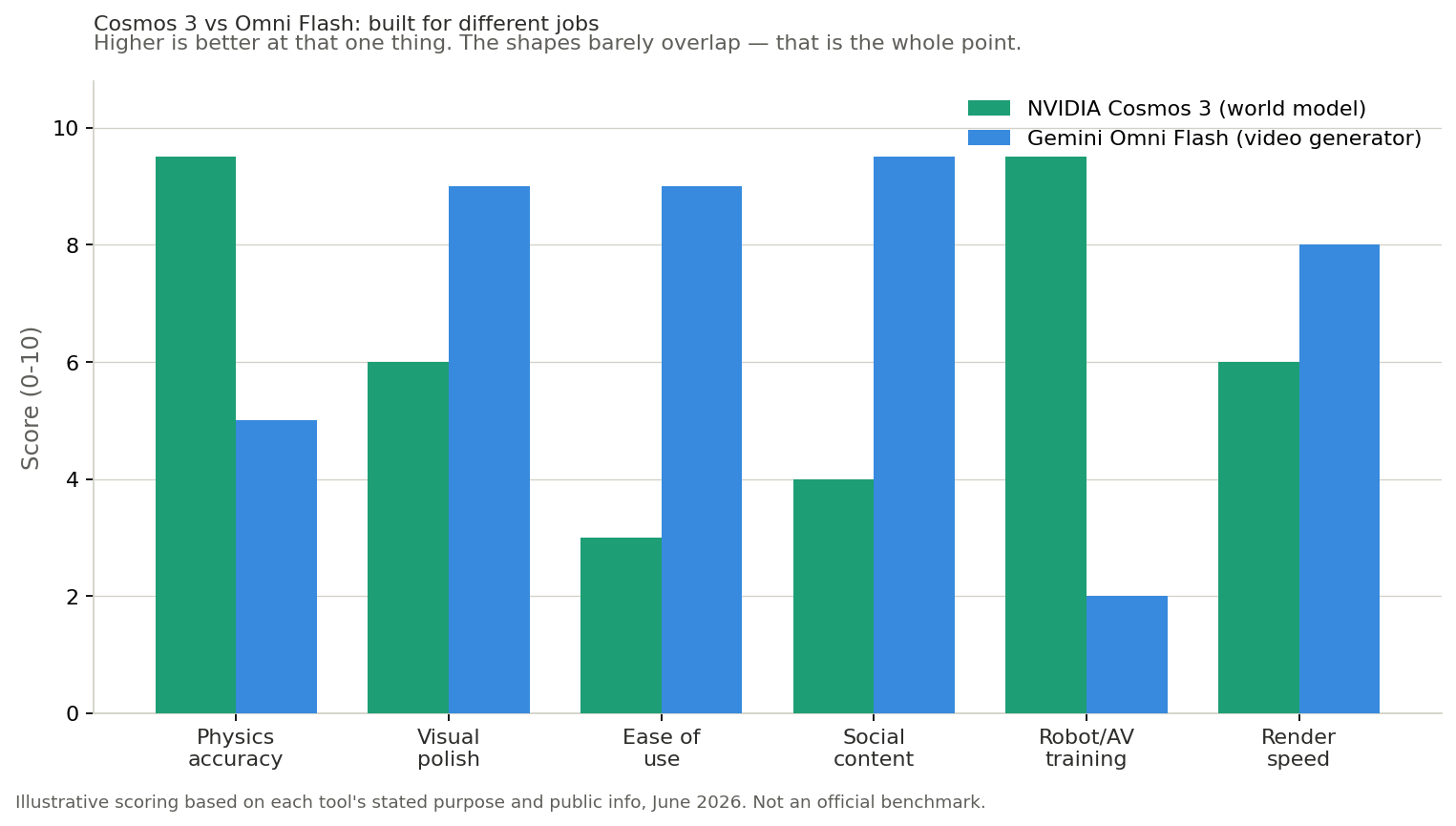
ide-by-side comparison
Here is the full table. Some Cosmos 3 and Omni Flash figures are based on public info as of June 2026 and may not be fully confirmed by official benchmarks.
What you care about | Gemini Omni Flash | NVIDIA Cosmos 3 |
|---|---|---|
What it is | Video generator | World model (world foundation model) |
Main goal | Footage that looks right | Footage that behaves right (physics) |
Built for | Creators, social, ads, stories | Robots, self-driving, physical AI |
Who is the "viewer" | A human audience | A machine that learns from it |
Physics accuracy | Plausible, not exact | Aims for physically correct |
Ease of use | Very easy, prompt and go | Technical, for developers |
Where you use it | Gemini app, Flow, YouTube | NVIDIA platform, code, GPUs |
Open or closed | Closed, Google-hosted | Open model license |
Inputs | Text, image, audio, video | Text, image, video, sensor/action data |
Output extras | SynthID watermark, audio | Physics-aware video + action data |
Cost model | Subscription / per-clip | Open weights, run on your GPUs |
Best at | Quick, pretty, shareable clips | Synthetic training data, simulation |
Worst fit | Robot training data | A fun 10-second social video |
Learning curve | Minutes | Days to weeks |
The quick read: there is almost no row where these two are truly competing for the same job. If a row matters to you, it usually points clearly to one tool or the other. That is exactly why "which is better" is the wrong question. "Which is right for my job" is the question that saves you.
How to pick without falling into a trap
Here is the avoid-the-trap part. Match your real goal to the right tool.
Pick Gemini Omni Flash if you are a creator. You want short videos, ads, social clips, story scenes, or quick concept tests. You care about how it looks and how fast you can make it. You do not want to touch code or rent GPUs. This is you if your output ends up on a screen for people to watch. If that sounds right, you can test this kind of creative video work on Gemini Omni Flash tool page and see results in minutes.
Pick NVIDIA Cosmos 3 if you are building physical AI. You are training a robot, a drone, or a self-driving system. You need synthetic footage where the physics are trustworthy enough to teach a machine. You have developers and GPUs. You care about correctness far more than beauty. This is you if your output ends up teaching a machine, not entertaining a person.
The traps to avoid:
Trap 1: Using a world model to make social content. Cosmos 3 can technically output a video, but it is slow, technical, and overkill for a TikTok. You would be hiring a physics professor to paint your bedroom.
Trap 2: Using a video generator for robot training. Omni Flash makes pretty clips, but its "convincing, not correct" physics can teach a robot the wrong lesson. Pretty is not the same as accurate.
Trap 3: Choosing by demo looks alone. Both can produce a stunning ten-second clip. The demo does not tell you which one fits your actual job. The purpose behind the tool does.
If you are ever unsure, ask one question: who is going to watch this video — a person or a machine? Your answer picks the tool for you.
Three real scenarios to make it concrete
Theory is fine, but let's run through a few real situations so you can see the choice in action.
Scenario 1: A small brand needs a product ad for Instagram. The goal is a clip that looks slick and stops the scroll. Nobody is going to measure whether the product rotates at a physically exact speed — they just need it to look great in five seconds. This is a clear Omni Flash job. Cosmos 3 here would be slow, need a developer, and add zero value, because the "viewer" is a shopper, not a machine. Reach for the video generator and move on.
Scenario 2: A robotics startup needs footage to train a warehouse robot. The robot has to learn how boxes fall, how shelves block paths, and how objects behave when pushed. If the training video shows a box floating or passing through a wall, the robot learns garbage. Here you need correct physics, not pretty footage, so Cosmos 3 is the only real choice. An Omni Flash clip might look convincing to you, but it could quietly teach the robot something false.
Scenario 3: A filmmaker wants a 30-second sci-fi scene with a consistent character. This is interesting because it sounds technical, but it is still a creator job. The filmmaker cares about look, mood, and character consistency — not whether the laser beam obeys real-world optics. Omni Flash fits, because the audience is human. The moment your output is meant for human eyes and a screen, you are in video-generator territory, even for ambitious creative work.
Notice the pattern across all three: the deciding factor is never "which model is smarter." It is always "who is the footage for." Get that straight and the tool is obvious every time.
Does the gap ever close?
A fair question: these models keep improving, so will a video generator ever get physics-correct enough to train robots, or will a world model ever get easy and pretty enough for casual creators?
The short answer is that the gap is shrinking at the edges but not in the middle. Video generators are slowly getting better at believable motion, and world models are slowly getting easier to use. But the core goals still point in opposite directions. Chasing "physically exact" forces a model to be slower and more technical. Chasing "fast and beautiful" forces it to skip strict physics checks. As long as those trade-offs exist, the two tool types will stay distinct, even as each one improves on its own turf. So for any real project today, you still pick based on purpose, not on a hope that one tool will do everything.
A quick myth-buster
A few things people get wrong about this matchup:
"Cosmos 3 is just a better video generator." No. It is not trying to be a video generator at all. It is a simulator that happens to output video. Judging it on prettiness misses the point.
"Omni Flash is worse at physics, so it is the weaker model." No. It is not trying to win at physics. It is trying to make great-looking content fast, and at that job it is excellent.
"They will eventually merge into one tool." Maybe someday, but right now the goals pull in opposite directions. Correct-for-machines and pretty-for-people are different targets, and chasing both at once usually means doing neither well.
The honest takeaway: neither is "better." They are tools for different rooms in the same house.
FAQ
1. Gemini Omni Flash vs NVIDIA Cosmos 3 — what is the real difference?
Omni Flash is a video generator built to make clips that look good for people. Cosmos 3 is a world model built to simulate physics so machines like robots can learn from the footage. One aims for convincing, the other for correct.
2. Why is Cosmos 3 called a world model and not a video generator?
Because its job is to simulate a slice of the real world with correct physics, not just to produce a nice-looking clip. The video it outputs is meant as training data for physical AI, so the rules of motion and gravity have to be right.
3. Which one is better for making social media videos?
Gemini Omni Flash, easily. It is fast, easy, and built for looks. Cosmos 3 would be slow, technical, and overkill for content meant for human viewers.
4. Can I use Cosmos 3 to make a normal creative video?
Technically yes, but it is the wrong tool. It is built for developers training machines, needs GPUs and code, and cares about physics over polish. For creative work, a video generator is the right call.
5. Is the physics in Omni Flash bad?
Not bad — just not the goal. Its motion usually looks believable because it learned from lots of real video. But it does not run a true physics check, so it aims for "looks right," not "is exact." That is fine for content, not for robot training.
6. Do I need a powerful computer for either one?
For Omni Flash, no — it runs on Google's servers, you just prompt it. For Cosmos 3, usually yes — it is an open model often run on your own GPUs, which is part of why it suits developers, not casual creators.
7. What is the easiest way to start if I just want to make videos?
Use a creator-focused platform. You can try this style of AI video on XMK and get a clip in minutes, with no code and no GPU setup.
Bottom line
Gemini Omni Flash and NVIDIA Cosmos 3 look like rivals because they both spit out videos. But the names tell the truth: one is a video generator that aims to look right, the other is a world model that aims to behave right. A creator who wants a great-looking clip should reach for Omni Flash. A team training a robot should reach for Cosmos 3. The trap is judging them on the same scoreboard, when they are not even playing the same game. Figure out who is watching your video — a person or a machine — and the choice makes itself. And if it is a person, you can start making creator-ready videos on the Gemini Omni Flash today.