If you’ve been tracking AI video tools this year, the Happy Horse 1.1 review everyone keeps asking for comes down to one question: does this model from Alibaba live up to its leaderboard reputation? The short answer is yes — with a few important caveats. Happy Horse 1.1 is the upgraded version of the Happy Horse AI video model, the family that stunned the AI community when its first release debuted anonymously at the top of the Artificial Analysis Video Arena in April 2026, outranking rivals in blind human-preference tests. Version 1.1 takes that foundation further with targeted improvements to motion, character consistency, prompt accuracy, close-up realism, and audio-visual sync — making it one of the most compelling AI video generators you can try today.
In this Happy Horse 1.1 review we break down everything: what changed from 1.0, the reported technical specs, real-world performance across text-to-video, image-to-video, and reference-to-video, an honest competitor comparison, and a plain verdict on who should use it. No hype, no filler.
👉 Try Happy Horse 1.1 free in the XMK studio
What Is Happy Horse 1.1?
Happy Horse 1.1 is the second release of Alibaba’s Happy Horse AI video model, built inside the Taotian Future Life Lab under Alibaba’s ATH innovation unit. According to community-compiled descriptions and vendor materials, it uses a unified single-stream self-attention Transformer — reported at 40 layers and 15 billion parameters, though these figures have not been independently verified — that generates video and audio together in one forward pass. This is a meaningful architectural difference from most rivals, which produce video and audio in separate pipelines. The headline detail behind the project is its leadership: the lab is led by Zhang Di, a longtime AI engineer who previously served as Vice President at Kuaishou and was the technical architect of Kling AI before moving to Alibaba in late 2025.
Version 1.1 is a direct response to real-world creator feedback from short-drama producers, e-commerce advertisers, brand marketers, and CG artists who used Happy Horse 1.0 in production. The upgrade targets five core areas: motion smoothness, character and product consistency, instruction-following accuracy, close-up realism, and audio-visual synchronization.
The Happy Horse 1.1 AI video generator supports three input modes:
Text-to-video — generate a clip from a text prompt alone
Image-to-video — animate a still image, with optional prompt guidance
Reference-to-video — upload up to 9 reference images for multi-character and product consistency
Output resolution goes up to 1080P, with aspect ratios including 16:9, 9:16, 1:1, 4:3, 3:4, and 21:9. Clip durations run roughly 3 to 15 seconds, with a 5-second default.
Happy Horse 1.1 vs 1.0: What Actually Changed?
The Happy Horse 1.1 vs Happy Horse 1.0 jump is a focused tune-up, not a full rebuild. Here is what improved and why it matters in practice.
Smoother Motion in Fast-Action Scenes
Version 1.1 handles kinetic energy better than its predecessor. Fast scenes — running, jumping, fighting, dancing — carry more grounded, frame-level detail. Where Happy Horse 1.0 could feel sluggish or stuttery in fast-action clips, 1.1 keeps momentum steady and realistic from start to finish. Best for action beats in short drama, sports clips, dance videos, and product motion shots.
Stronger Character and Product Consistency
Multi-reference reading is noticeably tighter in 1.1. Drop a product photo, a character portrait, or a storyboard into reference-to-video mode, and Happy Horse 1.1 reuses those details across the whole clip. This directly addresses a known 1.0 pain point, where subject details could drift or morph during longer generations. Best for multi-shot ads, episodic short drama, and e-commerce product video.
Better Instruction Following
Long prompts no longer get lost as easily. Happy Horse 1.1 follows multi-scene, multi-character scripts more reliably, so a one-line idea or a full storyboard brief stays closer to what you pictured. Fewer retries are needed for usable output. Best for storyboard-driven creators, narrative shorts, and complex brand briefs.
Sharper Detail and More Realistic Skin
Close-up shots look more natural in Happy Horse 1.1. Skin no longer feels over-smoothed, and details like pores, freckles, fine lines, fabric, and lighting stay readable without being exaggerated. Best for beauty content, fashion visuals, character drama, and cinematic close-ups.
Tighter Audio-Visual Sync
The single-pass architecture already gave the Happy Horse family a synchronization edge over separate-pipeline rivals. Version 1.1 refines it further, with tighter alignment between dialogue, ambience, music, and on-screen action. Native lip-sync covers seven languages — English, Mandarin, Cantonese, Japanese, Korean, German, and French. Best for dialogue scenes, vlogs, voiceover ads, and share-ready clips.
Technical Specifications
The following figures are drawn from vendor materials and community-compiled sources. Architecture details such as parameter count and layer depth are reported but have not been independently verified by third parties — treat them as directional.
Feature | Happy Horse 1.1 |
|---|---|
Developer | Alibaba — Taotian Future Life Lab (ATH innovation unit) |
Architecture | Unified single-stream self-attention Transformer (reported: 40 layers, 15B params — unverified) |
Inference steps | 8 (DMD-2 distillation, CFG-free — vendor-reported) |
Generation speed | ~38s for 1080P on H100 (vendor-reported, unverified by third parties) |
Generation modes | Text-to-video, image-to-video, reference-to-video (up to 9 images) |
Reference inputs | Up to 9 images, with |
Max resolution | 1080P (also 720P); super-resolution module runs in latent space |
Clip duration | 3 – 15 seconds (5s default) |
Aspect ratios | 16:9, 9:16, 1:1, 4:3, 3:4, 21:9 |
Audio generation | Native joint generation (dialogue, ambience, music, Foley) |
Lip-sync languages | English, Mandarin, Cantonese, Japanese, Korean, German, French |
Lip-sync WER | 14.60% (vendor-reported) |
Image upload formats | JPEG, JPG, PNG, BMP, WEBP up to 20MB (no transparent PNG) |
Commercial use | Permitted (confirm platform license terms) |
Open source status | Alibaba announced an open release intention; no public weights confirmed as of writing |
A note on generation speed: the ~38-second figure for 1080P on a single H100, if accurate, would represent a 30–40% speed advantage over comparable models — enabled by DMD-2 distillation cutting denoising to 8 steps versus the 50+ steps typical in diffusion pipelines. This figure has not been verified by independent third-party benchmarks, so treat it as directional.
Performance: What Happy Horse 1.1 Excels At
Text-to-Video Quality
This is where the unified architecture pays off most clearly. Because text, visual, and audio tokens are processed together in one sequence, Happy Horse 1.1 text-to-video output feels planned as one event rather than assembled in post — lighting, motion, and sound arise together. The Happy Horse family first earned its reputation when Happy Horse 1.0 debuted anonymously on the Artificial Analysis Video Arena in April 2026 and climbed to the top of both the text-to-video and image-to-video charts before anyone knew who built it. Leaderboard snapshots from that debut showed approximately 57–60 Elo points of lead over the second-place model in T2V without audio — a meaningful signal in an Elo system, where a 60-point gap translates to roughly a 60% win rate in direct comparisons. Arena Elo is recomputed continuously as new votes arrive, so any specific number is a snapshot; the family’s standing should be confirmed at the Artificial Analysis leaderboard before decisions are made. Version 1.1 builds on the same foundation.
Image-to-Video Animation
Upload a product shot, portrait, or concept render and Happy Horse 1.1 image-to-video animates it while keeping the subject’s identity stable and camera motion steady. Image-to-video has consistently been the family’s single strongest category in blind arena testing — the April 2026 debut put it at an Elo of 1,416 in the I2V without-audio track, ahead of every other model on the leaderboard at that time. For e-commerce creators and brand marketers working from fixed visual assets, this means professional motion without losing brand fidelity.
Native Audio Generation
Most AI video tools render a silent clip, then run a separate audio pass on top. Happy Horse 1.1 builds dialogue, ambience, music, and Foley in the same forward pass as the video, which removes the audio-visual drift that separate-pipeline models struggle with. Native lip-sync spans seven languages, so multilingual content — a Mandarin TikTok ad, a Japanese brand campaign, a short drama dubbed for several markets — can skip an entire post-production step. Vendor-reported lip-sync Word Error Rate is 14.60%, meaning roughly 85 in 100 spoken words align correctly to lip movements.
Reference-to-Video for Brand Consistency
Upload up to 9 reference images covering character, product, location, and style, then use @ tags to bind instructions to specific images. Version 1.1’s improved multi-reference reading keeps those elements stable across the clip without manual frame-by-frame fixes. For short drama, e-commerce advertising, and branded content, this is what makes Happy Horse 1.1 a practical production tool rather than a demo.
👉 Generate a Happy Horse 1.1 video with native sound on XMK
Where Happy Horse 1.1 Has Limitations
An honest Happy Horse 1.1 review has to cover the gaps.
Scene Continuity in Dialogue-Heavy Clips
In multi-shot dialogue sequences, character positioning can drift and spatial logic occasionally breaks down as the scene progresses. This is improved over 1.0 but remains a gap versus models with deeper director-level reference control. For complex conversational scenes with multiple speaking characters, run test generations before committing to a full batch.
Resolution Caps at 1080P
Happy Horse 1.1 tops out at 1080P. Some rivals offer higher-resolution tiers. For most social media and short-form content this is not a practical constraint, but for large-screen commercial or cinema-style work where resolution headroom matters, it is worth noting.
Clip Length and Voice Nuance
Clips run roughly 3 to 15 seconds, so longer stories are built by stitching several Happy Horse 1.1 generations together in an editor. And while native audio is a real strength, voice rendering in extended dialogue can still sound slightly unnatural. For voiceover-heavy formats, layering a dedicated TTS track may produce cleaner speech.
Happy Horse 1.1 vs Kling 3.0 vs Seedance 2.0
No tool should be reviewed in a vacuum. Here is an honest comparison across the dimensions that matter most.
Happy Horse 1.1 | Kling 3.0 | Seedance 2.0 | |
|---|---|---|---|
Developer | Alibaba | Kuaishou | ByteDance |
Blind-arena standing | Family debuted #1 in T2V and I2V (April 2026 snapshot; rankings update continuously) | Strong, competitive | Strong, frequently #2 |
Max resolution | 1080P | Higher-resolution tier available | Higher-resolution tier available |
Native audio | Yes (single pass) | Yes | Yes |
Lip-sync languages | 7 | Fewer | 7 |
Clip duration | 3–15s | 3–15s | 3–15s |
Reference inputs | Up to 9 images ( | Up to 9 images | Images + video + audio references |
Generation speed | ~38s at 1080P on H100 (vendor-reported) | 1–5 min Pro Mode | Similar range |
Open source | Announced, not confirmed as of writing | No | No |
Best for | Visual quality, e-commerce ads, multilingual content | 4K-tier cinematic, physical simulation | Director-level reference control, multimodal input |
Choose Happy Horse 1.1 when blind-test visual quality matters most, when you need native multilingual lip-sync across seven languages, when you’re working from reference images for e-commerce or brand campaigns, or when fast, sound-rich short video is your core output.
Choose Kling 3.0 when you need a higher-resolution tier, when physical simulation (cloth, hair, fluids) is critical, or when you’re building multi-shot cinematic narratives with a dedicated storyboard tool.
Choose Seedance 2.0 when you need director-level reference control with mixed image, video, and audio inputs, or when you want a battle-tested commercial ecosystem with broad platform integrations.
Who Should Use Happy Horse 1.1?
Based on its strengths and current limitation profile, Happy Horse 1.1 is the right tool for:
Short-form social media creators who need cinematic-quality clips for TikTok, Instagram Reels, and YouTube Shorts. Fast generation and 9:16 support make rapid iteration realistic.
E-commerce and brand advertisers working from fixed product assets. Reference-to-video with improved consistency in 1.1 makes brand-consistent ad creative possible without a production crew.
Multilingual content teams publishing across markets. Seven native lip-sync languages in one model removes a separate dubbing pipeline.
Short-drama creators producing 5–10 second beats with the same lead and wardrobe shot after shot, using reference-to-video to hold characters steady across an episode.
Independent filmmakers and CG artists prototyping scenes, camera moves, and ad concepts. Fast generation lets you treat each output as a quick draft and iterate.
👉 Start your first Happy Horse 1.1 video free on XMK
Happy Horse 1.1 Pricing
On XMK, Happy Horse 1.1 uses one-time credits instead of a forced subscription, with cost scaling by duration and resolution. A 720P generation costs 30 credits per second; 1080P costs 40 credits per second. Free voucher use follows a 720P, 5-second rule, and reference mode supports up to nine images. That makes Happy Horse 1.1 pricing easy to plan: test ideas cheaply at 720P, then spend more only on the pitch-ready 1080P cut.
How to Get Started With Happy Horse 1.1
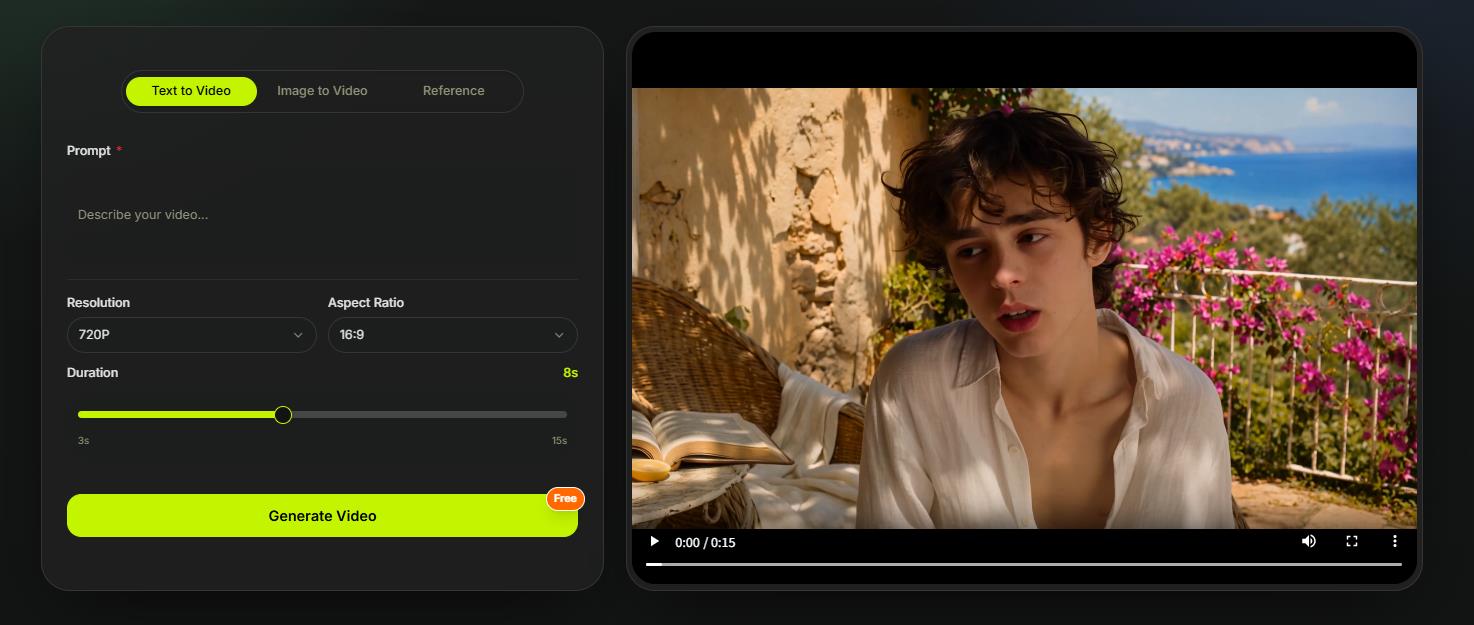
Select your input mode. Choose text-to-video for prompt-only generation, image-to-video to animate a still, or reference-to-video to upload up to 9 reference images for character or product consistency.
Write a detailed prompt. Include subject, action, environment, lighting, mood, camera movement, and audio direction. Happy Horse 1.1’s stronger instruction-following means multi-element prompts hold together — use that.
Set your output. Choose duration (3–15 seconds), resolution (720P or 1080P), and aspect ratio. For social content, 9:16 at 5–10 seconds is a practical start.
Enable audio. If your clip involves dialogue, ambience, or sound design, leave native audio on — it is one of the model’s core advantages.
Review and iterate. Fast generation means you can treat the first output as a draft, adjust prompt details or reference images, and re-run.
Verdict: Is Happy Horse 1.1 Worth It?
For most creators in short-form video, e-commerce advertising, and multilingual content, the verdict of this Happy Horse 1.1 review is yes. The Happy Horse family earned its reputation on the most rigorous public benchmark for AI video — blind human-preference voting on the Artificial Analysis Video Arena — and version 1.1 fixes the right things: motion, consistency, prompt accuracy, close-up realism, and sound timing.
The limitations are real but manageable. The 1080P ceiling matters for higher-resolution production, dialogue-scene logic is still improving, and voice nuance lags the visual quality. If those are critical to your work, Kling 3.0 or Seedance 2.0 may be a better primary tool. For everyone else — especially anyone who prioritizes visual quality, multilingual audio, and fast iteration — the Happy Horse 1.1 AI video generator is one of the most compelling options available in 2026.
👉 Try Happy Horse 1.1 now on XMK — free to start
Frequently Asked Questions (FAQ)
What is Happy Horse 1.1?
Happy Horse 1.1 is the upgraded version of Alibaba’s Happy Horse AI video model, built inside the Taotian Future Life Lab. It generates 720P or 1080P video with synced sound from a text prompt, a single image, or up to nine reference images, improving on Happy Horse 1.0 in motion, consistency, prompt accuracy, close-up realism, and audio-visual sync.
What improved in Happy Horse 1.1 vs 1.0?
Version 1.1 keeps everything 1.0 could do and sharpens five areas: smoother motion in fast-action scenes, stronger character and product consistency across references, better instruction-following on complex prompts, more realistic close-ups, and tighter audio-visual sync.
Does Happy Horse 1.1 generate audio automatically?
Yes. Happy Horse 1.1 generates dialogue, ambience, music, and Foley in the same forward pass as the video, with native lip-sync across seven languages. Audio can be disabled if preferred, and for best results describe both the visible action and the sound you want.
Which languages does Happy Horse 1.1 support for lip-sync?
Seven: English, Mandarin, Cantonese, Japanese, Korean, German, and French — useful for content aimed at more than one market.
Is Happy Horse 1.1 open source?
Alibaba announced an intention to release the model openly, but as of writing no public weights or code were confirmed. The practical way to use Happy Horse 1.1 today is through a hosted platform such as XMK. This Happy Horse 1.1 review will be updated if an open release ships.
How does Happy Horse 1.1 compare to Kling 3.0 and Seedance 2.0?
The Happy Horse family has led blind-arena visual-quality rankings (T2V and I2V, April 2026 snapshot), while Kling 3.0 offers a higher-resolution tier and strong physical simulation, and Seedance 2.0 offers director-level reference control with mixed media inputs. For visual quality and multilingual audio, Happy Horse 1.1 is a strong pick; for 4K-tier production or reference-heavy direction, the others may suit better. Note that arena rankings update continuously.
How much does Happy Horse 1.1 cost on XMK?
Happy Horse 1.1 uses XMK credits based on duration and resolution: 30 credits per second at 720P and 40 credits per second at 1080P. Free voucher use follows the 720P, 5-second rule.
What resolution and clip length does Happy Horse 1.1 output?
720P or 1080P in common aspect ratios such as 16:9, 9:16, and 1:1, with clips of roughly 3 to 15 seconds. For longer videos, stitch several Happy Horse 1.1 clips together in an editor.
Where can I try Happy Horse 1.1?
You can try it directly on the XMK Happy Horse 1.1 page, which supports text-to-video, image-to-video, and reference-to-video modes.