Nano Banana 2.1 prompts can produce a tea tin that looks ready to publish—until you read the smallest line. In our test on XMK, the words were right, but a slash was missing. We uploaded the image, asked for that one character back, and checked the next result. It worked.
Other fixes were less cooperative. A water bottle kept changing its cap, and an ultra-wide banner resisted our spacing instructions. Across 14 generations on XMK on the night of October 13–14, 2026 (Eastern Time), we tried eight practical jobs and kept the results, including the misses.
These Nano Banana 2.1 prompts come with the images they produced, the credit totals displayed before generation, and the changes we tried next. Pick a use case below, copy its prompt, and see which details deserve a closer look. Two corrections solved the main problem, one improved the result without fully fixing it, and the banner still needed work.
Nano Banana 2.1 Prompts: Quick Results
Job | Ratio | First attempt | Fix needed? |
|---|---|---|---|
YouTube thumbnail | 16:9 | Text, badge, and layout correct | No |
Cold brew infographic | 4:5 | Labels correct, one stray “12h” badge | Yes, fixed on the second try |
Product image with callouts | 1:1 | All three callouts correct | No |
Six-sticker sheet | 1:1 | Six stickers in a 3 × 2 grid | No |
Website hero banner | 8:1 | Text correct but tight to the left edge | Yes, not fixed by prompting |
Product scene edit | 1:1 | Background changed, cap and proportions drifted | Yes, partly fixed |
Tea tin label | 1:1 | Five lines present, slash missing | Yes, fixed with a focused edit |
Forecast card with Web Search | 1:1 | Temperatures within 1°F of the NWS forecast we checked | Compared against a run without search |
A Nano Banana 2.1 Prompt Structure You Can Reuse
Before the examples, here is the structure we used. It helps you decide where the subject goes, what the image should say, and what counts as a usable result:
Format and ratio: “Create a 16:9 YouTube thumbnail” or “Create a square e-commerce product image.”
Subject and placement: say where each element goes, using thirds, rows, or named sides. In our thumbnail test, “on the left third” put the subject exactly where we asked.
Exact text, in quotes, line by line: “SOURDOUGH” on line one and “IN 24 HOURS” on line two.
Style and light: one short phrase each, such as “flat vector style” or “soft studio shadow.”
Constraints: what the image must not contain. Be specific, because a general “no other text” was not always enough.
Create a [ratio] [format] for [use]. [Subject] on [position]. Add exactly [number] text lines: “[line one]” on line one and “[line two]” on line two. [Style], [lighting]. The only text in the image is [list]. No [things to exclude].
Google describes Nano Banana 2.1 as a high-efficiency model for image generation and conversational editing on its Gemini API model page.
How We Tested These Nano Banana 2.1 Prompts
All runs used the Nano Banana 2.1 workspace on XMK with PNG output at 1K resolution. Each prompt ran once, so the results show tendencies, not success rates.
Generations: 14 in total: eight first attempts, five revised prompts, and one Web Search control run.
Timing: seconds from clicking Generate to the image appearing on the page, where we could measure it. Some runs were not timed.
Cost: the credit total shown on the Generate button before each run. Credit figures are pre-generation quotes, not independently verified account deductions.
1. Nano Banana 2.1 YouTube Thumbnail Prompt
For the first example, we wanted a baking thumbnail that could communicate its topic at phone size: a baker on one side, a short headline on the other.
Create a 16:9 YouTube thumbnail for a baking channel. On the left third, a smiling baker in a white apron holds a golden sourdough loaf toward the camera. On the right two-thirds, bold white text with a thick black outline in two lines: “SOURDOUGH” on line one and “IN 24 HOURS” on line two. Use a bright orange background behind the text. Add one small red circle badge in the top-right corner with the text “NEW”. No other text, logos, or watermarks.
The requested text, badge, and layout were correct: the baker sits in the left third, both lines carry the black outline, and the red “NEW” badge is in the top-right corner. The only extra is part of a second loaf at the bottom edge.
Result: 17.5 seconds, 10 credits, 1376 × 768 pixels.
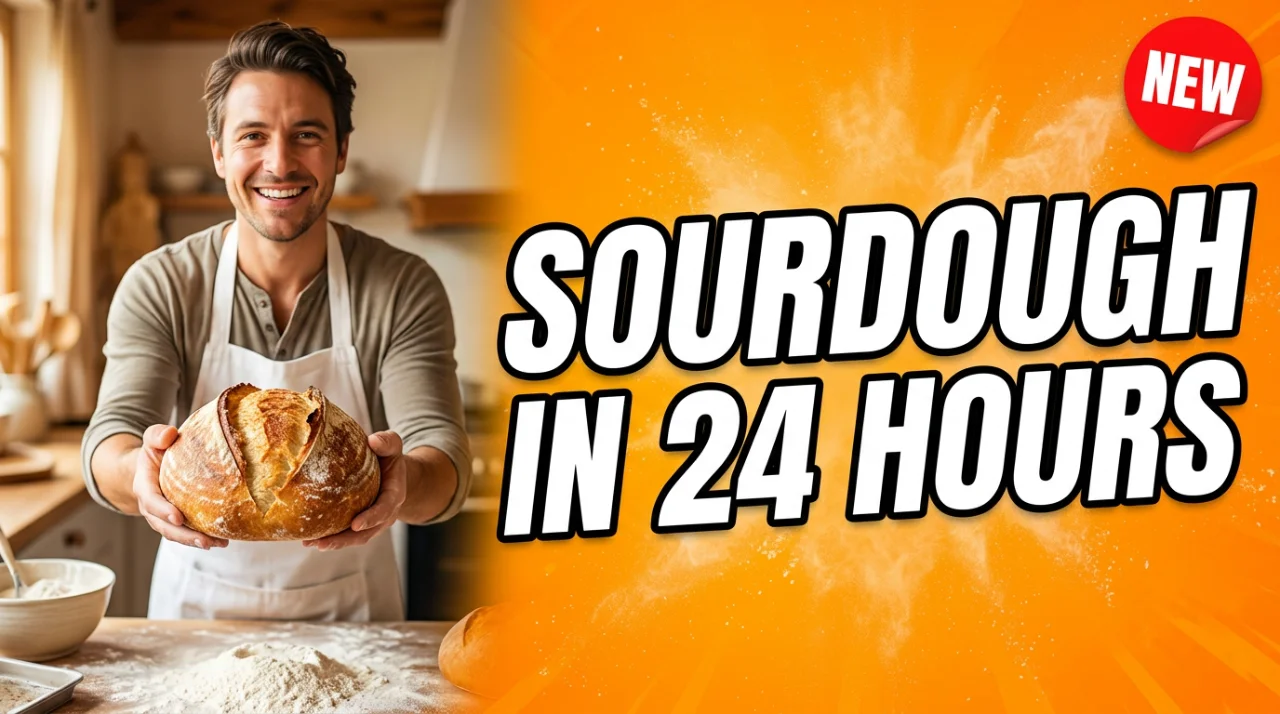
Giving each zone one job produced the layout we asked for here. To adapt it, swap the baker and loaf for your subject, keep the headline short, and give any badge its own corner. Then shrink the output to phone size. The extra loaf at the bottom is also a useful reminder to check the area YouTube’s timestamp may cover.
2. Infographic Prompt: Fixing Stray Text
Next, we gave Nano Banana 2.1 a three-step cold brew explainer. The challenge was keeping the instructions readable without letting the icons introduce their own text.
Create a clean 4:5 infographic titled “HOW COLD BREW WORKS”. Show exactly three numbered steps from top to bottom, each with a simple flat icon and a short label: “1. GRIND COARSE”, “2. STEEP 12 HOURS”, “3. FILTER AND CHILL”. Connect the steps with downward arrows. Cream background, dark brown text, flat vector style, no other text.
The title, all three labels, and both arrows were correct. The miss was small but real: Nano Banana 2.1 added a clock with a “12h” badge to step two, even though the prompt said “no other text.” The model appears to have turned the label into an icon detail.
First attempt: 25.0 seconds, 10 credits.
We replaced the last sentence with an explicit rule:
…Cream background, dark brown text, flat vector style. The only text in the image is the title and the three labels; icons must contain no letters, numbers, clock faces, or badges.
The revised image had no stray text at all. It still drew a stopwatch for the steeping step, just without numbers, so “no clock faces” was only partly followed. The labels also moved under the icons.
Revised prompt: 16.3 seconds, 10 credits.
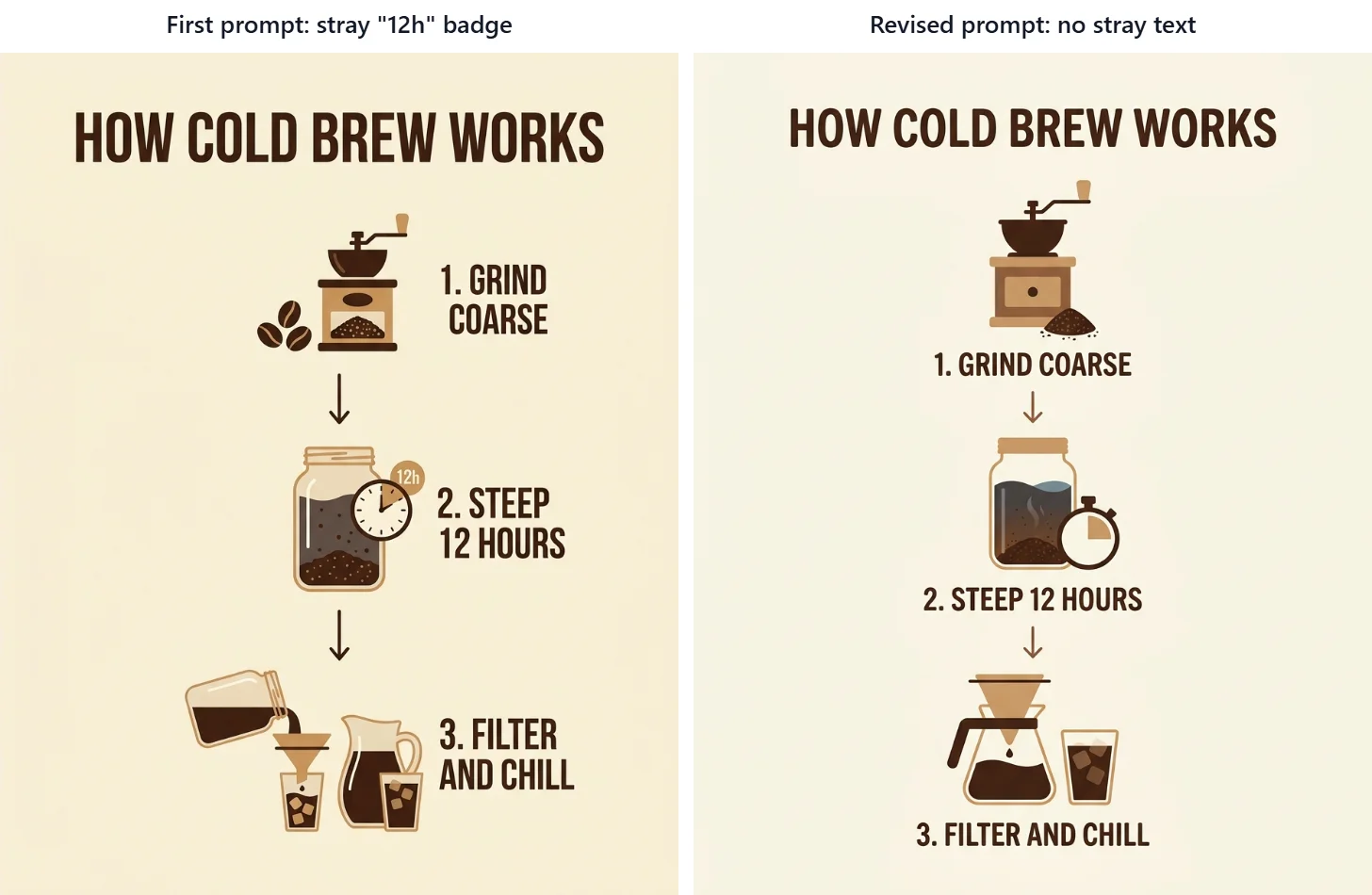
The useful change was naming the icons as text-free. Our original “no other text” instruction had not stopped the “12” from reappearing inside the illustration. If your infographic has the same problem, identify the specific place where the extra copy appeared. Check the icons as closely as the labels after the next run.
3. Nano Banana 2.1 Product Image Prompt With Callouts
For a product listing concept, we asked for three feature labels with pointers to specific parts of a bottle.
Create a square e-commerce product image of a matte black insulated water bottle, centered on a pure white background. Add exactly three callout labels, each connected to the bottle with a thin gray line: “LEAKPROOF LID” pointing to the cap, “24H COLD” pointing to the middle of the bottle, and “BPA-FREE” pointing to the base. Clean sans-serif text, soft studio shadow, no other text or logos.
This was the cleanest result of the day. All three labels are spelled correctly, and each line points at the part we named: the cap, the middle, and the base band.
Result: 10 credits, 1024 × 1024 pixels. This run was not timed.
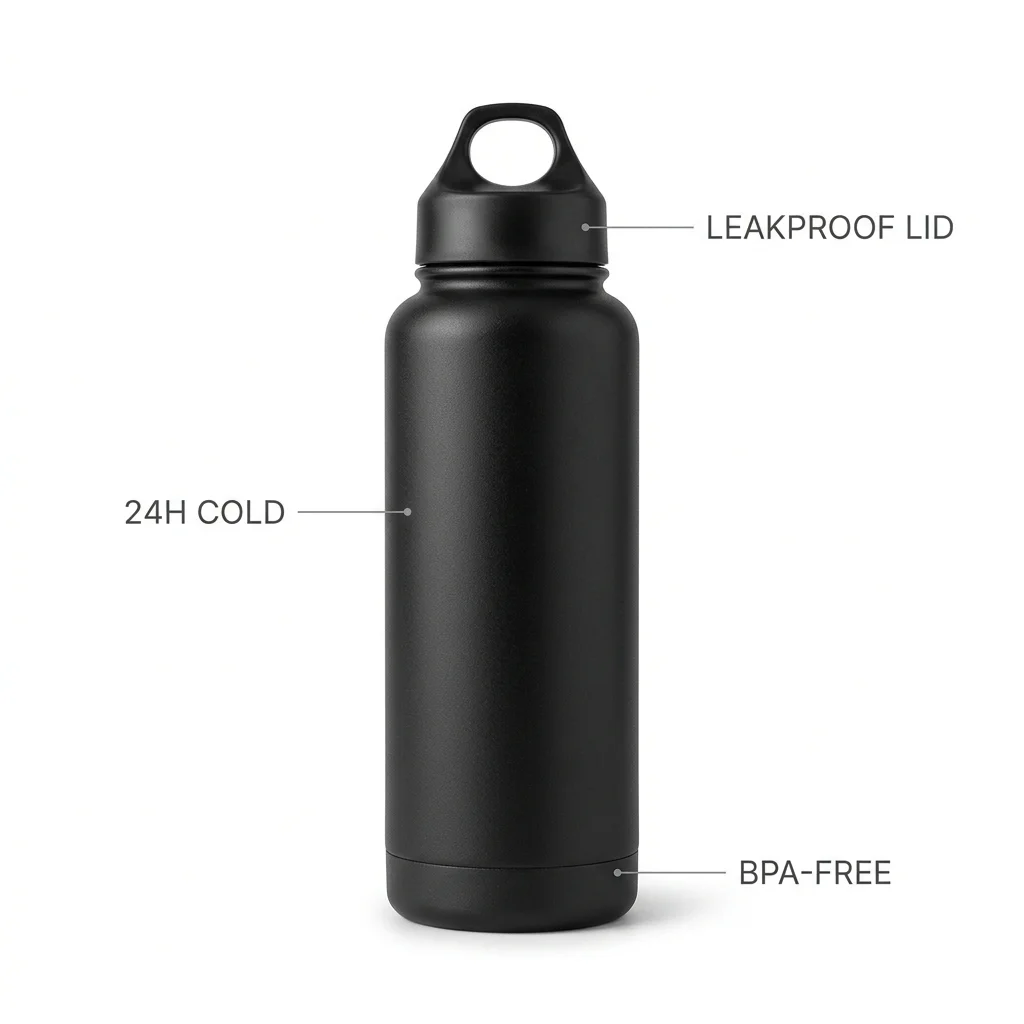
Each label had a named destination, which made the output easy to check. You can reuse this structure for another product by replacing both the feature wording and its target. Follow each pointer to its endpoint before approving the image; correct spelling does not help if the line identifies the wrong part.
4. Sticker Sheet Prompt With an Exact Count
We also wanted a Nano Banana 2.1 prompt that tested count and spacing without relying on text. A six-item sticker sheet gave us a simple way to check both.
Create a sticker sheet on a light gray background with exactly six separate die-cut stickers arranged in a 3 by 2 grid, each with a thick white border: a coffee cup, a cactus, a paper airplane, a crescent moon, a slice of pizza, and a camera. Flat cartoon style, bright colors, even spacing between stickers, no text.
Nano Banana 2.1 produced exactly six stickers in a 3 × 2 grid, each with a white die-cut border, in the order we listed. There is no text. The moon sticker includes a few small sparkles, but they sit inside its border, so they read as part of that design.
Result: 58.4 seconds, 10 credits.
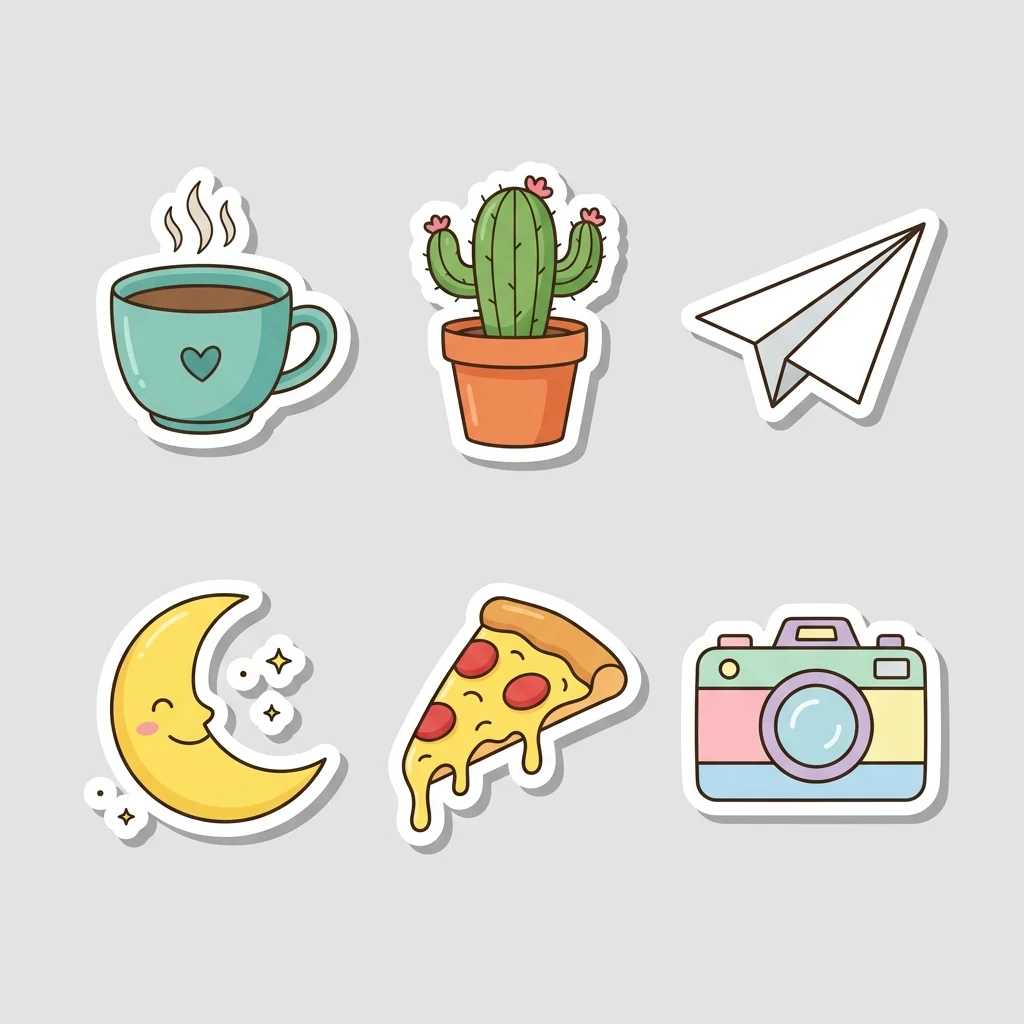
The count and grid described the same arrangement in two ways: six items, three columns, two rows. That structure is easy to adapt to icon sets or other small collections. For cutting or exporting individual stickers, look at the gaps and borders too. The moon’s sparkles stayed inside its outline here, but similar extras could complicate a cut line.
5. Nano Banana 2.1 8:1 Banner Prompt: What Prompting Could Not Fix
The ultra-wide banner was where our instructions started to struggle. We wanted a landscape strip with promotional text and enough breathing room at the edges.
We selected 8:1 in XMK; the resulting files measured 2928 × 352 pixels. This was the hardest layout in the set.
Create an 8:1 website hero banner for an outdoor gear store. A wide mountain lake landscape at sunrise stretches across the full width. On the left side, white text in two lines: “TRAIL SEASON” on line one and “UP TO 30% OFF” on line two. Keep the right side free of text. No logos, no other text.
The text was spelled correctly and the right side stayed clear, but “TRAIL SEASON” sat almost against the left edge. On a responsive site, that strip can be cropped.
First attempt: 19.4 seconds, 10 credits.
Next we asked for numeric margins:
Create an 8:1 website hero banner for an outdoor gear store. A wide mountain lake landscape at sunrise stretches across the full width. Place white text in two lines inside the left quarter of the banner: “TRAIL SEASON” on line one and “UP TO 30% OFF” on line two. Keep a clear margin of empty space around the text, at least 6% of the banner width from the left edge and 20% of the height from the top and bottom edges. Keep the right side free of text. No logos, no other text.
The landscape changed, but the text still started roughly 2% from the edge. The numeric margins were not followed in this run (19.4 seconds, 10 credits).
Finally, we asked for a text-free version:
Create an 8:1 website hero banner background for an outdoor gear store: a wide mountain lake landscape at sunrise. Keep the left third of the banner calm and uncluttered, with soft sky and still water and no peaks, trees, or bright highlights, so text can be added later. Place the mountains and the sunrise in the right two-thirds. No text, no logos.
The model left about the left half as a plain gradient and joined it to the landscape with a hard vertical seam, which would need editing before use (28.4 seconds, 10 credits).
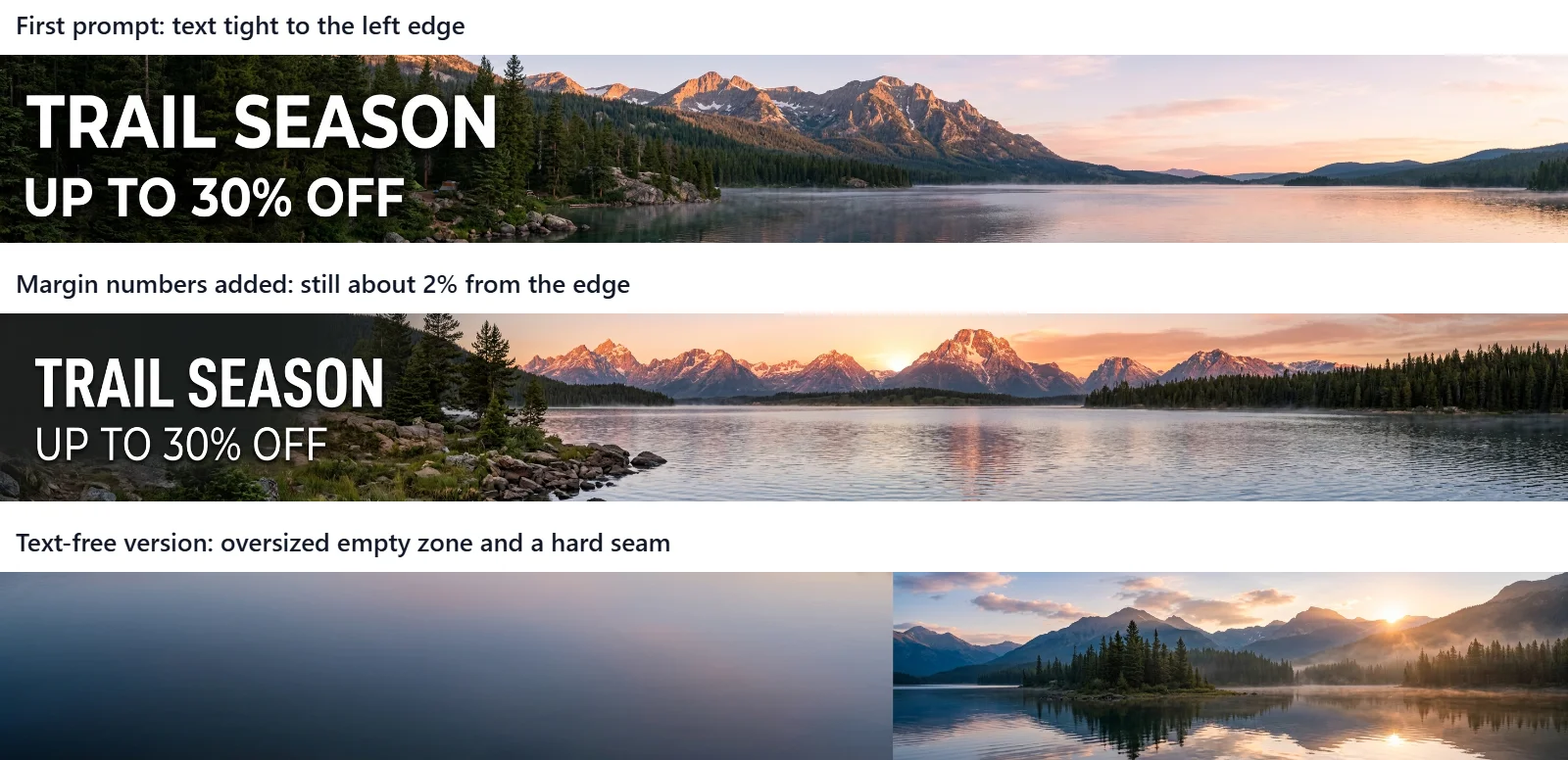
After three attempts, we still did not have a banner we would publish as-is. The first version put the text too close to the edge. The numeric-margin revision missed the requested spacing, and the text-free fallback introduced a hard seam.
For a layout that needs precise padding, adding the headline in a design tool is a practical next step. Check the background at your site’s actual display width before placing the copy, especially where an empty area meets the scene.
6. Image-to-Image Prompt: Trying to Keep a Product Unchanged
Changing the setting around a product sounds like an easy job for Nano Banana 2.1. We wanted to see whether the bottle would remain recognizable down to its cap and proportions.
For this test, we uploaded the callout image from test 3 as the reference. On XMK the first reference image is included in the base price.
Place this exact water bottle on a mossy rock beside a mountain stream in soft morning light. Keep the bottle’s shape, matte black finish, and loop cap exactly the same. Remove all callout labels, lines, and text.
The new scene looks convincing, and every label and line is gone. Side by side, though, the bottle changed: the loop on the cap became a smaller, squarer opening, and the body looks slimmer than in the reference.
First attempt: 48.4 seconds, 10 credits.
The revised prompt described the product instead of just saying “the same”:
Place this exact water bottle on a mossy rock beside a mountain stream in soft morning light. Treat the bottle as a fixed product photo: keep its proportions (a wide body about one third as wide as it is tall), the matte black finish, the separate base band, and the cap with a large, round loop opening. Do not redesign the bottle; only change the background, lighting, and shadows. Remove all callout labels, lines, and text.
This brought the proportions closer and kept the base band visible. The loop was still a small oval, not the large round opening in the reference.
Revised prompt: 44.4 seconds, 10 credits.
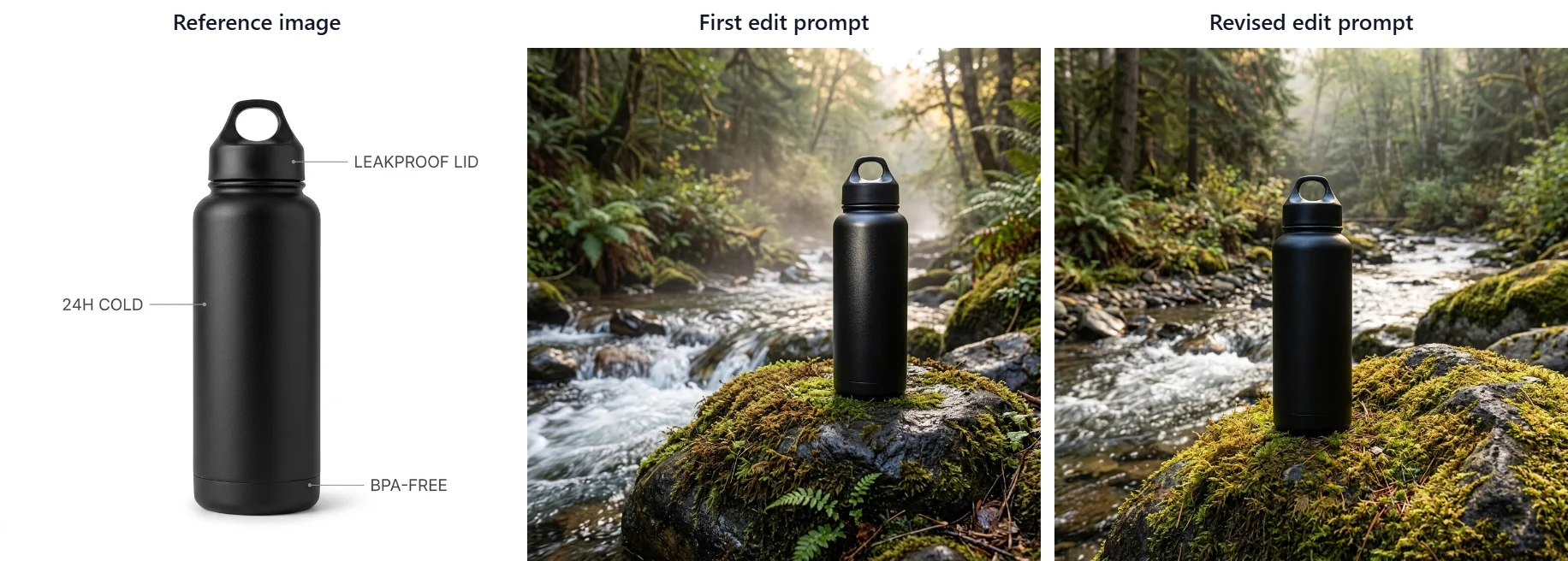
The longer description helped the proportions, but it did not recover the cap. That makes this a partial improvement, not a successful product-preservation test. Put your reference and output side by side at the same size when checking a similar edit. The new scene can be convincing enough to distract you from a changed silhouette.
7. Nano Banana 2.1 Label Prompt: Restoring One Missing Symbol
This is the tea tin from the opening: a convincing packaging image with one missing character. The brief included five short label lines and a single flower.
Create a square studio packaging photograph of one cylindrical brushed aluminum tea tin with a flat copper lid. The front label is ivory and faces directly toward the camera. Print exactly five lines: “NORTH GROVE”, “JASMINE GREEN TEA”, “LOOSE LEAF”, “NET WT 80 g”, “STEEP 80°C / 3 MIN”. The brand line is largest; the brewing instruction is smallest but fully readable. Put exactly one dry jasmine flower to the left of the tin. Pale charcoal background, soft side lighting, fine brushed-metal texture. No other text, no barcode, no extra tins, no tea cups.
The tin, copper lid, ivory label, single flower, and all five label lines appeared. One character did not: the brewing line read “STEEP 80°C 3 MIN,” with the slash missing. At a glance the label looks finished, which is why this kind of error slips through.
Instead of regenerating the whole scene, we uploaded this output as the reference and asked for one change:
Edit only the smallest brewing-instruction line on the tea tin label. Replace it with exactly “STEEP 80°C / 3 MIN”, including the visible forward slash between °C and 3. Preserve the tin, flat copper lid, ivory label, other four text lines, flower, background, lighting, crop, and all materials. Do not add or remove any other elements.
The edit restored the slash, and the rest of the label and scene looked unchanged in our side-by-side check. The two runs displayed 20 credits in total.
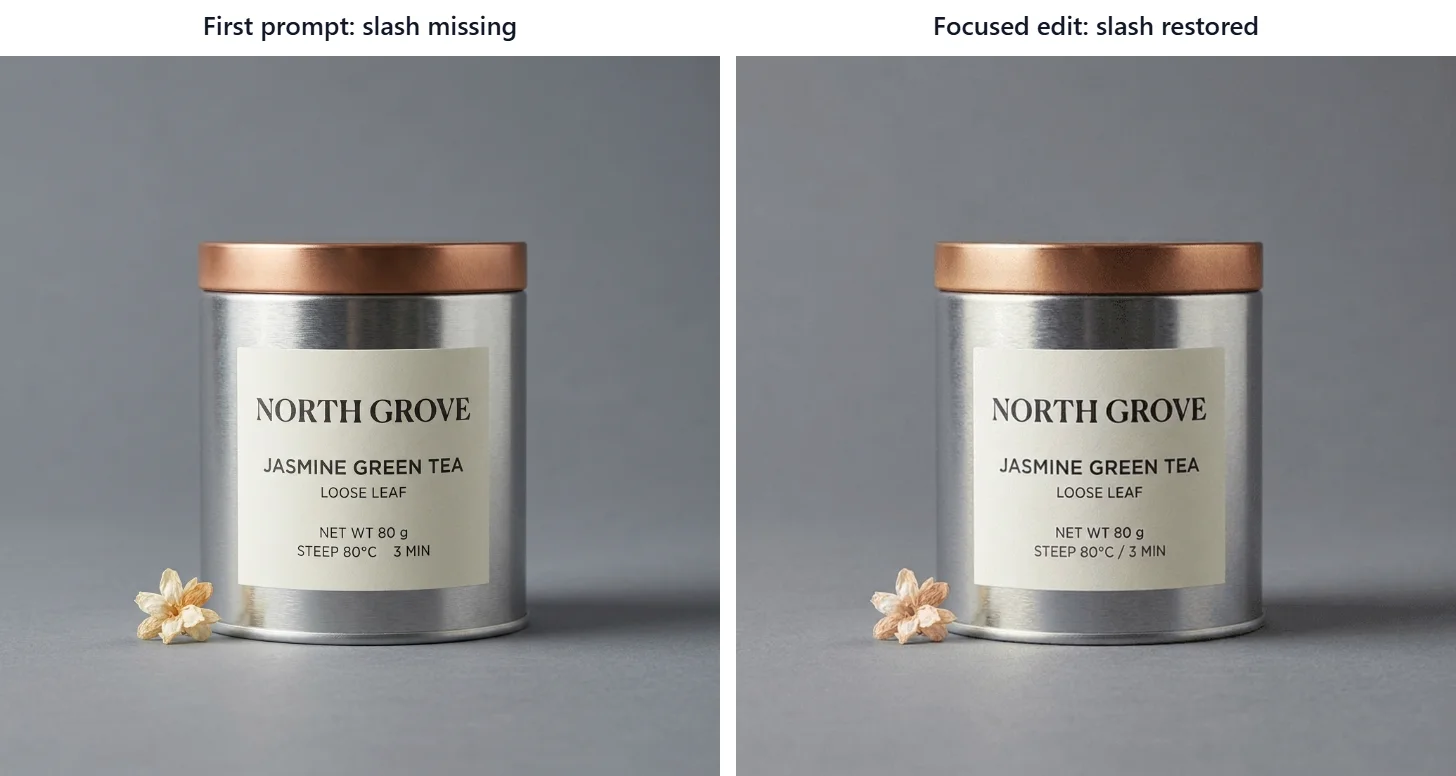
Here, the smallest possible request was enough: restore the slash between the temperature and brewing time. If one character is wrong in an otherwise useful image, this is a reasonable edit to try. Read the other lines again afterward; fixing the target detail is only part of the check.
8. Web Search Prompt: With and Without Live Data
Our last example needed information that a creative brief cannot supply on its own: a forecast for a specific city and day.
Nano Banana 2.1 on XMK has a Web Search option for an extra 10 credits. To see whether it matters, we ran the same prompt with and without it.
Create a minimal square weather card for New York City for Wednesday, October 14, 2026. Show the city name, the date, the forecast high and low temperatures in degrees Fahrenheit, and one matching weather icon. Use real forecast data for that day. Clean flat design, white background, no other text.
With Web Search on, the card showed a high of 77°F, a low of 58°F, and a rain icon. It also added small “H” and “L” markers we did not ask for.
With Web Search off, the same prompt produced 68° and 51° with a partly cloudy icon, and it dropped the °F unit.
We generated both cards at about 11:36–11:40 p.m. EDT on October 13. To check them, we used the National Weather Service forecast for New York City. We viewed it about two and a half hours later, at 2:09 a.m. EDT on October 14, 2026, when the forecast showed a last update of 1:52 a.m. EDT that day, and saved the screenshot below. For Wednesday, October 14, it listed a high near 78°F with a 20% chance of showers, and a low around 59°F for Wednesday night. We used Wednesday’s daytime high and Wednesday night’s low as the comparison values, although the card’s “low” may cover a different time span.
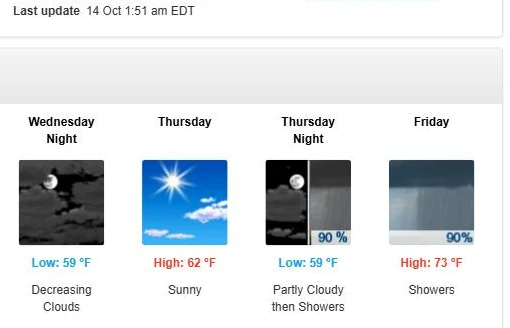
Against that source, the Web Search card was within 1°F on both the high and the low. The card without search was 10°F lower on the high and 8°F lower on the low. Forecasts update, so another source or time may give different numbers, and one pair does not show that every run without search will miss.
Web Search on: 20 credits; this run was not timed. Web Search off: 16.3 seconds, 10 credits.
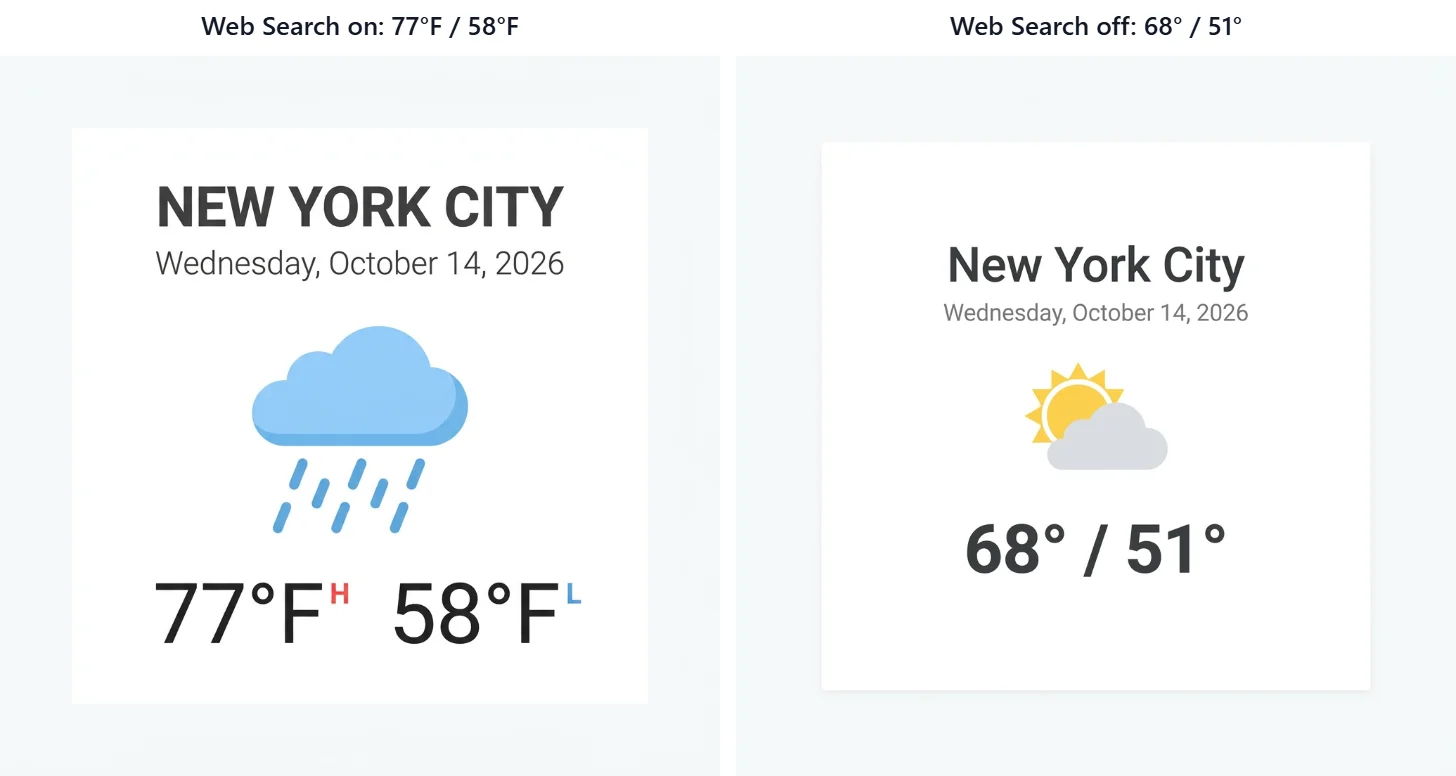
Web Search produced temperatures closer to the later NWS forecast in this pair. That is useful evidence for trying the option, but it does not make the card self-verifying. For a date-sensitive graphic, save the source and its update time, compare the same forecast periods, and check the units as well as the numbers. The run without search dropped the Fahrenheit unit entirely.
Common Nano Banana 2.1 Prompt Mistakes and Fixes
Start with the visible miss, then adjust the part of the brief that describes it:
What went wrong | What to change in the next prompt |
|---|---|
Stray text appeared inside an icon | State the only text allowed, and say icons and badges contain no letters or numbers |
A symbol disappeared from a label | Run a focused edit that names the symbol and its exact position |
Text sat too close to an edge | Check edges yourself; consider adding the headline in a design tool |
A product changed during an edit | Describe proportions, parts, and finish instead of “keep it the same” |
Numbers were far off without search | Try Web Search, then check every figure against a named source |
“Empty space” became a hard seam | Inspect the join and plan to retouch it, or let the scene fill the frame |
Keep the failed output when you run a fix, so you can see whether the change helped.
Nano Banana 2.1 Prompt Settings on XMK
These are the options the XMK workspace showed on October 13, 2026 (Eastern Time):
Setting | What XMK showed |
|---|---|
Resolution and price | 1K: 10 credits, 2K: 20 credits, 4K: 40 credits |
Search options | Web Search +10 credits, Image Search +10 credits |
Reference images | Up to 14; the first is included, each extra adds 10 credits |
Aspect ratios | Auto, 1:1, 2:3, 3:2, 3:4, 4:3, 4:5, 5:4, 9:16, 16:9, 21:9, 1:4, 4:1, 1:8, 8:1 |
Output format | PNG or JPG |
At 1K, our outputs measured 1376 × 768 for 16:9, 928 × 1152 for 4:5, 1024 × 1024 for 1:1, and 2928 × 352 for 8:1. Check the Generate button before each run, since prices can change.
If you want a second opinion on a finished brief, XMK also runs Nano Banana Pro in a separate workspace. For the earlier model’s workflow, see our guide on how to use Nano Banana 2.
Start creating with Nano Banana 2.1
Nano Banana 2.1 Prompts FAQ
What is the best prompt structure for Nano Banana 2.1?
Start with the format and subject, give the elements clear positions, then specify any exact wording and exclusions. Our examples use that approach, with text instructions added where needed. We did not compare different prompt orders, so treat it as a reusable starting point rather than a proven best sequence.
Does Nano Banana 2.1 render text in images accurately?
Nano Banana 2.1 spelled words correctly in every image we tested. The problems were smaller: a missing slash on the tea label, extra text such as a “12h” badge and “H” and “L” markers, and text placed too close to an edge. Check punctuation and numbers separately from spelling.
How do I stop Nano Banana 2.1 from adding extra text?
State exactly which text should appear and say that icons and badges must contain no letters or numbers. That change removed the stray “12h” badge in our infographic test.
Can I edit one detail in an existing Nano Banana 2.1 image?
Yes. Upload the output as a reference and ask for one specific change while listing what to preserve. That approach restored the missing slash on our tea tin label, and the rest of the scene looked unchanged in our side-by-side check.
Is Nano Banana 2.1 Web Search worth the extra credits?
It helped in our one test. With Web Search, the forecast card’s temperatures were within 1°F of the National Weather Service forecast we checked; without it, they were 8–10°F lower. Check the numbers either way, and leave it off for purely creative images.
Final Thoughts on Nano Banana 2.1 Prompts: Check the Detail That Matters
The thumbnail, callouts, and sticker sheet gave us useful first results. The infographic needed a tighter text rule, and the tea label needed one character restored. The banner and bottle edit showed where additional wording still fell short.
Choose the Nano Banana 2.1 example closest to your job and swap in your subject and copy. Before generating, decide what you will check: a label’s punctuation, a pointer’s endpoint, a product’s cap, or the space around a headline. If that detail fails, keep the output and test one focused change. You will have a clearer record of what improved—and what still needs work.