Google just made AI image generation cheaper than most people thought possible. Nano Banana 2 Lite turns a text prompt into a finished image in seconds, for a few cents each. That speed and price don't just save money — they change how you work. This guide covers what it is, what it does well, what it costs, and how it stacks up against Nano Banana 2 and Nano Banana Pro, so you know exactly which one to use.
We'll keep it simple and practical. No jargon, just the parts that help you decide.
What Is Nano Banana 2 Lite?
Let's answer the what is Nano Banana 2 Lite question straight. Nano Banana 2 Lite is Google DeepMind's fastest and most affordable AI image model, launched on June 30, 2026. Its official name is Gemini 3.1 Flash-Lite Image, but most people just call it Nano Banana 2 Lite. You type a prompt, and it makes an image — or you upload an image and it edits it.
The whole point of Lite is speed and cost. Google's official figures are about four seconds per image and $0.034 per 1K image — roughly half the price of the standard Nano Banana 2 ($0.067). In real use the speed varies by platform (our own test ran longer), but it's still the fastest tier in the family. It keeps solid quality, sharp in-image text in over 25 languages, and good consistency across a batch of images — it just trades maximum resolution for that speed.
A couple of facts worth knowing. The three tiers map to different underlying Gemini models: Lite is gemini-3.1-flash-lite-image, standard Nano Banana 2 is gemini-3.1-flash-image, and Nano Banana Pro is gemini-3-pro-image. Google also positions Lite as the recommended replacement for the original Nano Banana (Gemini 2.5 Flash Image), which was retired around this launch — so if you were on the old model, Lite is the upgrade path.
If you spotted a mystery "instant ramen" model being tested quietly in June, this is what it became. Google built it, in their words, for "high throughput, speed and scale" — which is a technical way of saying: make lots of good images, fast, without a big bill.
Why Speed Changes How You Work
This is the part people underestimate, so it's worth its own section. When an image takes a minute to make, you're careful. You craft the perfect prompt, wait, and hope it's right. If it's wrong, that's a painful redo.
Four seconds breaks that habit. You stop treating each image as a one-shot gamble and start treating it like a sketch. Try an idea, see it, tweak it, try again — all in the time it used to take to write one careful prompt. You stay inside the creative flow instead of waiting on the tool.
That shift matters for real work. A marketer can test ten thumbnail ideas over a coffee. A designer can rough out a dozen concepts before lunch. An online seller can spin up product graphics as fast as they think of them. Speed isn't just convenience here — it changes what you're willing to try.
Nano Banana 2 Lite Features
Here's what the model actually gives you, grouped by what matters.
Fast generation. Google's official figure is about four seconds per image. In real use it's often a bit slower depending on where you access it and the load at the time — in our own test on XMK it took around 15 seconds. It's still the fastest tier in the family, but ignore the "60x faster" claims floating around online; they don't match Google's own numbers or real testing.
Low cost. About $0.034 per 1K image through the Gemini API — roughly half the price of standard Nano Banana 2 ($0.067). Cheap enough to generate hundreds or thousands without a scary bill, which makes it great for high-volume work.
Sharp in-image text. It writes legible text inside images in English and 25+ other languages, including Chinese, Japanese, Spanish, French, German, Arabic, and Hindi. For marketing teams making the same graphic in several languages, that's a big time-saver.
Batch consistency. Generate many images in one go and keep a subject or style looking the same across them. Useful for series, catalogs, and campaigns.
Editing and references. It doesn't just make images — it edits existing ones and takes reference images for style or subject. You can stack a few edits in a row.
Real-world knowledge. It leans on Google's knowledge, so prompts about real places, objects, and concepts tend to come out more accurate.
The one trade-off to know: it generates at 1K (1024×1024) native resolution and does not do 2K or 4K. For higher resolution, you step up to a bigger model in the family.
Nano Banana 2 Lite Price
Cost is a big reason people choose Lite, so let's be exact. The Nano Banana 2 Lite price is $0.034 per 1K-resolution image through the Gemini API. The standard Nano Banana 2 is $0.067 for the same 1K image. So Lite is about half the price — not five times cheaper, as some posts claim. Half is still a big deal at volume, and that's the whole point: Lite is built for high-volume work.
Here's how that gap adds up as you scale:
Batch size | Nano Banana 2 Lite | Nano Banana 2 | You save |
|---|---|---|---|
100 images | ~$3.40 | ~$6.70 | ~$3.30 |
1,000 images | ~$34 | ~$67 | ~$33 |
10,000 images | ~$340 | ~$670 | ~$330 |
On XMK specifically, the two models run on credits, and our test showed the same rough two-to-one ratio: generating one image cost 10 credits on Lite versus 20 credits on standard Nano Banana 2. So whether you count in dollars or credits, Lite comes out to about half the cost per image.
As for Nano Banana 2 Lite free options, you can try it at no cost right here on XMK — just open it in your browser, no setup needed. Google's own Gemini app and AI Studio also offer free access. So you can try it before spending anything.
Hands-On Test: Nano Banana 2 Lite vs Nano Banana 2, Same Prompt
Numbers only tell you so much, so we ran both models through the same prompt on XMK and kept the first result from each — no retries or cherry-picking. We used a demanding one:
a black-and-white conceptual double-exposure portrait, with a misty forest emerging from the subject's forehead, the lower face kept solid, and a faint emerald tint only in the forest layer. It's the kind of prompt that tests face clarity, blending, and instruction-following all at once.
Here's what standard Nano Banana 2 produced (25 seconds, 20 credits):

And here's Nano Banana 2 Lite, same prompt (15 seconds, 10 credits):
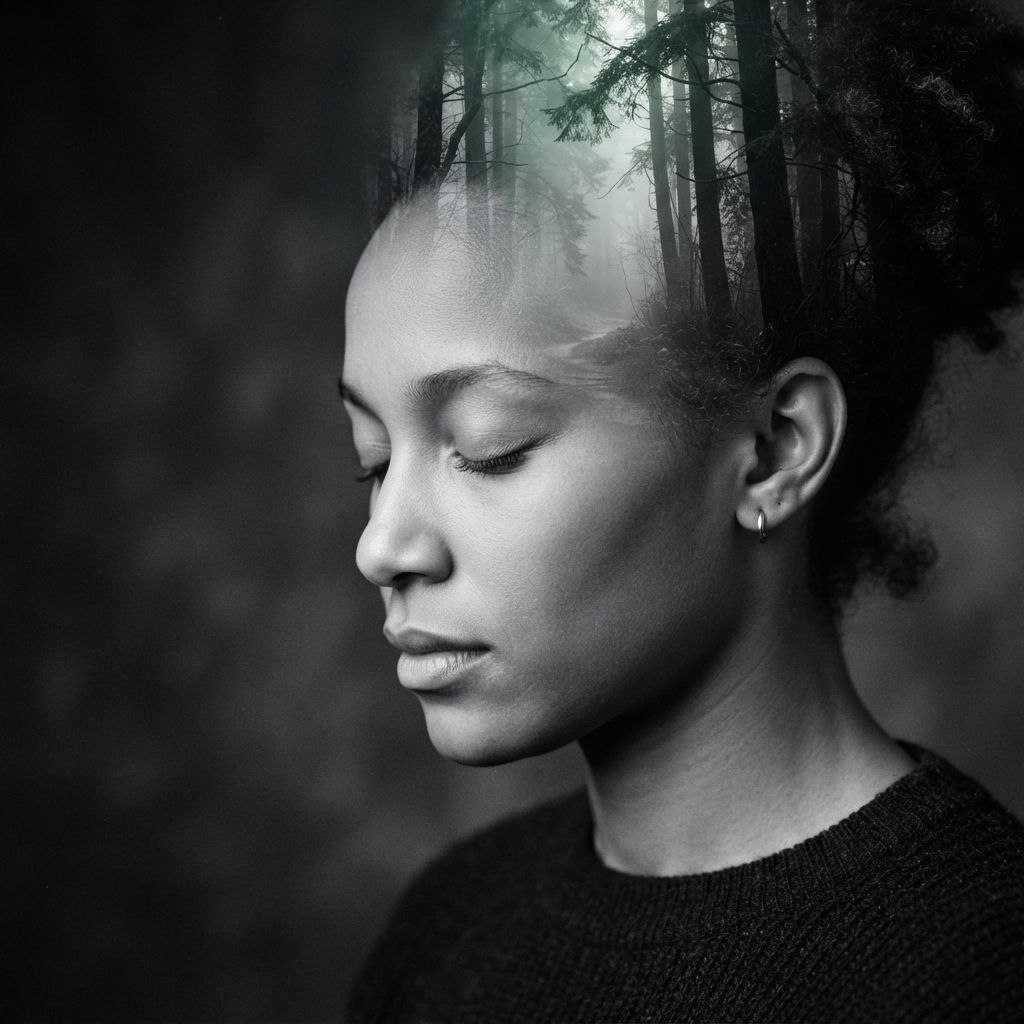
What we found is the interesting part. Both models nailed the concept: clear face, closed eyes, forest rising from the forehead, solid lower face, and the emerald tint kept to the forest layer only. On instruction-following, they were even. The main difference was interpretation, not quality — standard Nano Banana 2 went with a symmetrical front-on composition and a fuller forest background, while Lite chose a moodier three-quarter profile with a darker, more focused backdrop. Both look professional. At this 1K size, we honestly couldn't call one "better" — which lines up with what Google and other testers report: for many prompts, people can't reliably tell Lite from the standard model.
The real, measurable gaps were speed and cost. Lite finished in 15 seconds versus 25 for standard — about 40% faster — and cost half the credits (10 vs 20). Note that 15 seconds is well above Google's "about four seconds" figure; real-world speed depends on platform load and how you access the model, so treat four seconds as a best case, not a guarantee. Where Lite's limit would actually show is a different kind of job — tiny text, print-scale detail, or a complex multi-subject scene — not an atmospheric portrait like this one.
How to Use Nano Banana 2 Lite
The workflow is simple, which is part of the appeal. If you're wondering how to use Nano Banana 2 Lite, here's the basic flow, whether on Google's tools or a platform like this one.
First, pick your mode — start from a text prompt, or upload an image to edit.
Second, write your prompt. Because it's so fast, you don't need a perfect one; describe the basics and refine as you go.
Third, set your options — aspect ratio and any style or reference images.
Fourth, generate. In about four seconds you'll have your image.
Fifth, review and tweak. Change one thing, run it again, and keep going until it's right. The speed means iterating is painless.
A tip: lean into the speed. Don't overthink the first prompt. Generate a rough version fast, see what's off, and fix it in the next pass. That loop is where Lite shines.
If you want the full background on the family before choosing, our Nano Banana overview walks through all the models and where each fits.
Nano Banana 2 Lite vs Nano Banana 2 vs Nano Banana Pro
This is the question most people have, since Google offers three tiers. Here's the clear breakdown. The Nano Banana 2 Lite vs Nano Banana 2 and Nano Banana 2 Lite vs Nano Banana Pro comparisons come down to one trade-off: speed and cost versus resolution and detail.
Feature | Nano Banana 2 Lite | Nano Banana 2 | Nano Banana Pro |
|---|---|---|---|
Role | Speed & value | Balanced workhorse | Flagship, top detail |
Speed | ~4 seconds | Slower | Slowest |
Cost | Lowest (~$0.034/img) | Higher | Highest |
Max resolution | 1K only | Higher (2K options) | Highest (4K) |
In-image text | Yes, 25+ languages | Yes, finer control | Yes, best control |
Batch consistency | Strong | Strong | Strong |
Best for | High volume, drafts, iteration | Final deliverables | Complex, professional work |
The simple way to choose:
Pick Lite for high-volume work, quick drafts, brainstorming, and anything where speed and cost matter more than maximum detail. This covers most everyday image needs.
Pick Nano Banana 2 when you need a polished final image with higher resolution — the "workhorse" for real deliverables.
Pick Nano Banana Pro for complex, professional compositions where fine detail, accuracy, and 4K output matter most.
Here's the honest truth from real testing: the quality gap between Lite and the full Nano Banana 2 is smaller than you'd expect. In blind comparisons, people often can't tell which is which. So for the majority of work, Lite is enough — and when a project needs more polish, stepping up is easy.
A 30-second way to decide. Answer three questions in order: (1) Do you need 2K or 4K output, for print or a large display? If yes, skip Lite and use Nano Banana 2 or Pro. (2) Does the job involve complex composition, exact tiny text, or strict face and brand precision? If yes, lean to Nano Banana 2 or Pro. (3) Otherwise — high volume, drafts, 1K is fine? Use Lite. Most everyday work lands on Lite, with the bigger models kept for the smaller set of final, high-detail images.
Nano Banana 2 Lite Review: The Honest Take
For a quick Nano Banana 2 Lite review in plain terms: it's fast, cheap, and good enough for most things. That's the whole pitch, and it delivers.
The strengths are obvious. The four-second speed genuinely changes how you work — you experiment more because each try costs almost nothing in time or money. The multilingual text rendering is a real bonus for anyone making localized content. And the quality holds up well for something this cheap.
The limits are just as clear. It caps at 1K resolution, so it's not for large prints or high-detail hero images. Very small faces, exact spelling, and complex edits can still trip it up, so it's worth checking outputs before publishing. And it's not a magic wand — you may need a couple of passes to nail a tricky prompt.
The verdict: for high-volume, everyday creation, Nano Banana 2 Lite is one of the best value picks available. For final, high-detail work, step up to Nano Banana 2 or Pro. Most people will use Lite for the bulk of their work and the bigger models only when a project truly needs it.
Who Should Use Nano Banana 2 Lite?
Let's match it to real people.
Great fit for: marketers making lots of graphics and thumbnails, social media creators posting daily, online sellers making product images, designers brainstorming concepts, and developers building image features into apps at scale. If you make a high volume of images and care about speed and cost, this is your tool.
Less ideal for: anyone needing large prints, 4K output, or maximum fine detail in a single hero image. For those, Nano Banana 2 or Pro is the better call. But for the everyday flood of images most work needs, Lite covers it.
Real Use Cases
Here's where Lite fits naturally into real work.
Social media graphics. Instagram posts, story graphics, and YouTube thumbnails, made about as fast as you can think of them. The speed keeps you posting.
E-commerce product images. Spin up product shots and variations quickly and cheaply, then run the ones that work. The low cost makes testing painless.
Localized marketing. Make the same graphic with text in several languages, without a separate design pass for each. The multilingual text rendering handles it.
Concept and mood boards. Rough out a dozen visual directions in minutes, pick the strongest, and move on. Lite is built for this messy, exploratory stage.
App and product features. Developers can build fast image generation into their own tools, since the low cost and speed make high-volume use practical.
How Lite Compares to Other Image Models
Nano Banana 2 Lite isn't only competing with its own family. Here's how it sits against other popular image models, in plain terms.
Against models like GPT Image 2 and the older Nano Banana, Lite's edge is the same story: speed and cost. Most image models take long enough that you plan your prompts carefully to avoid wasting a slow generation. Lite flips that — it's fast enough that trial and error becomes the workflow, not a risk. Where a rival might give you one carefully-prompted image in the time Lite gives you five rough ones to choose from, that changes how you create.
On raw quality, the top-tier models still have an edge for complex, high-detail work. A flagship model will handle a very intricate scene or a large, print-ready image better than Lite. But for the everyday stuff — social graphics, product shots, thumbnails, quick concepts — the quality is close enough that the speed and price win. The smart approach many people take is to use Lite for the bulk of their images and reach for a heavier model only when a specific image needs maximum polish.
The takeaway: don't think of Lite as "the cheap one you settle for." Think of it as the right tool for high-volume, fast-moving work, with bigger models kept in reserve for the few images that truly need them.
Tips to Get the Best Results
A few simple habits make Lite work even better.
Start rough, refine fast. Don't agonize over the first prompt. Get a quick version, see what's wrong, and fix it in the next pass. The speed makes this the fastest way to a good result.
Be specific about the important parts. You don't need a perfect prompt, but naming the key details — subject, setting, style, mood — gets you closer, faster.
Use it for variations. Generate several versions of one idea, then pick the best. It's cheap and quick, so there's no reason to settle for your first try.
Check text and small details. In-image text is strong but not flawless, and very small faces can be off. Give outputs a quick look before you publish.
Match the model to the job. Use Lite for drafts and volume; if one specific image needs to be flawless and high-res, that's when you step up to Nano Banana 2 or Pro.
Frequently Asked Questions
What is Nano Banana 2 Lite in simple terms?
It's Google's fastest, cheapest AI image model, launched June 30, 2026. You give it a text prompt and it makes an image in about four seconds, or you upload an image and it edits it. Its official name is Gemini 3.1 Flash-Lite Image.
How is Nano Banana 2 Lite different from Nano Banana 2?
Lite is faster and cheaper but caps at 1K resolution. Nano Banana 2 is the balanced "workhorse" with higher resolution options for final work. Lite is for volume and speed; Nano Banana 2 is for polished deliverables.
How much does Nano Banana 2 Lite cost?
About $0.034 per 1K image through the Gemini API — roughly three to four cents. That makes generating hundreds or thousands of images affordable. Several platforms also offer free access to try it.
Can I use Nano Banana 2 Lite for free?
Yes. You can try it for free right here on XMK in your browser, with no setup. Google's Gemini app and AI Studio also offer free access, so you can test it before paying.
Is Nano Banana 2 Lite good quality?
Yes, for most uses. It keeps strong consistency, legible in-image text, and precise editing. In blind tests, people often can't tell it apart from the full Nano Banana 2. It only trades maximum resolution for its speed and low cost.
What resolution does Nano Banana 2 Lite support?
It generates at 1K (1024×1024) native resolution. It does not do 2K or 4K. For higher resolution, use Nano Banana 2 or Nano Banana Pro.
Which Nano Banana model should I choose?
Choose Lite for high-volume, fast, low-cost work. Choose Nano Banana 2 for polished final images with higher resolution. Choose Nano Banana Pro for complex, professional work needing top detail and 4K.
Final Thoughts
Nano Banana 2 Lite is a simple idea done well: make good images fast and cheap. The four-second speed changes how you work, letting you experiment freely instead of guarding every generation. It won't replace Nano Banana 2 or Pro for high-detail final work, but for the everyday flood of images most people actually make, it's one of the best value tools out there. Try it for your quick, high-volume work, and step up only when a project truly needs the extra polish. Want to start creating with Nano Banana 2 Lite and see the speed for yourself?