If you are comparing fast AI image models for high-volume creative workflows, Nano Banana 2 Lite is one of the most important new options to evaluate. This Nano Banana 2 Lite review breaks down exactly what the model does well, where it falls short, and whether it deserves a spot in your creative workflow — grounded in Google’s own published documentation, independent third-party testing, and a direct side-by-side look at its closest competitors.
Nano Banana 2 Lite is Google DeepMind’s speed-optimized entry in the Nano Banana image family, officially known under the model ID gemini-3.1-flash-lite-image. It launched on June 30, 2026, positioned as the fastest and most cost-efficient tier Google has ever shipped for image generation. But “fast and cheap” only matters if the output still holds up — so this review digs into exactly that trade-off.
Want to skip ahead and try it yourself?
Test Nano Banana 2 Lite on XMK
How We Evaluated Nano Banana 2 Lite
Before getting into the results, it’s worth being upfront about how this review was put together, since a lot of coverage of new models leans on marketing copy alone.
This Nano Banana 2 Lite review is based on two sources, clearly separated: Google’s own published documentation and benchmark disclosures for latency, pricing, resolution limits, and editing capabilities; and independent side-by-side prompt testing published by third-party AI tooling sites that ran Nano Banana 2 Lite against standard Nano Banana 2 on identical prompts. Where this review cites specific example outputs — like the two prompt comparisons below — those come from that published third-party testing, not from generations we ran ourselves, and we’ve kept the source clearly attributed rather than presenting it as first-party testing.
This isn’t a large-scale statistical benchmark across hundreds of prompts, and it doesn’t claim to be. What follows is a practical, prompt-level synthesis of where Nano Banana 2 Lite is genuinely strong and where it starts to show the cracks you’d expect from a speed-optimized model — useful for deciding whether it fits your workflow, rather than a lab-grade performance audit.
What Is Nano Banana 2 Lite?
Nano Banana 2 Lite sits below Nano Banana 2 and Nano Banana Pro in Google’s image model lineup, and it replaces the original Nano Banana (gemini-2.5-flash-image) as Google’s recommended entry-level option. It’s built for high-throughput, high-volume scenarios: rapid prototyping, A/B testing ad creative, drafting storyboards, or powering apps that need to generate images on the fly.
The headline numbers are what make Nano Banana 2 Lite stand out:
Latency: roughly four seconds per image, per Google’s own published figures
Cost: $0.034 per 1K-resolution image, about half the price of standard Nano Banana 2
Resolution: capped at 1K output, unlike Nano Banana 2’s 1K/2K/4K range
Character consistency: maintains identity and object fidelity across rapid, repeated generations
Text rendering: legible in-image text across 25+ languages, including Chinese, Japanese, Arabic, and Spanish
Reference and editing workflows: Nano Banana 2 Lite can handle image-based generation and fast local edits, though it is not the best choice for complex character-reference workflows, style-reference control, or long sequential edit chains — for those cases, Nano Banana 2 or Pro is more reliable
Despite trading away peak resolution, Nano Banana 2 Lite retains the prompt adherence and world knowledge that made the Nano Banana family popular in the first place — it just gets there faster and cheaper, within the limits above.
Nano Banana 2 Lite Speed: Does the 4-Second Claim Hold Up?
Speed is the single biggest selling point in every Nano Banana 2 Lite review you’ll find online, so it’s worth checking against independent sources rather than repeating the marketing line.
Google’s own figures put text-to-image generation at “as little as four seconds.” Independent third-party benchmarking we reviewed backs this up, placing Nano Banana 2 Lite in a 4–6 second range per image, including image-to-image edits with a reference attached. That same third-party testing places standard Nano Banana 2 in a comparable 4–8 second window. The real gap isn’t the 60x speed jump some social posts have claimed; it’s a smaller, but still meaningful, edge that compounds when you’re generating hundreds or thousands of images in a single session.
Where the speed advantage actually pays off is in workflows built around iteration rather than one-off finals: rapid concept exploration, live prompt testing, chatbot-driven image generation, or any product experience where a user is waiting on-screen for a result.
Nano Banana 2 Lite Pricing Explained
At $0.034 per 1K-resolution image, Nano Banana 2 Lite pricing is straightforward compared to token-based competitors like GPT Image 2. There’s no quality-tier math, no separate charges for text tokens versus image tokens — just a flat per-image rate.
To put that in perspective:
Volume | Nano Banana 2 Lite | Standard Nano Banana 2 |
|---|---|---|
1,000 images | ~$34 | ~$67 |
10,000 images | ~$340 | ~$670 |
That gap widens fast at scale, which is exactly why teams running high-volume catalog generation, ad variant testing, or social content pipelines gravitate toward Nano Banana 2 Lite over the full-size model.
Nano Banana 2 Lite Image Quality Test
To get past the spec sheet, here’s what published side-by-side prompt testing shows across a few different scenario types.
Simple single-subject scenes
Nano Banana 2 Lite | Nano Banana 2 |
|---|---|
 |  |
Prompt: “A cozy ceramic mug on a wooden café table, morning light through a window, steam rising, shallow depth of field, warm tones.”
Per third-party testing, Nano Banana 2 Lite rendered the mug and lighting accurately in roughly five seconds, with a slightly simplified background and less texture detail in the wood grain compared with standard Nano Banana 2. For a straightforward, single-subject prompt like this, the quality gap between the two models is minor.
Complex, multi-object scenes
Nano Banana 2 Lite | Nano Banana 2 |
|---|---|
 | 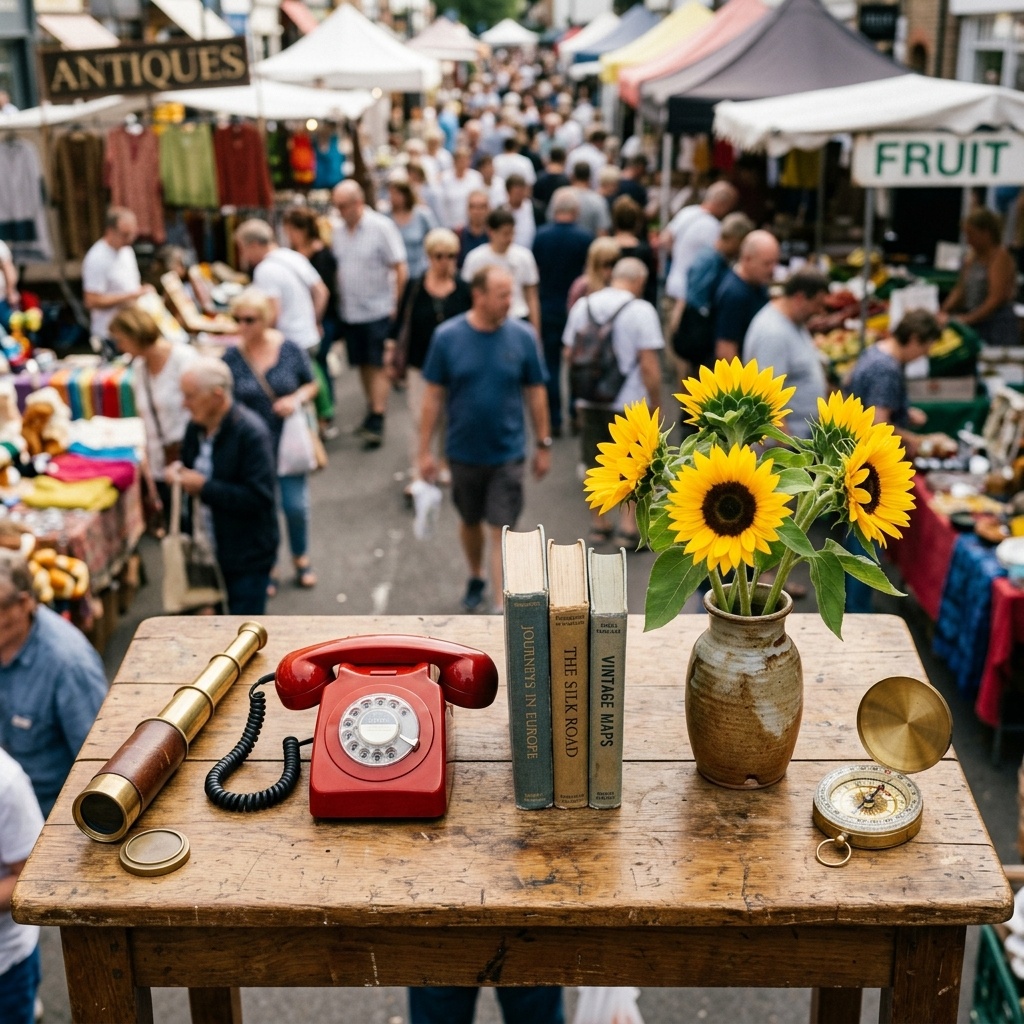 |
Prompt: “Flat-lay of seven objects arranged left to right — a brass telescope, a red rotary phone, three stacked books, a vase of sunflowers, a compass — on a busy outdoor market table, with vendors and shoppers blurred in the background.”
This is where the two models diverge, according to the same published comparison. Nano Banana 2 Lite captured most of the named objects but simplified the busy market background into a near-empty street, dropping some of the requested scene complexity and object ordering. Nano Banana 2 held the multi-object sequence and busy market framing noticeably closer to the original prompt.
Text-in-image rendering
Short, quoted text strings — think product labels, signage, or single-word titles — are reported to render legibly and accurately on Nano Banana 2 Lite, consistent with Google’s claim of reliable text rendering across 25+ languages. Longer lines of text and small captions are where quality becomes less predictable, a limitation Nano Banana 2 Lite shares with most fast-tier image models.
Character consistency across generations
Per Google’s own product documentation, running the same character description across several sequential prompts keeps facial features, wardrobe, and props largely stable — useful for storyboard-style workflows where you’re generating a series rather than a single hero image. This kind of consistency is generally more reliable within a single short session than across long, unrelated prompt chains.
Image editing
Nano Banana 2 Lite is built to handle fast, single-step local edits well — recoloring, background swaps, small object changes. More ambitious workflows, like juggling multiple reference images for character or style control, or chaining many sequential edits on the same asset, are where Nano Banana 2 or Pro becomes the more reliable choice, per Google’s own product guidance.
Where Nano Banana 2 Lite Falls Short
No speed-optimized model is a free lunch, and Nano Banana 2 Lite has a few clear limits worth knowing before you build a workflow around it:
1K resolution ceiling. There’s no 2K or 4K option on this tier, so anything destined for large-format print or high-resolution final delivery needs to move to Nano Banana 2 or Pro.
Complex scenes lose detail. Dense, multi-object prompts are where instruction-following softens — objects get dropped, backgrounds get simplified, and object ordering can drift from what was requested.
Weaker on complex reference and edit chains. It handles fast local edits well, but complex character-reference workflows, style-reference control, or long sequential edit chains are better suited to Nano Banana 2 or Pro.
Not a substitute for final commercial assets. For brand key visuals, dense infographics, or anything where accuracy is non-negotiable, Nano Banana 2 Lite is best used to draft the concept, not deliver the final file.
Nano Banana 2 Lite Benchmark Summary
Rather than assign precise numeric scores from a small set of test prompts — which would overstate the rigor of this review — here’s a qualitative synthesis of where Nano Banana 2 Lite lands across the dimensions that matter most, based on Google’s documentation and independent third-party testing:
Test Area | Rating | Notes |
|---|---|---|
Speed | Excellent | Reported at 4–6 seconds per image; a meaningful edge at high volume |
Cost | Excellent | Roughly half the per-image price of standard Nano Banana 2 |
Prompt accuracy (simple scenes) | Strong | Close to standard Nano Banana 2 on single-subject prompts |
Prompt accuracy (complex scenes) | Moderate | Detail and object ordering slip on dense, multi-constraint prompts |
Text rendering | Strong | Legible short text across 25+ languages; long text and captions less reliable |
Editing flexibility | Good for local edits | Fast at single-step edits; not built for complex multi-reference or long edit chains |
Overall verdict | Recommended for drafting and iteration | Best used to explore ideas fast, then hand the winner to Nano Banana 2 or Pro for the final render |
This is a directional synthesis based on Google’s published documentation and third-party benchmarks, not a large-scale statistical study conducted by us — treat it as a starting point for your own evaluation rather than a final word.
Nano Banana 2 Lite vs Nano Banana 2 vs GPT Image 2
A proper Nano Banana 2 Lite review needs to answer the question everyone actually cares about: how does it stack up against the alternatives you’d otherwise be choosing between?
Feature | Nano Banana 2 Lite | Nano Banana 2 | GPT Image 2 |
|---|---|---|---|
Model ID | gemini-3.1-flash-lite-image | gemini-3.1-flash-image | gpt-image-2 |
Typical latency | ~4–6 seconds | ~4–8 seconds | Several seconds to tens of seconds, varies by quality tier |
Max resolution | 1K | Up to 4K | Up to ~1536×1536 (custom sizes supported) |
Pricing model | Flat per-image ($0.034 / 1K image) | Flat per-image ($0.067 / 1K image) | Token-based pricing; final cost depends on image size, quality settings, and input/output usage |
Multi-reference / multi-turn editing | Handles fast local edits; not built for complex multi-reference or long edit chains | Strong, up to 14 reference images | Supported via image input tokens |
Text rendering | Strong, 25+ languages | Strong, with finer typographic control | Best-in-class for dense, multilingual text |
Best for | High-volume drafting, rapid iteration | Balanced quality and speed for production work | Text-heavy designs, complex photorealistic compositions |
Who Should Actually Use Nano Banana 2 Lite?
Based on the pricing, speed, and quality trade-offs above, Nano Banana 2 Lite makes the most sense for:
Marketing teams testing dozens of ad variations before committing budget to a final render
E-commerce platforms generating product mockups or catalog visuals at scale
App developers who need near-real-time image generation inside a live product experience
Creative teams doing rapid concept exploration before handing a winning prompt off to a higher-tier model for the final asset
It’s less suited to single, high-stakes final deliverables — brand key visuals, dense infographics, complex multi-object compositions, or workflows built around multiple reference images and long edit chains — where Nano Banana 2 or Nano Banana Pro will give you more reliable results.
A practical workflow many teams have landed on: draft and iterate fast on Nano Banana 2 Lite, then hand the winning prompt to Nano Banana 2 or Pro for the final, high-resolution render.
If your goal is fast prompt testing rather than final 4K output, start with XMK’s Nano Banana 2 Lite tool and compare results with your own prompts.
Try Nano Banana 2 Lite instantly on XMK’s Nano Banana 2 Lite tool — no setup required.
Tips for Better Nano Banana 2 Lite Prompts
Since Nano Banana 2 Lite trades some instruction-following precision for speed, a few prompting habits go a long way:
Keep one clear idea per image. Overloading a single prompt with too many subjects increases the odds of dropped details.
Quote exact text. If you need in-image text, put it in quotation marks — unquoted words are more likely to render scrambled.
Anchor characters with fixed descriptors. Repeat the same three or four identity traits word-for-word across a series to avoid character drift.
Treat data visuals as drafts. World knowledge makes charts and infographics look plausible, but numbers aren’t guaranteed to be accurate — swap in real figures afterward.
Compose loosely for 1K. Since output is capped at 1K resolution, frame slightly looser rather than packing fine detail into a busy composition.
Stick to single-step edits. If your workflow depends on juggling several reference images or long chained edit sequences, start on Nano Banana 2 instead.
Nano Banana 2 Lite FAQ
Is Nano Banana 2 Lite free to use?
Nano Banana 2 Lite is available through Google AI Studio and the Gemini API at $0.034 per 1K-resolution image, and it’s also rolling out inside consumer products like the Gemini app, AI Mode in Search, and Google Photos, some of which offer free daily usage limits.
How is Nano Banana 2 Lite different from Nano Banana 2?
Nano Banana 2 Lite trades maximum resolution and some instruction-following precision for lower latency and roughly half the cost per image. Nano Banana 2 supports up to 4K output, handles complex multi-object prompts more reliably, and is built for complex multi-reference and multi-turn editing workflows in a way Lite is not.
Can Nano Banana 2 Lite edit existing images?
Yes, and it’s fast at single-step edits like swapping backgrounds, adjusting lighting, or refining a composition. It’s not designed for complex multi-reference workflows or long chains of sequential edits — that’s better handled by Nano Banana 2 or Pro.
Does Nano Banana 2 Lite support multiple languages for in-image text?
Yes. It renders legible text in English plus 25+ additional languages, including Chinese, Japanese, Spanish, French, German, Arabic, and Hindi.
Is Nano Banana 2 Lite better than GPT Image 2?
It depends on the use case. Nano Banana 2 Lite is faster and cheaper for high-volume, simple compositions, while GPT Image 2 tends to edge ahead on dense, text-heavy, or highly detailed photorealistic work.
What replaced the original Nano Banana model?
Google recommends Nano Banana 2 Lite as the direct upgrade path for anyone using the original Nano Banana (gemini-2.5-flash-image), citing better quality, faster speeds, and lower costs across the board.
Ready to see it for yourself?