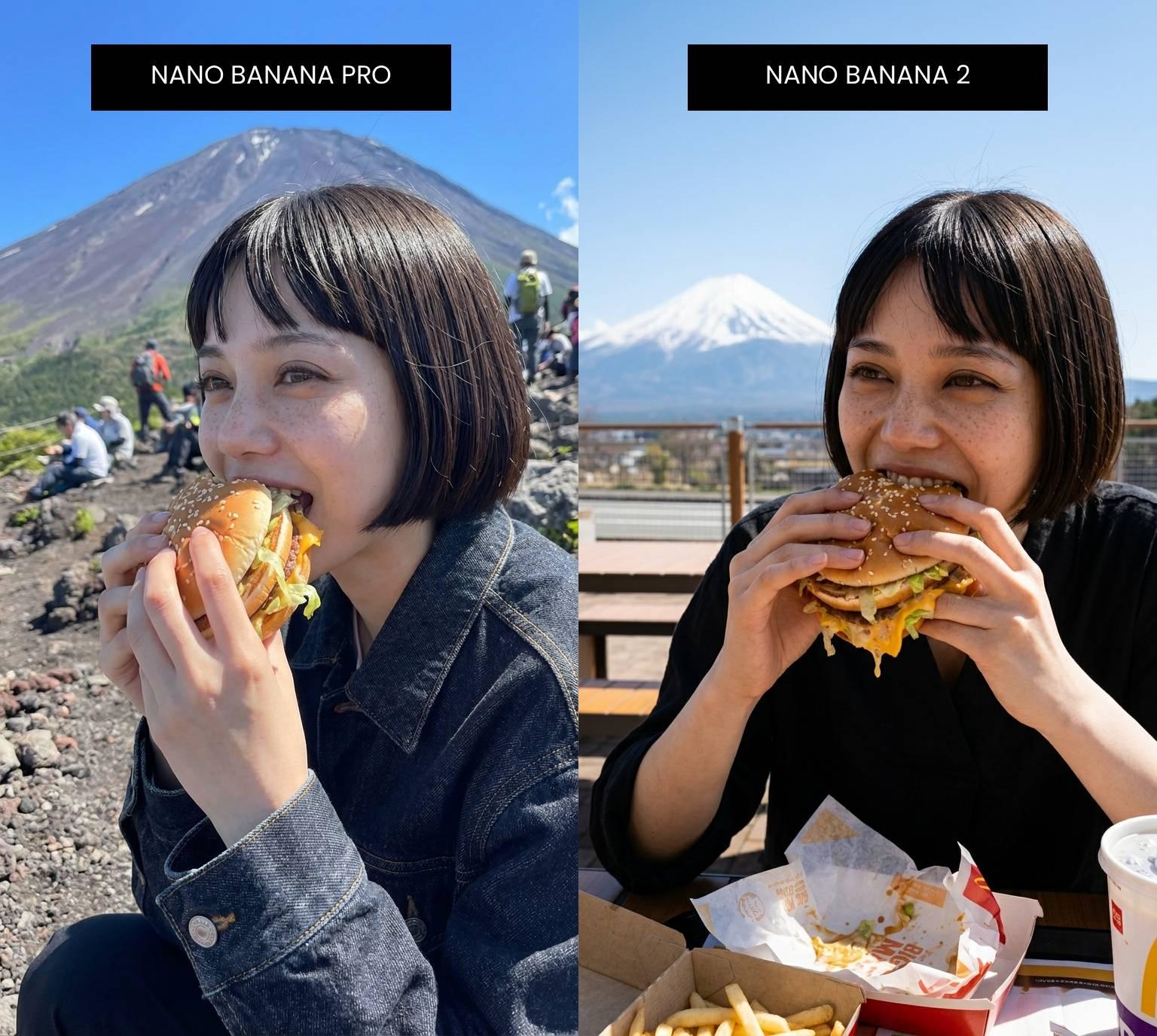
Google doesn’t slow down. Less than three months after Nano Banana Pro launched in November 2025, the company dropped Nano Banana 2 on February 26, 2026 — and the AI image generation world took notice. The promise? Pro-level quality at Flash speed, available for free to every user on the planet.
That’s a bold claim. So we tested it.
We ran Nano Banana 2 through its paces across text rendering, character consistency, photorealistic scene generation, and real-time data integration. We also pulled insights from PCWorld, WIRED, Curious Refuge, and TechCrunch to give you a complete picture. Here’s what the model actually delivers — and where it still falls short.
What Is Nano Banana 2?
Nano Banana 2 — officially Gemini 3.1 Flash Image — is Google’s latest AI image generation and editing model. It occupies a unique spot in Google’s lineup: a model that makes Pro-tier quality accessible to everyone, for free, at speeds that make iteration feel effortless.
The model’s lineage matters for context. The original Nano Banana debuted in August 2025 and immediately went viral — millions of images were generated in the first week. Nano Banana Pro followed three months later, bringing studio-grade realism and advanced composition control. Now Nano Banana 2 is designed to merge both worlds.
The result is a model that Google positions as the default for rapid generation, precise instruction following, and integrated image-search grounding — while Pro remains available for maximum-fidelity professional work.
You can access and create with Nano Banana 2 directly at xmk.com — no complicated setup, just open the tool and start generating.
Nano Banana 2 Review: Key Features and Improvements
1. Speed: From Slow to Instant Iteration
The single most noticeable upgrade is raw generation speed. Nano Banana 2 produces complex images in roughly 10–15 seconds at 1K resolution, down from 20–30 seconds with Pro. At 512px — a quick-preview resolution exclusive to Nano Banana 2 — you can get results in as little as 3–8 seconds.
This isn’t just a convenience improvement. It fundamentally changes how you work with the tool. When generation is slow, you batch your prompts and accept whatever comes back. When generation is fast, you experiment — tweaking lighting, composition, and style until you get exactly what you want. Nano Banana 2 enables that kind of iterative workflow for the first time at zero cost.
2. Precision Text Rendering: A Long-Overdue Fix
Text in AI-generated images has historically been a disaster. Ask earlier models to write “Happy Birthday” on a cake and you’d get “Hppy Brithday” or worse. Nano Banana 2 addresses this with what Google calls precision text rendering.
In practice, this means billboards with readable slogans, greeting cards with accurate copy, infographic labels that say what you intended, and UI mockups with proper placeholder text. PCWorld’s testing found that simple text on a neon marquee rendered cleanly and accurately. Newspaper headlines and subheads came through correctly, though dense body text at lower resolutions showed some waviness when zoomed in closely.
This opens up a category of use cases that were previously unreliable: marketing mockups, social media graphics with text overlays, educational diagrams, and multilingual content. The localization feature is particularly useful — you can generate an image with English text, then request the same image with copy translated into Japanese, Spanish, Arabic, or Hindi automatically.
3. Resolution and Visual Quality
Nano Banana 2 supports four resolution tiers: 512px (fastest, NB2-exclusive), 1K (default), 2K, and 4K via Google’s GemPix 2 Diffusion Renderer. The 4K output preserves fine texture detail and lighting consistency that makes images usable for large-format digital applications.
Beyond resolution numbers, the visual quality improvements are tangible. Landscapes, product shots, and architectural interiors show noticeably richer textures and more consistent lighting than earlier models. Curious Refuge’s testing found that in a close-up macro shot of a human eye, Nano Banana 2 actually outperformed Pro — delivering impressive skin texture without the uncanny valley effect.
4. Character and Object Consistency
One of Nano Banana 2’s most significant capabilities for content creators is subject consistency. The model can maintain character appearance across up to 5 characters and preserve the fidelity of up to 14 objects across multiple images in the same workflow.
For storyboarding, comic creation, or brand asset development, this is a genuine breakthrough. You can generate a series of images featuring the same characters in different settings, lighting conditions, or scenarios without their appearance shifting between frames.
5. Real-World Knowledge Integration
Most AI image models generate from training data alone. Nano Banana 2 can pull from Gemini’s real-time knowledge base and use live search results to inform its outputs — rendering specific landmarks, current products, real brand aesthetics, and trending visual styles more accurately than any model working from static training data.
Practical applications include infographics with current statistics, diagrams that accurately represent real-world data, localized content for global markets, and images of specific subjects that the model references accurately rather than hallucinates.
One important caveat: real-time data accuracy isn’t always perfect. WIRED’s testing found that a weather report infographic pulled dates from the previous week. For any data-critical output, verify the content against authoritative sources before publishing.
Hands-On Testing: What Works and What Doesn’t
What Works Well
Text rendering on short copy: Signs, labels, headlines, and single-line slogans come through cleanly. For marketing mockups and social graphics, the improvement over earlier models is night and day.
Detail preservation in photo editing: When editing existing photos, Nano Banana 2 faithfully reproduces clothing patterns, jewelry, and background elements not explicitly mentioned in the prompt. Edited images look convincingly natural.
Non-destructive editing: Repeated edits no longer “fry” the image. Swapping backgrounds, changing clothing, and relocating subjects in a single image keeps the final result clean — a major improvement over earlier models.
Cinematic scene quality: Neon-noir aesthetics, anamorphic lens flares, and atmospheric lighting render beautifully. For mood boards and creative concepting, the quality is more than sufficient for professional presentations.
Complex diagrams with captions: PCWorld’s test of a technical architecture diagram with labeled captions produced readable, logically structured output.
Where It Struggles
Real-time data accuracy: Web-grounded outputs can include outdated information. The model presents this confidently, which makes independent verification essential for factual use cases.
Face integration in photo manipulation: Face-swapping scenarios produce mixed results — hands and backgrounds look convincing, but face integration can break the realism. Expect uncanny valley effects in complex face manipulation tasks.
Dense text at lower resolutions: Full paragraphs or body text in 1K outputs show waviness and occasional gibberish when examined closely. Stick to headlines and short copy for reliable results.
Complex crowds: Wide-angle scenes with many small characters still suffer from distortion. An upscaler is recommended for crowd-heavy compositions.
Peak-hour reliability: Some users have reported 503 errors during high-demand periods. Batch processing via the API helps mitigate this for production workflows.
Nano Banana 2 vs. Nano Banana Pro: Full Comparison
With Nano Banana 2’s release, Google simplified its lineup. The new model is now the default across Fast, Thinking, and Pro settings in the Gemini app. Pro remains available for Google AI Pro and Ultra subscribers via the three-dot regenerate menu.
Feature | Nano Banana 2 | Nano Banana Pro | Best Choice |
|---|---|---|---|
Speed | 3–15 sec (Flash) | 20–30 sec | Nano Banana 2 |
Max Resolution | 4K | 4K | Tie |
Text Rendering | Excellent (short copy) | Excellent (all lengths) | Pro for dense text |
Character Consistency | Up to 5 characters | Up to 5 characters | Tie |
Reference Images | Up to 14 | Advanced | Tie |
Real-Time Web Search | Yes | Advanced knowledge | Pro for accuracy |
512px Preview Mode | Yes (exclusive) | No | Nano Banana 2 |
Price | Free | Pro/Ultra subscription | Nano Banana 2 |
Best For | Rapid iteration, social, mockups | Studio-grade precision | Depends on use case |
When to use Nano Banana 2: For 90% of everyday tasks — content creation, social media, marketing mockups, prototyping, and storyboarding. It’s faster, it’s free, and at screen resolution the quality difference from Pro is negligible.
When to use Nano Banana Pro: Studio-grade print work, extremely dense text rendering, or final deliverables where every pixel matters.
Nano Banana 2 Pricing: What Does It Actually Cost?
“Free” is the headline, but the full pricing picture is more nuanced. Here’s how it breaks down as of March 2026:
Free tier: 20 images/day at 1K resolution. No credit card required.
Google AI Plus ($7.99/month): Higher generation capacity and faster response times.
Google AI Pro ($19.99/month): Includes 4K output and access to Nano Banana Pro.
Ultra ($249.99/month): Maximum API access, enterprise features, highest production capacity.
API pricing: $0.067 per 1K image at standard rate — 50% less than Nano Banana Pro. Batch API drops to $0.034 per 1K image for non-urgent workloads.
For a full breakdown of plan features and the latest pricing, visit the XMK pricing page.
Who Should Use Nano Banana 2?
It’s a strong fit for:
Content creators and bloggers: Fast, high-quality header images, social media graphics, and visual content without a stock photography subscription. Text rendering improvements make it viable for graphics that include copy.
Marketers and brand teams: Mockups, ad creative, infographics, and campaign visuals. Character consistency means you can build a visual series with a consistent cast.
Developers building applications: The competitive API pricing ($0.067/1K standard, $0.034/1K batch) makes Nano Banana 2 the most cost-effective option for production image generation pipelines in 2026.
Small business owners: Product visualization, promotional materials, and website imagery without hiring a designer or photographer.
Educators and researchers: Labeled diagrams, infographics, and visual explainers that previously required manual design work.
Consider alternatives if:
Artistic style is your top priority: Midjourney V7 still produces imagery with a distinctive atmospheric quality for fine art and highly stylized work.
You need studio-grade precision: For print-quality 4K or dense text rendering, Nano Banana Pro remains the better choice.
Video generation is your goal: Nano Banana 2 is image-only. For AI video, look into dedicated video generation tools.
How to Get Started with Nano Banana 2 on XMK
Getting your first image takes less than two minutes:
Go to xmk.com/nano-banana/nano-banana-2 — no app download or account setup required to try it.
Write your prompt — describe the image you want. Be specific about subject, style, lighting, mood, and composition for best results.
That’s it. Nano Banana 2 handles the rest.
Prompting Tips for Best Results
Be specific about text: Write exactly what any text in the image should say. “A billboard reading SUMMER SALE 50% OFF” gives better results than “a billboard with a discount message.”
Specify aspect ratio early: Nano Banana 2 supports 14 aspect ratios including NB2-exclusive ultra-wide and ultra-tall formats. Adding “16:9 widescreen” or “9:16 vertical” shapes your output for its intended platform.
Use reference images for consistency: Upload up to 14 reference images to anchor style, character appearance, or product design across a series.
Verify data-driven outputs: If generating infographics with statistics or dates, check the numbers against authoritative sources before publishing.
Safety, Watermarking, and Content Standards
Every image generated by Nano Banana 2 carries an invisible SynthID watermark — Google’s proprietary marker for AI-generated content. Google is also implementing C2PA Content Credentials (an industry standard backed by Adobe, Microsoft, and OpenAI) to provide additional context about AI’s role in an image’s creation.
Since the SynthID verification feature launched in November 2025, it has been used over 20 million times across multiple languages. C2PA verification is coming to the Gemini app in the near term.
The challenge is adoption. As AI image quality improves, the visual cues that something is AI-generated become subtler. Watermarks and content credentials are only effective if platforms and viewers know to look for them.
Conclusion: Is Nano Banana 2 Worth It?
Nano Banana 2 delivers on its headline promise: Pro-level image generation at Flash speed, available for free. The improvements to text rendering, character consistency, and real-time knowledge integration make it a genuinely useful tool for content creators, marketers, developers, and small businesses.
It isn’t perfect. Real-time data can be inaccurate, face swapping produces mixed results, and dense text still has limits at lower resolutions. Peak-hour slowdowns are a real issue for production workflows.
But for the vast majority of everyday image generation needs — social media content, marketing mockups, storyboarding, product visualization, infographics, and rapid prototyping — Nano Banana 2 is the best free option available in 2026 by a significant margin. And the best place to experience it is right here on XMK, where you can go from prompt to image in seconds.
Frequently Asked Questions
Is Nano Banana 2 completely free?
Yes. The free tier gives you 20 images per day at 1K resolution with no credit card required. Paid tiers unlock higher capacity, 4K output, and API access. See the full breakdown on the XMK pricing page.
How does Nano Banana 2 compare to Midjourney or DALL-E?
Nano Banana 2 leads on speed, text rendering, real-time knowledge integration, and price. Midjourney V7 still has an edge for highly stylized, artistic output. DALL-E (via GPT-Image-1.5) is comparable for general use but costs more at scale. For content creation and marketing, Nano Banana 2 is the best value in 2026.
Can I use Nano Banana 2 images commercially?
Generally yes, but always verify Google’s current terms of service for the latest guidance on commercial usage rights, as terms can change. Check the official terms before publishing commercially.
What’s the difference between Nano Banana 2 and Nano Banana Pro?
Nano Banana 2 uses Gemini 3.1 Flash — optimized for speed. Pro uses Gemini 3 Pro — optimized for maximum quality and compositional precision. For most use cases, quality is indistinguishable at screen resolution. Choose Pro for studio-grade print work or extremely dense text.
Does Nano Banana 2 support languages other than English?
Yes. The model handles text rendering and translation across multiple languages, including non-Latin character sets like Japanese, Hindi, Arabic, and Chinese — useful for global content creation and localization workflows.
How do I start using Nano Banana 2 on XMK?
Simply visit xmk.com/nano-banana/nano-banana-2, type your prompt, and generate. No account is needed to try it. For full access to all features and higher generation limits, check out the plans on the XMK pricing page.
🚀 Ready to Try Nano Banana 2?
Generate your first image free — no account required. Start with a simple prompt and see what Nano Banana 2 can do in under 15 seconds.