Grok Imagine Video 1.5 Preview has arrived, and it wasted no time taking the top spot on the Image-to-Video Arena leaderboard. Launched by xAI in late May 2026 under the API alias grok-imagine-video-1.5-2026-05-30, this preview model is a purpose-built image-to-video generator: feed it one still image plus a natural-language motion prompt, and it animates the scene into fluid, cinematic video—complete with native synchronized audio. With a confirmed +52 Elo improvement over Grok Imagine Video 1.0, the 1.5 Preview is quickly becoming a default choice for creators, marketers, and developers who already have a strong image and want to bring it to life.
Whether you’re animating a product photo, prototyping a film shot, or building a content calendar from existing brand assets, Grok Imagine Video 1.5 Preview offers an accessible, prompt-first pipeline that starts with an image you already own. This guide covers everything you need—features, real pricing, a step-by-step walkthrough, and a head-to-head competitor comparison.
What Is Grok Imagine Video 1.5 Preview?
Grok Imagine Video 1.5 Preview is xAI’s latest and most capable image-to-video AI model. It runs on the Aurora engine—an autoregressive mixture-of-experts architecture that predicts tokens across interleaved text, image, video, and audio modalities—trained on xAI’s Colossus supercomputer cluster (public reports of its scale range from 110,000 NVIDIA GB200 GPUs upward). Unlike diffusion-based tools, this token-prediction approach is a core reason for the model’s frame-to-frame motion coherence and source-image fidelity. The video pipeline also incorporates technology from Hotshot, a video generation startup xAI acquired in 2025.
You provide a still image as the opening frame, then describe the motion in plain language. The model animates from there while preserving the source detail and lighting.
Note: The 1.5 Preview API model is built around image-to-video. The wider Grok Imagine platform has historically supported text-to-video and video extension, and which of those features ship in 1.5 is still evolving in public reporting—check the latest xAI docs before building a production pipeline around any single capability.
Grok Imagine Video 1.5 Preview — Full Specs
Specification | Detail |
|---|---|
Model type | Image-to-video |
Engine | Aurora (autoregressive mixture-of-experts) |
Max resolution | 720p (480p available) |
Frame rate | 24 fps |
Clip length | 5, 10, or 15 seconds |
Aspect ratios | Seven (landscape, square, vertical) |
Input formats | JPG, JPEG, PNG, WEBP, GIF, AVIF |
Output format | H.264 MP4 |
Native audio | Yes — dialogue, SFX, ambient music |
API alias | grok-imagine-video-1.5-2026-05-30 |
API endpoint | |
Consumer access | X Premium rollout in progress |
Grok Imagine Video 1.5 Preview Pricing
Through the xAI API, Grok Imagine Video 1.5 Preview is billed per second of generated video:
Tier | Cost |
|---|---|
Input image | ~$0.01 per image |
Video at 480p | ~$0.08 per second |
Video at 720p | ~$0.14 per second |
Rate limit | ~60 requests per minute |
On some third-party aggregator platforms, per-second pricing can land closer to $0.05. A practical workflow is to draft at 480p to test prompts cheaply, then re-render the winner at 720p. Because this is a preview release, always confirm live rates in the xAI documentation before a production run.
No API key? You can try the model directly in your browser—no code, no billing setup required:
Try Grok Imagine Video 1.5 Preview for free
Key Features of Grok Imagine Video 1.5 Preview
Natural-Language Motion Prompting
The most praised capability in the 1.5 Preview is how accurately it follows natural-language prompts. Describe the camera move, pacing, lighting shift, and sound design in plain English—from a slow cinematic push-in to a sweeping tracking shot or a subtle head-turn under changing light—and the model animates accordingly. No keyframes, no motion curves, no timeline editors.
Prompting tip from early users: Front-load the key action in your prompt. The model renders described actions roughly in the order they appear, so put the most important motion first.
Faithful Image Preservation
A core strength of the 1.5 Preview is fidelity to the source frame. Earlier AI video models often “reinterpreted” the input—shifting colors, drifting from the original lighting, or inventing new elements. Grok Imagine Video 1.5 Preview is specifically engineered to preserve the detail and lighting of your input frame, so the output reads as a continuation of your image rather than a remix of it. This makes it especially valuable for:
Brand work requiring consistent visual identity
E-commerce product animation where product accuracy is non-negotiable
Portrait and fashion photography brought to life
Architectural visualization with cinematic camera movement
Native Audio Synchronization
The headline upgrade over version 1.0 is single-pass native audio. The 1.5 Preview generates synchronized dialogue, lip-sync, sound effects, and ambient music in the same pass that produces the video—no separate text-to-speech step, no manual sound design for quick drafts. For trailers, event promos, and branded clips where audio-visual coherence matters, this removes a major post-production bottleneck that most competing image-to-video models still leave to the user.
Multi-Shot Sequencing for Longer Narratives
The model is built for sequences, not just one-off clips. Stage each scene with its own source image, animate each individually, then chain the clips into a longer narrative that maintains a consistent look—same lighting, same subject appearance, same tonal atmosphere. This makes Grok Imagine Video 1.5 Preview genuinely useful for short films, storyboards, and multi-shot brand campaigns rather than isolated clips alone.
Clips Up to 15 Seconds
Maximum clip length is 15 seconds. A common creative workflow:
5 seconds — social hooks, fast drafts, quick concept tests
10 seconds — product showcases, character introductions, scene setups
15 seconds — fuller scenes with room for pacing, atmosphere, and audio arc
Grok Imagine Video 1.5 Preview vs. Competitors
The 2026 AI video generation market is crowded. Here is how Grok Imagine Video 1.5 Preview compares with the leading models across the dimensions that matter most for real workflows.
Model | Mode | Max Resolution | Max Length | Native Audio | I2V Leaderboard | Best For |
|---|---|---|---|---|---|---|
Grok Imagine 1.5 Preview | Image-to-video | 720p | 15 sec | Yes (single-pass) | #1 | Affordable, top-ranked image-to-video |
Google Veo 3.1 | Text + image | Up to 4K | ~8 sec | Yes (strong) | Top tier | Premium final delivery |
Seedance 2.0 | Text + image + refs | 1080p | ~16 sec | Yes | Top tier (T2V #1) | Dialogue-heavy, multimodal control |
OpenAI Sora 2 | Text + image | 1080p | Varies | Yes (comprehensive) | Top tier | Physics realism, complex audio |
Kling 3.0 | Text + image | 1080p | ~10 sec | Varies | Top tier | Commercial visual fidelity |
Key takeaways:
Grok Imagine 1.5 Preview leads image-to-video on the Arena leaderboard and is the most affordable route to a top-ranked I2V clip with single-pass native audio.
Seedance 2.0 holds the text-to-video lead and offers the deepest multimodal reference system, making it the stronger pick for dialogue-heavy or reference-driven work.
Google Veo 3.1 offers the highest resolution ceiling (up to 4K) but at premium pricing better suited to final delivery than rapid iteration.
Sora 2 sets a benchmark for physics realism and comprehensive audio.
Kling 3.0 is strong on raw commercial visual fidelity.
The honest summary: no single model wins every task. If your workflow starts from a great image and you want fast, affordable, top-ranked motion with audio included, Grok Imagine Video 1.5 Preview is the strongest option available today. Many production teams draft in Grok and finish in a premium model for final output.
How to Use Grok Imagine Video 1.5 Preview (Step-by-Step)
You don’t need an API key or any code to use Grok Imagine Video 1.5 Preview. The entire flow runs in your browser and takes a few minutes from image to finished clip.
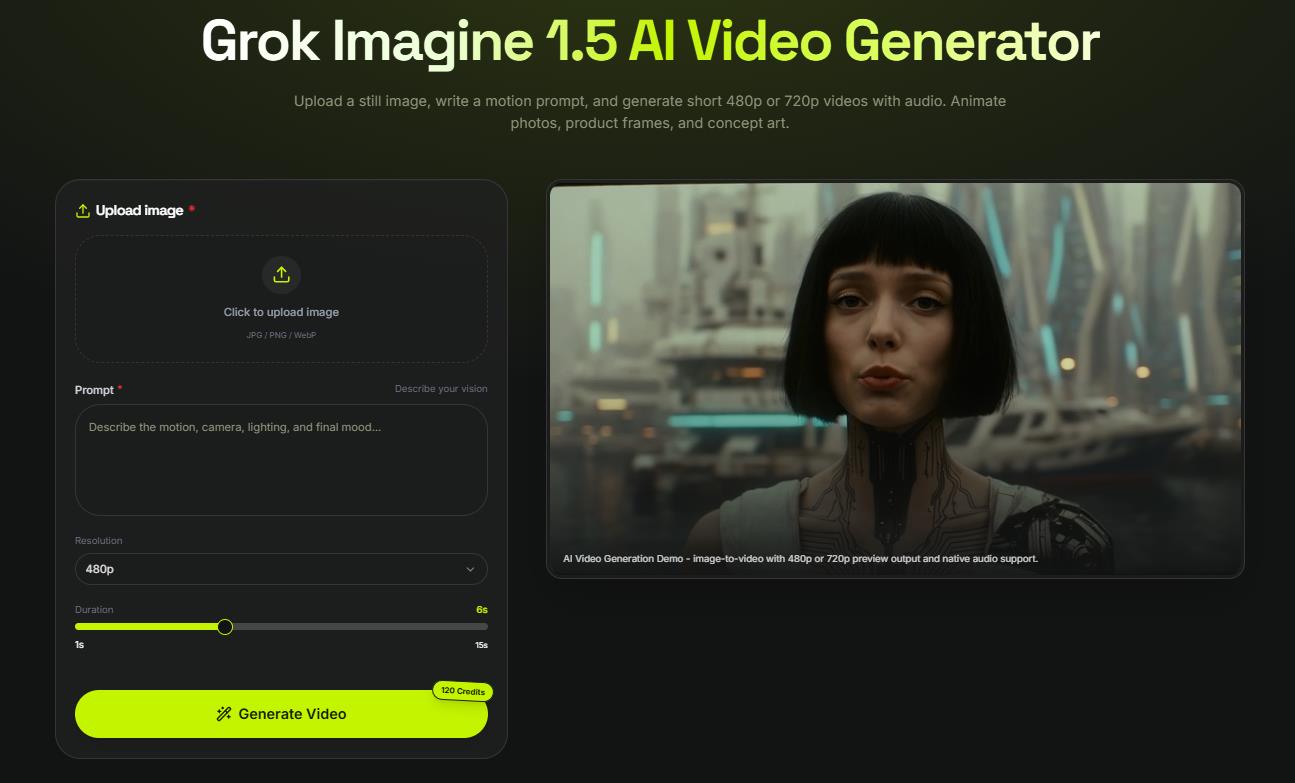
Step 1 — Open the workspace
Head to the Grok Imagine Video 1.5 Preview tool and sign in. Nothing to install—the generator runs directly in your browser.
Open the Grok Imagine Video 1.5 Preview workspace
Step 2 — Upload your starting image
Drag and drop your image or click to upload. Supported formats: JPG, JPEG, PNG, WEBP, GIF, AVIF. Start with a sharp, well-lit image—the model preserves whatever detail and lighting you give it, so the quality of your input directly shapes the output.
Step 3 — Write your motion prompt
In the prompt box, describe how the image should move. Include the camera move, pacing, mood, and any audio you want. Example: “Slow cinematic push-in as light shifts across the subject’s face, soft ambient hum building.” Remember to front-load the key action—the model renders described motions roughly in the order they appear in the prompt.
Step 4 — Set resolution, clip length, and aspect ratio
Choose your output settings:
Resolution: 480p for fast, cheap drafts — 720p for final quality
Length: 5, 10, or 15 seconds depending on the use case
Aspect ratio: landscape for YouTube/web, square for Instagram, vertical for Reels/TikTok
Step 5 — Generate and review
Click generate. In most cases your clip is ready in under a minute, complete with native synchronized audio. Review the result, then download as H.264 MP4 if you’re happy.
Step 6 — Extend into a sequence (optional)
Want a longer piece? Stage a second source image, generate the next shot, and chain the clips. The model maintains visual consistency across shots—same atmosphere, same identity—making multi-shot sequences feel cohesive rather than disconnected.
Practical Use Cases for Grok Imagine Video 1.5 Preview
E-Commerce & Product Marketing
Turn a product photo into a short video ad—a slow orbit, a zoom-in reveal, a dramatic lighting shift—without hiring a production crew. Faithful image preservation keeps the product looking exactly as shot, which matters when brand and retail partners review your assets.
Fashion & Portrait Photography
Fashion editorial images become dynamic short-form content with subtle movement, fabric in motion, and shifting light. Portrait photographers can offer animated portraits as a premium deliverable, differentiating their packages without additional shooting time.
Film Pre-Production & Storyboarding
Directors and writers can test a shot concept before committing to a production day: upload a reference image, describe the camera move and emotional tone, and judge whether the concept holds in motion. Faster and cheaper than traditional animatics, and shareable with collaborators in seconds.
Brand Campaign Development
Generate multiple video directions from one campaign image, testing different camera moves, pacing, and emotional tones before locking a direction. Consistent identity preservation makes this ideal for brand-governed content where visual drift between frames is unacceptable.
Game, App & Event Promotion
Animate character art, concept images, or key art into trailers and social content without the cost or timeline of full video production. Particularly effective for indie game launches, app store previews, and event announcement clips.
Social Content Calendars & B-Roll
For brands and creators maintaining a high-frequency content schedule, Grok Imagine Video 1.5 Preview makes it possible to animate existing photo assets into weekly motion content—without new shoots, new budgets, or new team members.
Leaderboard Performance & Benchmarks
The headline benchmark result: Grok Imagine Video 1.5 Preview debuted at #1 on the Image-to-Video Arena leaderboard, with a +52 Elo point improvement over Grok Imagine Video 1.0. Reported absolute Elo scores fall in the 1,300–1,400 range depending on the leaderboard and timing—treat current standings as a snapshot rather than a fixed score, since positions shift as new models enter the arena. What stays consistent across sources is the relative gain over the previous version, reflecting measurable improvements in motion quality, visual coherence, and scene fidelity, and wins over rivals like Seedance 2.0 in blind testing.
Long-Tail Use Cases Worth Knowing
Beyond the headline scenarios, Grok Imagine Video 1.5 Preview is proving useful in more specific workflows:
AI video for real estate marketing — bring listing and architectural photos to life with sweeping cinematic moves
Animated AI art for NFT and digital collectibles — add motion to still AI-generated artwork without a separate tool
YouTube Shorts and TikTok hooks — generate B-roll and opening hooks from existing photo libraries
Cinematic AI video prompting for indie filmmakers — rapid concept visualization before principal photography
AI video for educational explainers — animate diagrams, charts, and illustrations with natural motion
Event announcement clips — turn a single venue or speaker photo into a motion graphic promo
What’s Next for Grok Imagine
xAI is iterating on the platform quickly. Areas to watch:
Text-to-video — historically part of the wider Grok Imagine platform; its status in the 1.5 line is still evolving in public reporting
Video extension — building on the extend-video feature from earlier versions, expected to see further optimization
Consumer rollout — broader availability across X Premium tiers is actively in progress
Higher resolutions — 1080p and beyond are anticipated as the model matures, catching up to rivals already offering 1080p and 4K
Because the 1.5 Preview is still a preview build, verify the latest specs, pricing, and feature availability in xAI’s official documentation before committing to a production pipeline.
Explore the Grok Imagine Video 1.5 Preview workspace
FAQ: Grok Imagine Video 1.5 Preview
What is the difference between Grok Imagine 1.0 and 1.5 Preview? The 1.5 Preview delivers a +52 Elo improvement over 1.0 in image-to-video, adds clip lengths up to 15 seconds, native single-pass audio synchronization, stronger source-image preservation, and more accurate motion-prompt following.
Does Grok Imagine Video 1.5 Preview need a source image? Yes. The 1.5 Preview API model is image-to-video, so you upload at least one starting image, and the prompt directs how it moves. The status of text-to-video in the 1.5 line is still evolving—check xAI’s documentation for the latest.
What image formats does it accept? JPG, JPEG, PNG, WEBP, GIF, and AVIF are all supported as inputs.
What resolution and format does it output? H.264 MP4 at 24 fps, in 480p or 720p, across seven aspect ratios. 1080p is not available in the preview.
How much does Grok Imagine Video 1.5 Preview cost? Roughly $0.01 per input image, $0.08 per second at 480p, and $0.14 per second at 720p via the xAI API. Some third-party platforms offer rates near $0.05/sec. Rates are subject to change during the preview period.
Can I use it without coding? Yes. The no-code web interface requires no API key and runs entirely in your browser—just upload an image, write a motion prompt, and generate.
Try Grok Imagine Video 1.5 Preview
How does Grok Imagine 1.5 compare to Seedance 2.0? Grok Imagine 1.5 leads in image-to-video quality and cost-per-second; Seedance 2.0 leads in text-to-video and offers a deeper multimodal reference system, making it the stronger pick for dialogue-heavy and reference-driven production work.
How does it compare to Kling 3.0? Grok leads image-to-video on the Arena; Kling 3.0 is strong on commercial visual fidelity. Choose Grok Imagine 1.5 if your workflow starts from an existing image; consider Kling 3.0 if raw visual fidelity is the priority.
Can I chain multiple clips into a longer video? Yes. Multi-shot sequencing lets you generate clips from separate source images and chain them into longer scenes while maintaining consistent style, lighting, and atmosphere across shots.
Is Grok Imagine available on mobile? A broader consumer rollout to X Premium users—including mobile—is in progress, and the no-code browser-based tool works on mobile devices today.
Ready to try the #1 image-to-video AI model in 2026?