Native 1080P Video
Generate in native 1080P instead of upscaling a low-resolution draft. Higher working resolution helps keep details visible in subjects, products, environments, and camera movement.
Seedance 2.5 just landed — longer 1080P clips with richer multimodal references.
Start from a text prompt or a single image and receive a full video up to 30 seconds long. Wan 3.0 delivers native 1080P picture and synchronized audio in a single pass, helping you go from concept to a shareable clip without a long production chain.
A light, dreamy live-action commercial: a young European-American girl blows bubbles alone on a sunny beach. The visual is bright and breezy in vertical format, built from clear sea-sky blue, golden side backlight, pale beige sand, and iridescent highlights flowing across soap-bubble surfaces. A six- or seven-year-old girl stands at the edge of a windy seaside boardwalk, pale blonde hair continuously lifted by the wind, wearing a light summer dress and white sporty sandals, holding a small bubble solution bottle and a round children's wand. She looks excited and focused: first dipping carefully, then looking up and blowing gently, countless bubbles surrounding her as she laughs and reaches to pop them, continuously interacting with bubbles and sea breeze. Bubble formation is explicit: the clear bottle's solution gleams wet in the sun, the wand lifted from the bottle carries a complete iridescent film with a droplet hanging from its rim; the child exhales evenly, the film first tightens into a tiny mirror with rainbow interference patterns, then slowly bulges into a hemisphere, and finally a large main bubble detaches followed by two or three smaller ones carried away by the sea wind. Once free, bubbles are immediately pushed sideways and forward by the wind, their paths longer, driftier, and more unstable; bubbles of different sizes drift past in layered depth, some grazing the girl's cheek, others rising above her head. The 15-second mini-story is complete: opening three seconds in close-up, wind lifting her bangs and skirt as she opens the bottle, dips the wand, and lifts it, the camera clearly showing the full iridescent film. Then she raises the wand and blows the first big bubble and a few small ones; as they leave the wand the wind carries them upward, sea sparkles and distant wave lines reflected on their surfaces, and she laughs with widened surprised eyes. Mid-section she reaches for the largest bubble ahead, misses, laughs, turns to watch a lower cluster float past her waist, then half-turns to chase again. The climax from 10-13 seconds: a larger bubble is blown back near her face, she touches it, and it bursts at her fingertip into tiny water droplets and a brief flash of membrane light; she pauses, then breaks into happy laughter. The environment emphasizes the seaside wind and transparent air: sparkling sea, distant low waves, wooden boardwalk railings, wind-blown beach grass, and occasional seagulls. Sunlight creates strong iridescent highlights on the bubbles, wind continuously redirects their paths and lifts her hair, skirt, and wand, the air salty and bright with moisture. The camera language is designed for vertical 15 seconds: opening with close-ups of the film and pursed lips to grab attention, mid-section with medium and full-body follow shots of her chasing bubbles sideways, using the upper half of the vertical frame for floating bubbles and the lower half for running, inserting a brief slow-motion of the fingertip pop, and ending on an upward tilt that gathers sea breeze, bubbles, and the child's smiling face. Bright, rhythmic, and far more fluid than standing still to blow bubbles.
Demo 1 of 5 · Click the video to view its full prompt and settings.
Explore Wan 3.0 video examples with their complete, copy-ready prompts and generation settings.
The video starts from the first frame shown in image1. 0-8s: Both of them move at the same instant! They sprint rapidly toward each other through the withered grass. The camera uses a high-speed side tracking shot, showing two figures carving out two "waves" in the half-person-high withered grass (the physical effect of grass being pushed aside quickly). Intersection at the 8th second: The two leap into the air or slide along the ground, clashing their swords. The screen instantly shifts into slow-motion. At the moment of the sword collision, a few realistic sparks burst out, and a visible "air ripple" caused by the metal impact diffuses outward, tearing the surrounding floating dry leaves in half. 8-12s: Normal speed resumes. The two complete three rapid move exchanges in the air and on the ground: Move 1: The swordswoman in green executes a sweep close to the ground, her sword qi slicing through a patch of reeds. Move 2: The swordswoman in gray flips in mid-air to dodge, her bamboo hat grazed by the opponent's sword tip in the air, splitting open a tear as a few bamboo fibers scatter. Move 3: The two clash palms in mid-air, using the rebounding force to drift backward and land. 12-15s: Accompanied by a wide, rapid pull-back zoom of the camera. The two land, their boots sliding across the muddy ground, crushing the dry grass and plowing two deep dirt trenches with mud splattering. Finally, the two stand facing each other, ten paces apart. The wind continues to blow, but their swords have been sheathed (or point diagonally toward the ground). Cut-off dry grass, bamboo hat fragments, and dust slowly drift down like snowflakes in the fading glow of the blood-red sunset.
The video starts from the first frame shown in image1. 0-3s:The camera zooms in rapidly in a high-speed spiral, passing through countless luminous spores and debris floating in the air. As the camera passes, these debris and spores exhibit realistic physical avoidance and spinning effects, dynamically influenced by the airflow. 3-7s: The camera focuses on the Lotus of Time. The golden gears inside the lotus begin to spin rapidly in reverse, emitting faint sparks of metallic friction. Meanwhile, the petals bloom layer by layer like a peacock spreading its tail. A miniature black hole at the center of the flower suddenly unleashes a ripple of gravitational waves, causing a visible refraction in the air. The debris and water droplets, previously suspended in mid-air, instantly alter their trajectories, flowing upward into the sky like reverse rain. 7-11s: Several "hummingbirds of light," made of pure blue light energy, fly out from the fully bloomed center of the flower. They dart rapidly between the spinning gears and petals. One of the hummingbirds touches a suspended droplet of upward-flowing water with its beak; the droplet instantly freezes into an ice crystal adorned with intricate ice-carved patterns, refracting a spectrum of rainbow light. 11-15s: The camera abruptly pulls back and rotates at a 45-degree tilt. At this moment, the plants of the entire ruined forest (giant fluorescent mushrooms, vines) seem to be infused with life, growing wildly along the stone pillars of the temple ruins. Their leaves rapidly unfurl and bloom, spraying a shower of golden spores across the sky. Finally, the scene fades to black amidst an incredibly stunning, multi-dimensional visual feast composed of gravity reversal, mechanical rotation, bursts of light energy, and a wild celebration of flora.
The video starts from the first frame shown in image1. 0-3s Extreme Macro Shot framing the toe box. Amid faint air compression sounds, the knit upper fibers contract minutely in a rhythmic breathing motion, with perforations flaring open slightly. An amber laser line traversing the midsole glides fluidly along the shoe profile and vanishes at the heel. 3-8s Complex seamless scene transition: the setting instantly shifts from sandy beige to the cool grey of exposed concrete. The running shoe is now worn on the runner's feet, tearing down a black track at explosive speed. Camera switches to high-speed Dolly Tracking. Footage cuts to 1000fps ultra-slow motion: at the moment the midsole strikes the ground, the high-rebound foam undergoes visible, elegant physical deformation & instantaneous energy rebound with zero lag or drag. 8-12s The runner surges upward into a leap, body fully extended mid-air; the frame shifts to Bullet Time. Air currents sweep across the shoe upper, turning tiny airborne dust particles into golden pinpricks against backlighting. Knit fabric expels trapped air, forming thin, translucent wispy vapor trails trailing off the heel—visually materializing wind resistance. 12-15s Camera executes an ultra-smooth Dolly-up & Spin, following the runner's ascending trajectory. All kinetic motion gradually decelerates as the athlete hits peak elevation, freezing completely at the apex, cutting cleanly and seamlessly into the final frame shown in image2.
The video starts from the first frame shown in image1. 0-3s The video opens in slow motion at 240 fps. A chef's knife slices cleanly through young rosemary sprigs. Tiny water droplets clinging to the leaves shake loose from the impact, scattering and splashing through the air in drawn-out slow motion. The visuals deliver an immensely soothing, deeply satisfying cutting motion. 3-8s Smooth transition: The cut shifts instantly to a preheated cast-iron pan. A steak drops into the frame with speed ramping—fast descent, slowed impact. Microscopic physical details unfold: The moment the meat hits metal, fat along the steak's edges liquefies into clear oil bubbles, sizzling audibly with visible physical distortion. The steak's surface tightens and sears dark almost immediately. 8-12s Only the fingertips of a slender hand enter frame, gently sliding the pre-sliced rosemary and a pat of butter into the pan with refined grace. Upon contact with heat, the butter puffs and melts into countless tiny golden bubbles. The rosemary fronds unfurl in hot fat, which deepens from pale yellow to a rich hazelnut amber. 12-15s A spoon glides into shot. The wrist tilts elegantly, letting streams of golden butter pan sauce cascade down in a flawless curved waterfall. The camera executes a slow dolly-in toward the steak's surface, capturing extreme close-ups of butter bubbles popping and gliding across the seared, aromatic crust. The shot freezes on the final pour, forming a seamless visual loop with the closing frame shown in image2.
The video starts from the first frame shown in image1. 0-5s: The squirrel curiously nudges the golden acorn with its nose. Suddenly, the magical runes on the acorn light up, starting to spin in its paws and releasing vibrant, colorful magical particles. 5-10s: Startled, the squirrel's little ears twitch twice as it lets go, allowing the acorn to float in the air. It spins around excitedly on the ground, sweeping at the magical particles with its big, fluffy tail. 10-15s: With a sudden "pop," the acorn turns into a huge pile of colorful candies. The squirrel happily pounces forward to hug the candies, showing its two big front teeth to the camera and laughing in an extremely heartwarming, healing way. Close-up shot.
The video starts from the first frame shown in image1. 0-3s: The camera zooms in rapidly from a wide shot, rushing directly into a close-up of the hero's eyes. The full moon is reflected in his pupils, which suddenly flash with a piercing blue light (skill ready). Physical dynamics: The blue cape and high ponytail behind him flutter wildly like waves; the debris beneath his feet is instantly shattered into dust, generating a circular shockwave ripple. 3-8s: Rapid teleportation (Flash Step): The hero leaves a blue ink afterimage in place, while his true self transforms into a dazzling blue stream of light, surging forward. The camera switches to a high-speed whip pan / tracking shot. Holding his long sword, he executes three consecutive "Z"-shaped weaving slashes across the night sky. With each strike, the void is sliced open, leaving a sword qi rift shimmering with calligraphic starlight (Calligraphy & Star VFX). 8-12s: He leaps to the highest point in the air and thrusts his long sword downward with immense force. Ultimate skill visual feast: The instant the sword tip touches the void, a colossal "Azure Lotus" made of immense blue light energy instantly blooms in the sky (VFX Blooming). Countless sword qi beams turn into a shower of flying light streaks, shooting out from the petals and piercing the night sky. The camera employs a 360-degree rotating orbit (3D Bullet-time Orbit) to capture his epic posture at the center of the lotus, pointing his long sword to the heavens. 12-15s: 【Hero Landing & Promotional Freeze-Frame】 Accompanied by a dull sonic boom, the hero executes a perfect landing (Hero Landing), supporting himself with one hand on the ground as his long sword is driven diagonally into the roof tiles. Slow Motion: The blue starlight particles filling the sky slowly drift down around him like snowflakes. He slowly raises his head toward the camera, sweeps his long sword, and performs a stylish sword flourish.
A crane shot begins as a Go piece falls onto the board; the crane rises to reveal that the board is a real city's aerial view, black and white pieces becoming pedestrians and vehicles on the streets, and the higher the camera goes the more indistinguishable the game and reality become.
A five-shot, 15-second Hong Kong literary film-style short, governed by Wong Kar-wai-style low-saturation cool film texture, with a main palette of blue-gray, dark green, and dull white, fine film grain, and shallow depth of field. The subject is a woman in her early thirties with slightly messy black mid-length hair and a delicate face, wearing a gray-blue crew-neck sweater over a white T-shirt, her left ring finger habitually rubbing her right wrist bone. Cantonese挽留式质问 dialogue drives the emotional arc. Shot 1: fixed medium close-up in a cramped apartment entryway; warm yellow corridor light squeezes through a half-open iron door and falls on her face. She asks softly, “你真系要走?”, her voice breathy with a trembling rising tail, stress on “真系”; immediately after, her lips tighten and jaw sets, eyes reddening but holding back tears, the corridor behind her blurred into warm bokeh. Shot 2: over-shoulder reverse from behind her right shoulder; the foreground is the soft silhouette of her shoulder and hair, the background a man’s backlit back turning toward the stairwell outside, face hidden in shadow, establishing the spatial relationship—she faces his back, he faces the door, one and a half steps and a half-open iron door between them. His clothing rustles and his fingers touch the metal doorknob; her voice lowers: “你有无……挂住过我?”, with an obvious one-and-a-half-second pause where only corridor hum and her breathing exist, “挂住” whispered with a catch in her throat; she involuntarily leans half a step forward, left hand lifting then freezing in mid-air. Shot 3: close-up of her face, suddenly frontal; the camera pushes extremely slowly forward about half a foot, capturing her gaze shifting from staring at the man’s back to slowly dropping; her eye sockets are red, pupils reflected like wet dark-brown glass, a tear sliding down her right cheek about two seconds after she finishes speaking, with only a slight swallow and almost imperceptible nostril flare. A very low string long tone rises from the ambient noise, pressing the sound field into silence while the corridor hum stays at the edge of perception. Shot 4: handheld slightly shaky medium shot, following her forward inertia; her left hand finally grips the man’s upper arm, knuckles whitening as the gray-blue sweater sleeve wrinkles, restrained yet stubborn; lips part and close, finally releasing only a barely audible breath “唔好走,” more like air squeezed from the throat. The man’s arm pauses slightly but he does not turn back; the iron door slowly opens with a short creak, cold stairwell wind lifting her forehead hair. The string tone fades, leaving only the door hinge, wind, and her unsteady nasal breathing. Shot 5: fixed medium shot, jump cut to the living room; cold natural light slants from a left window, casting long stripes on the floor. She slumps in a dark blue fabric armchair, now in loose olive-green loungewear, body slightly curled, head tilted right against the chair back, hands folded on her abdomen, eyes lightly closed with residual wetness on her lashes, facial muscles completely relaxed into an emptied blankness rather than peace. A white wainscot and wooden doorframe line above the chair anchor the space. No dialogue or music, only faint rain outside, the intermittent hum of the refrigerator compressor, and an occasional faucet drip. The last two seconds hold perfectly still, letting silence and the rise and fall of breath carry all the weight. The imaging is film photography: desaturated cool color, blue-gray shadows, slightly milky haze in highlights, extremely shallow depth of field with sharp focus and soft background. The sound field is layered—dialogue in close dry sound, ambient noise always underpinning, music only briefly surfacing at emotional turning points before retreating into silence. The five cuts maintain continuous readable movement within the same space, with relative positions evolving from facing across the door to reaching out to curling up alone, without axis breaks or spatial resets.
One continuous handheld shot follows an old man sitting on a park bench fishing; the line is cast into the lake, and the camera travels down the line underwater, where the lakebed is a sunken urban ruin. Schools of fish swim through collapsed neon signs, and a fish bites the hook—words are carved into its body.
At a Qin-dynasty battlefield site on a loess plateau, the setting sun is blood-red, a broken war chariot half-buried in yellow earth, and wind whips up sand. The shot racks focus from the chariot wreckage to a woman in red holding a pipa on a distant slope; she begins to play "Ambush from Ten Sides," the steel strings producing sharp, piercing tones like clashing weapons, her right-hand rolling fingers building a dense wall of sound like ten thousand galloping horses, and sweeps like blade slashes. From the first note the camera charges forward, its speed increasing in sync with the rolling-finger density; her left hand pushes and pulls the high positions so the pitch rises sharply like a warhorse's neigh, while the wind is swallowed by the pipa as battlefield cries overwhelm everything. The final sweep explodes from lowest to highest string, then absolute silence for two seconds, only the wind remains.
A fifteen-second low-angle upward shot of a Chinese classical dance solo in the style of an epic period visual effects film with realistic light and shadow. The palette is built on the cool indigo blue of a bamboo grove moonlit night, overlaid with warm highlights from the dancer's ochre-red top and moon-white gauze skirt under the moon. The music begins with a free-rhythm dizi and xiao phrase, shifts into a slow-tempo body-rhythm section, and closes with strings fading to settle the breath. Opening on a close-up of the dancer kneeling on a stream stone, orchid fingers lift slightly at her side, fingertips trembling twice with the free rhythm; breath slowly rises from the dantian, drawing the chest from contained to open. Her waist and back spiral backward from a hunched posture, head and neck turning to gaze up at the full moon behind her, the golden step-shake in her high bun swaying gently. The low-angle shot frames dancer, full moon, and bamboo shadows together, creating a sculptural, reverential upward gaze. Power then erupts from the waist-hips twisting left, force traveling from hip root through waist to right shoulder and arm; the right arm lifts the ochre-red wide sleeve in an arc behind her, the fabric rolling into a trailing afterimage with twisted wave folds at the cuff. The left arm folds inward to the chest to create opposing tension; the kneeling lower body follows the spiral, spreading the skirt in layered folds over the stone and revealing the moon-white patterned silk beneath. As the flute moves into slow tempo, the dancer leans forward in a small tanhai pose, chest forward, chin tucked, the right sleeve still hovering beside her, orchid fingers dipping as if touching shimmering water, holding about one second to form a static sculptural image. The camera slowly rises a little, moving close to her face and neck to capture the lingering mood in her restrained eyes. Then breath sinks, the wide sleeve falls back to her side as the arm retracts, waist and back return from spiral to centered contained posture, moonlight through bamboo leaves sways slightly and stills. The final image freezes on a close-up silhouette of lowered eyelids and the fallen sleeve, bamboo shadows and moonlight gradually dimming to a still frame.
Generated with reference to image1 and image2. Theme: spatial interpretation of an enterprise product platform homepage. Generate a 22-second, 16:9 advanced futuristic UI homepage demo animation. The style reference is large whitespace, semi-transparent glass cards, low-saturation mist purple and cream-white tones, a few refined metal micro-decorations, and premium product-website hero-section quality. The visual focus is multiple glass floating cards establishing hierarchy while keeping information structure clear; the brand is unified as WAN, all copy uses original generic content. Image quality: premium product website motion, sophisticated 3D UI, subtle iridescence, cinematic clean render, precise motion design, modern typography, soft shadows, elegant depth. Music: light electronic, minimal celesta, soft low-frequency atmosphere; a slight rhythm in the middle, ending with a natural fall rather than an abrupt stop. 0–4s: the scene begins with a huge semi-transparent glass panel floating in a warm gray space, its border showing a delicate transparent edge in backlight; the WAN logo and simple navigation fade in at upper left, with silver micro-beads and translucent decorative spheres drifting in the background. 4–8s: the main card slides in from the left into the hero area, a mist-purple gradient softly blooming, title “WAN Cloud / Motion Platform” and an “Explore” button appear, while a smaller card drifts in from upper right and a third info card from lower right; the camera shifts slightly right to reinforce depth. 8–13s: page vitality display—particles twinkle inside the main card, the secondary card flips to show another set of info, a thin glass slider on the right moves slowly, and a button group with status dots appears at the bottom; the camera orbits slightly to reveal card-edge highlights and translucent thickness. 13–17s: the three cards restructure; the main card enlarges and centers while the other two slide to auxiliary positions, the title updates to “Build elegant systems with WAN,” decorative spheres and metal particles move to create slight spatial tension, colors become a little brighter while remaining premium. 17–22s: all floating elements decelerate and stabilize, the picture settling on a complete brand-web homepage; the camera gently pulls back to show the full layout—logo, navigation, three main cards, background decorations, right-side widgets—while a tiny tagline “WAN — Soft systems, vivid clarity.” fades in at the bottom. The music ends with a soft rise then natural fall, accompanied by tiny glass sounds and airy reverb. Avoid chaotic composition, too much text, ugly dashboards, corporate-template look, harsh neon, dark cyberpunk, low detail, noisy particles, fake glass, sharp ugly reflections, misaligned cards, random symbols, abrupt stops, poor hierarchy, messy web UI, real trademarks, or watermarks.
A 15-second 16:9 surreal high-altitude fashion concept film set above a sea of clouds, where a vintage black wrought-iron single bed floats among bright, billowing cumulus with no ground support, like a private room suspended in the sky. A cool, composed adult female model lies on the bed in a look blending minimal business wear, vintage aviation uniform, and avant-garde fashion: loose gray-blue suit trousers, a white pointed-collar shirt, a black cropped leather jacket, a dark burgundy silk scarf and leather gloves, and burgundy pointed high-heel ankle boots, her hair slicked back into a low bun, wearing narrow black sunglasses and clean, cold makeup. The mattress is covered by a light-colored sheet with abstract hand-drawn marks, old newspaper, and collage textures, and the bed is scattered with still-life objects like books, folders, a small chessboard, a white sphere, and a vintage camera. The film shows the model waking, turning, stretching, and half-sitting up on the floating bed, showcasing clothing, leather, boots, gloves, and neckline details from varied angles; her movements are extremely slow yet physically tense. Gray analog noise, black-and-white negative flashes, defocus, and motion smear interrupt the imagery, while the camera combines extreme low-angle wide shots, aerial long shots, and body close-ups to emphasize the rhythmic contrast between rapid camera scale shifts and the model's languid motion. The overall style is a high-end fashion brand concept film, cold European editorial fashion imagery, cloudscape dream, minimal absurdism.
Generated with reference to image1. A rhythmic epic showing the vitality of dough-making. 1-3 seconds: top-down vertical shot, camera descends evenly toward a mound of flour on a board, 45-degree soft side light creating calm; a glistening egg cracks into the center, capturing the dynamic tension as viscous yolk collides with powder. 3-6 seconds: hand close-up from a low angle, the chef's hands enter the frame performing complex kneading, warm-cool contrast light emphasizing muscular force and the physical deformation of dough under pressure, flour particles floating like stardust in the beam. 6-10 seconds: macro slow-motion extreme close-up of the dough surface, showing the physical realism of gluten fibers slowly springing back after fingers press in, light shifting to bright rim light that outlines the dough's fine pores, ending with a smooth dolly back that locks on the finished dough, smooth as jade.
A 10-second, 16:9, 25fps short film blending realistic city footage with 2D collage motion graphics. The camera stands in the middle of an old-town street, low-angle wide lens looking up at the sky, with warm gray-brown historic buildings on both sides forming an urban canyon. Vivid 2D flowers, leaves, sun, clouds, rainbow, an original illustrated fashion character, and geometric paper pieces enter from building edges and the sky, gradually turning the real street into a dynamic fashion poster. The only permitted text is "Wan"—capital W, lowercase a, lowercase n—which pops out letter by letter at the end and stabilizes. The visual style fuses real urban architectural photography, high-saturation 2D MG animation, vintage magazine collage, pop poster design, and silkscreen grain, bright and upbeat. The city background stays realistic in warm gray and beige; 2D elements use solid blocks of bright red, lemon yellow, cobalt blue, hot pink, violet, grass green, and ivory white. Fixed illustrated elements: a large red five-petal flower with yellow center on the left, small blue-violet flowers, green long leaves, a yellow sun upper right, ivory clouds, a red-yellow-blue rainbow, pink branches and geometric paper pieces, and one original 2D fashion character with elongated proportions, dark blue short hair, a yellow circular hat ornament, an ivory loose dress, purple arms, pink-green geometric pants, and black pointed shoes, with only minimal facial lines. Motion rules: all elements enter from building edges, windows, or sky, maintaining correct occlusion—sun and clouds behind buildings, flowers and character in front, graphics never pass through buildings. Animation uses fast entrance, endpoint deceleration, slight overshoot and settle, lively but maintaining flat paper texture. Timeline: 0-1.4s establish the city, sun rises and clouds enter; 1.4-3s a green stem opens into a large red flower, blue-violet flowers, and green leaves; 3-4.8s the character rises from behind the flower and stretches, camera gently pushes in; 4.8-6.4s rainbow and colored geometric paper pieces enter along arcs to form a loose circular composition around the character; 6.4-7.6s yellow, pink, and blue paper pieces align horizontally while character and flower make room; 7.6-9s capital W, lowercase a, and lowercase n pop out from the colored papers; 9-10s all elements settle into a complete dynamic poster. Sound is bright, light, and vintage-stylish instrumental music, no dialogue or vocals. Constraints: maintain clear material distinction between real city and 2D illustration; do not render flowers, character, or rainbow as realistic 3D, do not cartoon the buildings, do not turn the character into a real person; no second character, no clothing changes; final image must preserve the five-layer relationship of city, character, flowers, rainbow, and "Wan".
Generated with reference to image1. Generate a 15-second 16:9 axonometric dynamic short film of Hangzhou city landmarks in the style of a dreamy urban sandbox, 3D axonometric map, oriental landscape, and cloud floating island. The palette is bright and clear, combining green mountains, blue-green lake surfaces, white clouds, modern skyscrapers, and traditional Jiangnan architecture. A brush writes across paper at the start, its ink turning into terrain-generating strokes; Hangzhou’s outline, waterways, hills, and road lines gradually appear. The camera follows the ink as black lines become blue-green water channels, West Lake spreads out, green hills rise, and tea terraces, small bridges, lakeside pavilions, and boats successively emerge. Leifeng Pagoda then grows from a paper-cut base, its eaves popping out and golden spire lighting up, filmed from a low angle to stress the shift from flat to three-dimensional. The camera sweeps over the eaves into Lingyin Temple and the Jiangnan building cluster, where mountains, temple roofs, courtyards, and stone steps rise from line art into colored three-dimensional structures amid drifting clouds and soft light. Next the scene shifts to modern Qianjiang New City: road grids appear, glass-curtain towers rise vertically, and the high-rise group, golden sphere, and twin towers grow elastically as a drone flies between them. Finally Hangzhou Olympic Center’s “Big Lotus” opens like white petals, with roads, plazas, and greenery forming around it as the camera orbits at low angle. The ending pulls smoothly up to a full axonometric view of the floating island city; in the center the white axonometric 3D text “Hangzhou” springs up elastically, ceramic or matte-plastic with soft edges and premium light, while clouds circle and a bird flies past, holding on the complete Hangzhou axonometric map. Camera work includes brush-tip macro tracking, ground-level rushing, low-angle looking-up shots, inter-building flight, half-orbit, and fast pull-up, with rhythm rising then settling; every scene is naturally linked by brushstrokes, ink paths, and growing architecture. No real aerial footage, cluttered labels, or extra subtitles.
Generate a 6-second, 16:9, 30fps surreal city-event short film in real Paris aerial, surreal giant-object CG, and high-end fashion event teaser style, as one continuous aerial long take. On a sunny day the Arc de Triomphe sits slightly below center, surrounded by real roads, cars, trees, and city rooftops, shot by a stable long-focus drone with a naturally desaturated background. A giant pink plush cake-shaped art installation rises elastically from the top of the Arc: a low, rounded cylinder with a slightly domed top, width about 70% of the Arc top width, stable height about 65% of its width, covered in dense, fine soft-pink short fur with natural frayed edges and an interior like high-density cotton stuffing. The elastic motion shows five stages in order: force-compression, fast pop-up, upward overshoot, landing compression, and one secondary micro-bounce before stabilizing; when compressed the height drops to 65% and width expands about 8%, then releases and pops up in about 0.35s, overshoots to 108% height and narrows about 4%, lands and compresses about 6%, then rebounds about 3% and returns to normal rounded proportions. The fur surface has a 2–3 frame inertia delay, continuing to tremble for about 0.3s after the motion ends. Colorful confetti erupts synchronously at the peak speed of the pop, in pink, coral red, blue, tender green, lemon yellow, and a little gold, mostly elongated rectangles and small squares, fast at first then slowing and tumbling through air resistance, decreasing quickly once the installation stabilizes. After stabilization a cream-white scroll invitation unrolls downward from the center bottom of the installation, width about 38% of the installation width, thick paper with visible fiber, slightly curled top and bottom edges, and a dark red unmarked wax seal at the lower right; only the word “Wan” in black modern sans-serif appears on it, strictly capital W, lowercase a and n, printed on the paper from the start and revealing as it unrolls. Camera work is a stable long-focus slow push-in, slightly following upward during the pop, continuing forward as the invitation unrolls, and ending with a slight rightward shift and settle. Sound includes a brief tightening cue, soft low “boom,” air push, confetti cannon, soft collision, elastic hint, paper roll, and brand chord. Keep the Arc and city structure stable, the installation must not leave the top platform, and no text appears on the plush surface.
American drama color grading with warm-cool contrast and cinematic widescreen framing. At two in the morning, a one-main-street town in the American Midwest is lit only by a single sodium lamp at the only gas station, casting a lonely orange-yellow pool of light; beside it, a 24-hour diner glows warm yellow through grimy windows with empty tables inside. A middle-aged trucker in a plaid flannel shirt and baseball cap steps out, carrying takeout coffee in one hand and fumbling for his keys with the other, walking toward his idling eighteen-wheeler parked by the pumps. As he passes the cab he freezes: standing on the asphalt is a slim humanoid creature about 1.5 meters tall, its translucent pale gray-blue skin revealing a network of blue veins that pulse and glow faintly beneath. Its head is proportionally large, inverted-teardrop shaped and hairless; two huge almond eyes are pure black without iris or pupil, reflecting the sodium lamp's orange points like dark mirrors. Its nose is only two small breathing holes, its mouth a barely visible narrow horizontal slit. Four long, thin fingers spread open, each tipped with a faintly glowing blue bioluminescent point. The coffee cup falls and splashes; the driver steps back, paralyzed, mouth slightly open. The creature slowly tilts its head in a curiously human gesture, the orange reflections in its black eyes shifting with the angle; the blue veins beneath its skin pulse faster and brighten slightly, as if responding emotionally. It raises one four-fingered hand toward the driver in a slow, open-palm greeting, the four blue points shining like tiny stars in the dark. The camera gently pushes in from a medium shot beside the truck to a medium-close shot of the roughly three-meter standoff, the asphalt reflecting both the warm sodium orange and the creature's cool subcutaneous blue, forming a color-temperature dividing line; the warm trucker on the right and the cool alien on the left create extreme chromatic contrast. The main street stretches into the distance and vanishes into the pitch-black prairie.
A 15-second, 16:9, 30fps premium compact camera concept ad built around a single unbranded portable camera as a continuous visual narrative. The product is a horizontally elongated rounded-rectangle body, roughly 2.1:1 in ratio, with a large circular lens on the left occupying about 68% of the body height, a narrow pure-black display area on the right, a silver sandblasted matte aluminum frame, black micro-textured body, a flush circular shutter button on top, a tiny dark-red status dot on the front, and a precise continuous seam along the edges. The lens consists of six dark-gray aperture blades, a brushed-black ring, and multi-layer dark optical glass showing only subtle blue-gray and cool-white reflections, no rainbow flare. No brand name, logo, text, numbers, or parameters appear; the device must not become a phone, DSLR, or action camera, and no extra lenses, buttons, screens, grips, or flashes may be added. The visuals carry premium industrial-design advertising and precision electronics photography qualities, with restrained composition, generous negative space, and fast yet accurate camera moves. Lighting uses a large rectangular soft source from the upper left, a thin rim light from the upper right rear, and a controllable vertical soft reflection in front of the lens; backgrounds shift among black, cool gray, and warm white. Four minimalist art still-life sample images unify the piece: an ivory-white feather floating against deep graphite gray; a black volcanic rock on a warm-white seamless surface; a curved silver metal sheet as a minimal sculpture; and circular ripples on cool gray water. The palette is black, white, and silver-gray, with only a hint of blue-gray in the water. No people, landscapes, flowers, pets, or cluttered desktops. Timeline: 0-1.7s extreme macro inside the lens, six aperture blades rotate outward in sync, the central hole expands from a tiny cool-white point to about 30% of frame height, camera pulls back rapidly along the optical axis revealing real internal lens space and mechanics. 1.7-3.5s continues pulling back while arcing right about 25 degrees, a thin edge light sweeps across to reveal the full body, width about 55% of frame. 3.5-5.3s the camera rushes into the lens center, transitioning to a warm-white studio; the viewfinder shows only the ivory feather floating between deep gray and warm white, with only four corner marks, a central hollow focus box, a thin horizontal line, and a small red dot, no text or parameters. The focus box contracts to lock the feather, camera arcs about 12 degrees around it creating parallax. 5.3-7s shutter fires without white flash, aperture quickly closes about 40% from the edges for a brief exposure dim, the viewfinder shrinks into a refined image card with a thin warm-white border; the other three sample cards fan out behind it, all identical in size and spacing, floating in warm white. 7-9.2s cards arrange into a horizontal sequence, camera travels fast left-to-right at low height, nearby edges blur directionally while distant cards create parallax; after passing feather, volcanic rock, and metal sheet it brakes precisely before the water card, overshooting 5% then settling. 9.2-11.4s the water card enlarges about 8% and begins rippling, camera accelerates into it, the water expands full screen, lens skims about 3cm above the cool gray surface as circular ripples spread outward and the central highlight gradually matches the lens shape. 11.4-13.2s camera approaches the dark circular reflection at the water's center; the moment it fills frame, a shape match cuts back to the camera's front lens glass, then the camera pulls out and arcs up-left about 30 degrees to reveal the full camera, background transitioning to seamless warm-white studio. 13.2-15s the camera floats in warm white at a three-quarter front-left angle, camera arcs up about 20 degrees and pushes in about 12%, slowing with a slight overshoot and settle; a cool-white highlight streaks across the metal frame and lens ring, the red dot lights once. Final 0.6s holds perfectly still, camera width about 48% of frame, surrounded by warm-white留白, no title or fade to black. Transitions rely on shape and position matches among lens, cards, water ripples, and product lens; no hard cuts, flashes, liquid morphs, or illogical deformations. Sound is restrained, precise modern experimental electronics: aperture blade friction, mechanical locking, low-frequency air suck on pull-out, focus confirmation ping, clean shutter click, paper-like card unfolding, stereo whoosh passing cards, low-frequency water immersion, ripple resonance, and a subdued final product thump. No narration, vocals, orchestral music, or heavy EDM drums. Reject cheap plastic, toy-camera feel, rough chamfers, overly mirrored metal, rainbow flare, blue-purple tech glow, neon, or cyberpunk; reject thick Polaroid borders, random card rotation, cards passing through each other, repeated images, distortion, or disappearing elements.
The girl in image1 wears the off-white lace blouse from image2, paired with a black high-waisted A-line skirt and pointed ankle boots, set at the entrance of a European vintage corner café with wrought-iron tables and chairs, climbing roses, a warm yellow display window, and old brick walls. She pushes open the glass door and steps out, entering the frame full-body to show the overall silhouette as the triple-tiered ruffled cuffs flutter with each arm movement. Then she leans sideways against a wrought-iron chair, one hand lifted to her collarbone as the camera pushes in to reveal the intricate lace openwork at the chest and the delicate pearl buttons along the placket. Next she tucks back her hair and turns to the side, the satin fabric's soft sheen flowing with her body's curve. Finally she lifts the coffee cup on the table and takes a gentle sip, the ruffled cuffs fanning out layer by layer beside the rim, holding the final frame. Soft afternoon natural light, French lazy romantic tone.
Fantasy epic style: a heavy war bow long-range dragon hunt in golden-red sunset and ash-storm tones. A female dragon hunter in a dark green cloak with scorched edges stands atop a broken city wall; her cheek bears a thin old scar, her gaze locked onto a diving young dragon in the distance. Her shoulder and back lines are clear, leather armor covered by carved metal pauldrons, thick forearm guards, and a quiver of black-feathered heavy armor-piercing arrows at her waist. Her left arm is fully extended to steady the longbow, right hand drawing the string to the corner of her mouth; trapezius, latissimus dorsi, and ribs show clear strain under full draw, and the bow hand trembles slightly. The war bow is dark laminated wood with bone inlay, limbs curved exaggeratedly, string vibrating at high frequency; the arrow shaft is thick, the head barbed with tiny rune engravings, black feathers trembling in the side wind. At release the fingertips snap open cleanly, the bow rebounds violently, and the string produces a low whoosh. Within 15 seconds she first dodges a dragon-flame sweep behind a collapsed tower edge, ash rolling past her cloak, then kneels steadily to use a wall gap as a natural shooting window, judging between the dragon’s wing rhythm and the wind flag; a close-up shows her holding her breath, jaw tight, pupils locked on the scale-gap over the dragon’s chest. The arrow leaves the string and speeds almost straight through dust for two seconds, then drops slightly over extreme distance; half-side tracking shows the heavy arrow trailing distorted wake and spark-like rune residue, passing a broken flag and chipping wall stones before striking precisely the scale seam at the young dragon’s right wing root. Hard scales explode with sparks and fragments, then the arrow penetrates halfway, tail vibrating violently; the dragon is jerked off course, right wing folding out of balance, its huge body smashing into a siege tower below, beams and iron hoops bursting, dust and feather-ash shooting skyward. In the ending she turns and draws a second arrow, cloak flying in the high wind, layers of burning embers, gravel, dragon-scale shards, and sunset dust. Use telephoto compression for the long-range hit, close-ups of fingertips and eyes before release, high-speed mid-flight tracking, and local slow-motion on impact. 8K realistic CG quality, epic volumetric light, sand particles, readable scale reflections, and wall debris detail.
Also generated with reference to image2. A realistic heavy mecha executes an orbital drop strike, referencing the mecha design in image1, with a camouflage green and fire orange palette. The backdrop is a desert battlefield with heat-cracked ground and dense ballistic trails across the sky. The opening wide-angle shot shows the mecha diving from high altitude, a massive sonic-boom cloud forming around its frame, airborne dust particles conveying atmosphere. Upon landing it triggers violent ground fracturing and dust-fluid animation; mechanical joints reveal hydraulic-piston compression details, and the hull shows hard-surface reflections. In the climax the weapons fire with recoil shifting the mecha's center of gravity, then it takes off through a hail of gunfire, the camera shaking like war footage while shell-casing impacts stay audio-visually synchronized.
A 20-second 21:9 ultra-widescreen plush universe adventure, rendered in hyper-detailed plush materials, cinematic cosmic scale, cute forms contrasted with intense action, exaggerated FPV camera work, and authentic soft-body physics. A spaceship made of plush fabric, buttons, zippers, and stuffing carries three small plush animals—a rabbit, a fox, and a crow—fleeing at high speed through a universe of giant yarn planets, fleece nebulae, and stuffed-toy beasts. A giant interstellar whale covered in deep-blue long plush fur with glass-button eyes chases them from the nebula. The action includes the zipper-ship catapulting into flight, low-altitude high-speed orbit around a yarn planet, the whale bursting out behind, weaving through a button asteroid belt, being swallowed into the whale's body, escaping through a golden zipper on its back, the whale slowly deflating like a toy losing its stuffing, and finally bursting through a pink-purple fleece nebula toward a colorful button sun.
Generated with reference to image1. A 16:9, 21-second high-quality original 3D animated short. Inherit only the pink background, dense plush texture, rounded proportions, and exaggerated expressions; do not copy the reference character’s identity or facial features. Design an original WAN plush character: yellow body, cream-colored fur, asymmetric small ears, amber-dark two-tone small eyes, geometric mouth, cute and dull. 0–3s: the character dozes off, eyes suddenly light up, fur swings with realistic delay. 3–7s: a dopamine-colored mood selector, date, task, and status cards unfold around the character; it taps a circular mood button, and the interface color and expression change in sync. 7–12s: the pupil zooms into a circular mask, entering a full music-player interface with central album animation, left playlist, right mood mix, and bottom waveform, while the plush fur gently undulates with low frequencies. 12–17s: a tuft of fur flies out and deforms into a rounded card, entering a full animation sticker maker where the character’s action, expression, color, and timeline are fully shown. 17–21s: the character makes one exaggerated but restrained bounce, compressing into a soft W shape, then recovers into the WAN logo and blinks. Music is 118 BPM playful electronic with soft drums and bubble-pop forming a four-beat tail, the final note held for 1.2 seconds.
Wan 3.0 is an AI video model that turns prompts or still images into short clips where picture and sound are generated together.
Rather than shooting every beat and mixing audio later, you describe the subject, action, setting, camera path, and sound you want. Wan 3.0 uses those cues to build the visuals and soundtrack in one pass.
The Wan 3.0 AI Video Generator is aimed at complete short-form scenes, not isolated silent shots. It supports native 1080P output, clips up to 30 seconds, and synchronized audio—enough room to open a scene, show the action, and land on a clear ending.
Use it for early concepts, social posts, product visuals, story scenes, ads, music-led clips, and other projects where motion and sound need to feel connected.
Native 1080P output, clips up to 30 seconds, synchronized audio, and practical controls for short-form scenes.
Generate in native 1080P instead of upscaling a low-resolution draft. Higher working resolution helps keep details visible in subjects, products, environments, and camera movement.
Use the longer runtime for a short narrative arc, product reveal, multi-beat social clip, or a scene with a clear beginning and ending—without stitching many tiny fragments first.
Wan 3.0 creates audio with the visual sequence. Describe dialogue, ambient sound, action cues, or atmosphere in the prompt for a more complete first draft than a silent export.
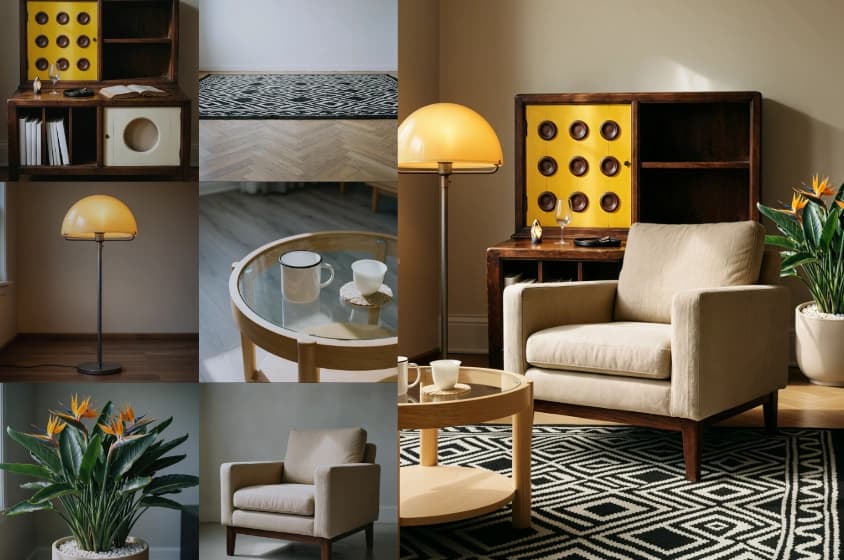
Begin from text or an image, then add image, video, and audio references when the scene needs more direction across character, setting, movement, style, voice, or sound.

Keep important visual relationships easier to follow across a longer clip. Wan 3.0 is designed to maintain characters, props, and spatial relationships as the action develops.
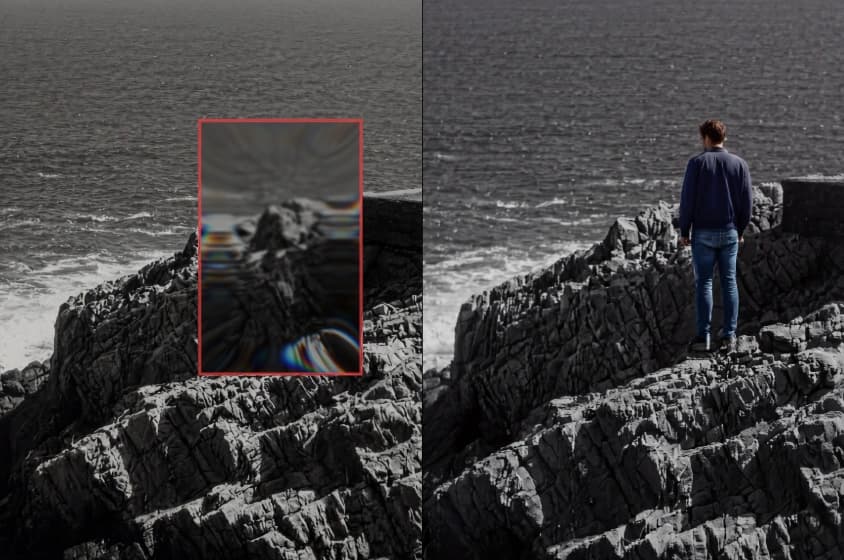
Let the model choose vertical, square, or landscape framing, or lock 16:9, 9:16, or 1:1. You can also define start and end frames when a scene needs to move between two visual states.
Write a clear scene, add references when needed, then generate and refine a complete short video.
Describe what the viewer should see and hear—subject, action, setting, shot type, camera movement, lighting, dialogue, and ambient sound. Keep each instruction concrete so Wan 3.0 has a clear direction.
Add images, video clips, or audio references when you need to lock a subject, product, movement, starting frame, style, or sound direction. Then set aspect ratio, duration, and native 1080P output.
Generate the clip, then review motion, details, framing, and audio timing together. Share directly or download for editing. Revise the prompt or resource and generate another version when needed.
Whether you are drafting social posts, product spots, or pre-vis, Wan 3.0 lets teams watch and listen to an idea fast.
Produce quick scenes for feeds, Shorts, Reels, and similar formats. A Wan 3.0 clip pairs motion with audio in one draft, so you can validate a concept before investing in a full edit.
Convert a product still or campaign brief into a moving mock-up. The 30-second ceiling lets you set the scene, demonstrate usage, emphasize a detail, and hold on a stable closing frame.
Turn a written beat into something stakeholders can watch together. Test framing, blocking, pacing, and sound before locking a shoot or a heavier production pipeline.
Outline the rhythm, setting, and movement you envision, then generate a visual draft with audio for a music-forward post, mood piece, or short performance sketch.
Apply image to video to see how an existing product visual might animate. Produce variants with alternate settings, camera moves, and sound accents, then pick the strongest direction.
Wan 3.0 shifts your starting point. Reach for it when hearing and seeing an idea quickly matters most.
| Workflow area | Wan 3.0 AI Video Generator | Seedance 2.5 | Traditional production workflow |
|---|---|---|---|
| Starting material | A text prompt or still image | Text plus multimodal references | Script, shot list, locations, talent, and gear |
| Picture | Rendered as native 1080P video | Up to 4K output for supported workflows | Captured or animated, then edited |
| Clip length | Up to 30 seconds per run | Up to 30 seconds per run | Set by footage length and final edit |
| Audio | Produced together with the video | Reference-aware synchronized audio | Recorded, licensed, and mixed separately |
| Iteration | Adjust the prompt and run again | Prompt, references, and local re-draw | Reshoot, re-render, or rebuild the timeline |
| Best fit | Ideation, short scenes, variations, and pre-visualization | Reference-heavy briefs and longer high-resolution clips | Deliverables that demand full manual control and pixel-perfect finishing |
Wan 3.0 does not replace editing or full production. Switch to a traditional pipeline when the final deliverable needs exact performances, legal sign-off, or frame-level precision.
Extended runtime, synchronized audio, native 1080P, and flexible text or image entry points.
Each clip can run up to 30 seconds, giving your visual idea room to breathe. Map an intro, a key action, and a final beat without splitting every moment into its own generation.
Synchronized audio is baked into the generation, not added later. The first result reads as a whole scene, making it easier to spot timing issues early.
The Wan 3.0 AI Video Generator exports native 1080P video suited to standard publishing and edit pipelines. Spend energy on the scene instead of upscaling a tiny preview.
Open with words when the concept is still fluid, or open with an image when the subject or aesthetic is already set. Either path uses prompts to steer motion, camera behavior, and audio.
Specific shot notes, visible detail, and explicit audio cues help Wan 3.0 assemble a coherent scene.
Assign one sentence per visual beat. Name who or what is on screen, what shifts, and how the frame is composed. For longer clips, sequence beats from first frame to last.
Specify lighting, place, palette, lens distance, and movement in concrete terms. Swap vague phrases like “polished commercial” for notes such as “diffused window light, waist-level camera, slow dolly toward the product.”
Include dialogue only when it carries the scene, and write the line verbatim. Add ambient and action sounds—rain on glass, footsteps on tile, the snap of a package opening—that reinforce what is happening on screen.
Avoid cramming unrelated subjects and competing motions into one prompt. A single focal action gives the Wan 3.0 AI Video Generator a stronger chance at a legible scene.
When a clip runs beyond roughly 10 seconds, break the action into distinct stages. Give every stage a visible objective and describe how the scene should resolve.
Wan 3.0 has no separate negative-prompt field. State what to avoid inside the main prompt—for example, “no on-screen text” or “keep the character's outfit unchanged.”
Common questions about audio, resolution, duration, inputs, aspect ratios, and prompting in Wan 3.0.
Wan 3.0 AI Video Generator turns text prompts or images into video. Each run can produce native 1080P clips as long as 30 seconds with synchronized audio included.
Yes. Audio is created alongside the video so sound can track on-screen action and pacing. Note the dialogue, ambience, and key sound effects you want directly in the prompt.
Wan 3.0 generates native 1080P video. Full-HD output at source resolution is a practical baseline for social posts, presentations, ads, and standard edit workflows.
Each Wan 3.0 video can reach up to 30 seconds. Pick a length that matches how many visual beats your scene requires.
Yes. Supply a prompt covering subject, setting, action, camera, lighting, and sound. The text to video path uses those details to assemble the clip.
Yes. Provide a starting image and describe how the subject, surroundings, or camera should evolve. Audio direction can live in the same prompt.
Wan 3.0 accepts image, video, and audio references. Each file can influence a character's look and wardrobe, the environment, motion, voice, or overall sonic feel.
Yes. Start-and-end-frame control is available for scenes that need fixed opening and closing visuals. This option may be disabled when multi-image reference mode is active.
Wan 3.0 can infer aspect ratio from the prompt or lock to formats such as 16:9, 9:16, or 1:1. Match the ratio to the platform where the video will appear.
Typical outputs include short social scenes, product mock-ups, ad concepts, story previews, image animations, and other 1080P clips where synchronized audio reinforces the visuals.
It depends on the brief. Wan 3.0 can deliver a full draft with audio, while an editor remains valuable for captions, brand overlays, exact trims, color grading, and stitching multiple clips.
Focus on one scene with precise visual and audio language. Identify the subject, action, setting, framing, camera move, lighting, and sound, then tweak only the elements that miss the mark.
Turn a prompt or image into a native 1080P clip up to 30 seconds long, with audio generated alongside the picture. Give Wan 3.0 a clear scene, direct the motion and sound, and review a complete video draft.