Seedream 5.0 Pro reference images give you more control than a text prompt alone. Instead of asking the model to invent every face, product, outfit, and pose from scratch, you upload existing images and tell it exactly what each one controls — that is how you keep one character across a campaign, place a real product in a new setting, or edit a source image without rebuilding the composition.
The XMK workspace offers Text to Image and Image to Image modes and accepts up to 10 reference images per project. But uploading more images does not automatically produce a better result — the critical step is assigning a clear role to every reference. This guide covers how to organize Seedream 5.0 Pro reference images, write stronger multi-image prompts, preserve important details, and fix the most common consistency problems.
Try Seedream 5.0 Pro reference images on XMK
What Are Seedream 5.0 Pro Reference Images?
A Seedream 5.0 Pro reference image carries information the written prompt cannot communicate as precisely: facial identity, product shape, packaging, clothing, pose, camera angle, composition, palette, lighting, materials, or layout direction.
A written prompt can describe “a matte-black running shoe with a red heel tab,” but a product reference shows the exact sole shape, stitching, and logo position. Seedream 5.0 Pro reference images matter most when visual accuracy outweighs creative randomness.
How Many Seedream 5.0 Pro Reference Images Can You Use on XMK?
The XMK workspace allows up to 10 Seedream 5.0 Pro reference images. That does not mean every project should use all ten: a simple portrait may need one identity image, while a complex campaign visual might use separate references for character, outfit, pose, location, and palette.
Use the smallest number of references that clearly communicates the visual requirements.
Too many references introduce conflicting faces, materials, and perspectives. Every image needs a specific job.
Assign a Role to Every Seedream 5.0 Pro Reference Image
The most important technique in this Seedream 5.0 Pro reference images guide is explicit role assignment. Instead of “use these images to create an advertisement,” write:
Use Image 1 for the product shape and packaging. Use Image 2 only for the color palette. Use Image 3 for the camera angle and composition. Do not copy the products or text from Images 2 and 3.
This separates the information sources and reduces unintended mixing.
 | 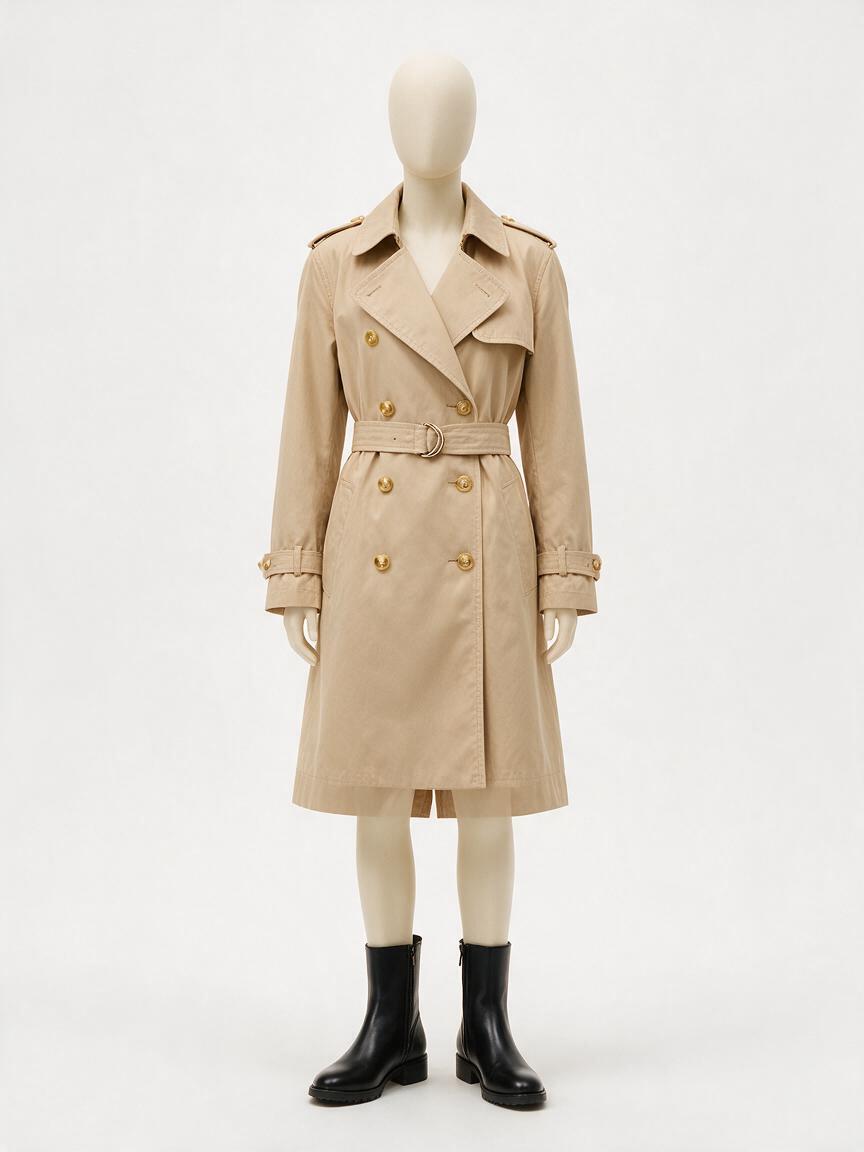 | 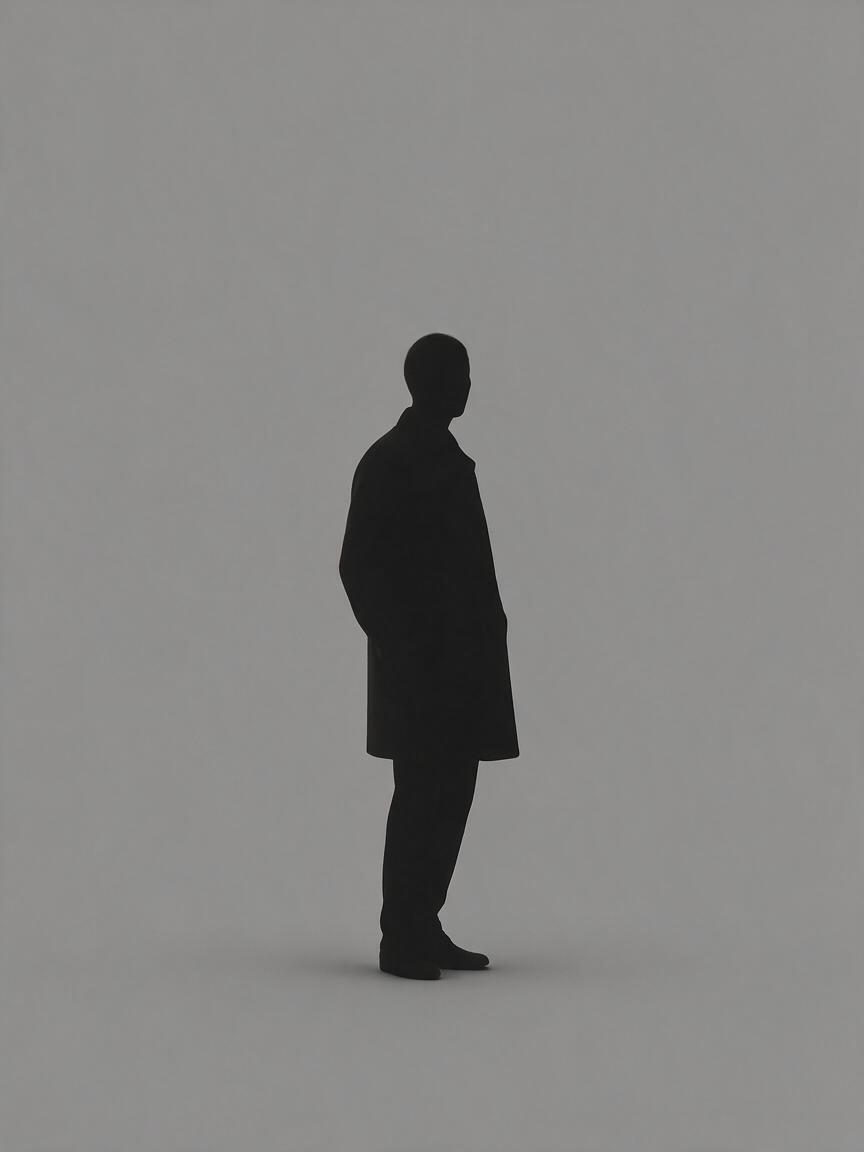 | 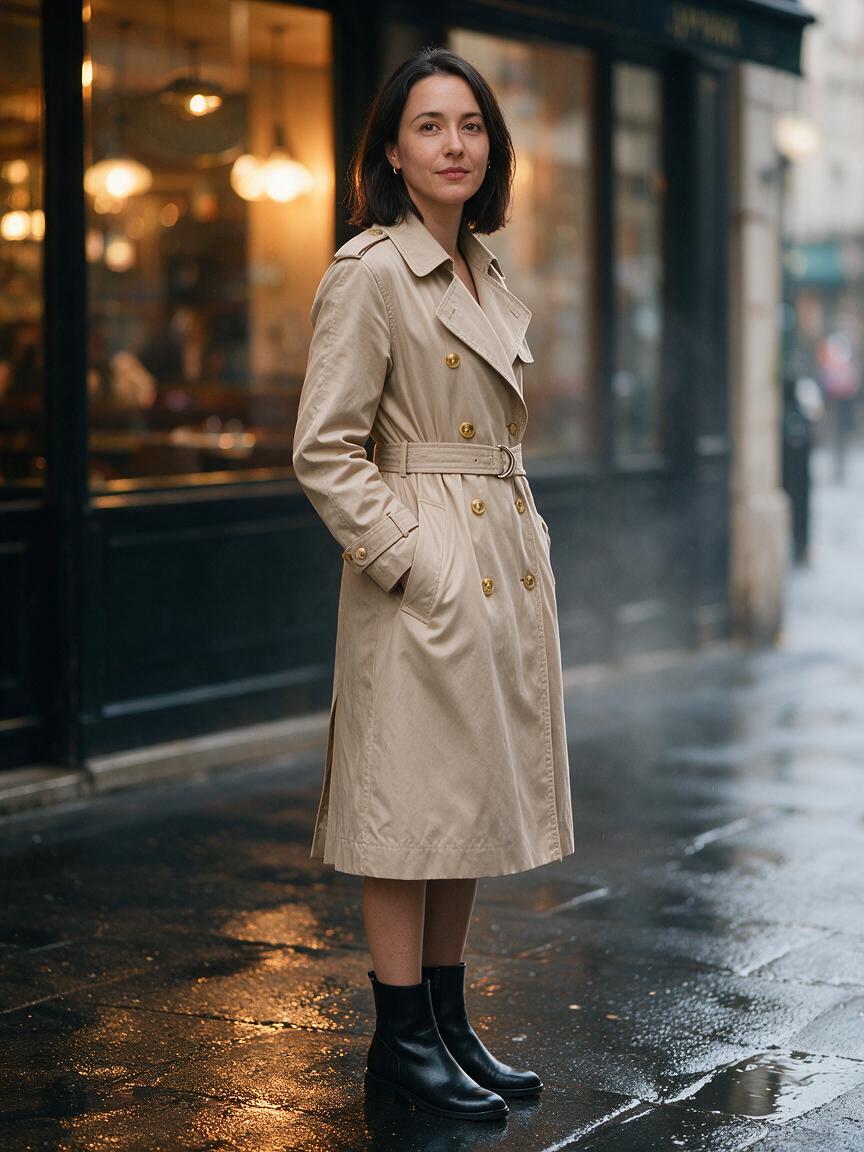 |
|---|
Three references, three jobs: Image 1 supplied the face, Image 2 the coat and boots, Image 3 the stance. The Paris background came from the prompt, not from any upload.
Reference role | What the model should borrow | What to protect or ignore |
|---|---|---|
Identity reference | Face, hair, age, distinctive features | Ignore original pose and background |
Product reference | Shape, logo, packaging, proportions | Do not redesign the product |
Outfit reference | Clothing design, colors, materials | Do not copy the model’s face |
Pose reference | Body position and camera angle | Ignore identity and clothing |
Style reference | Palette, grain, rendering style | Do not copy subject or layout |
Composition reference | Placement, framing, negative space | Replace the original objects |
Lighting reference | Direction, softness, contrast | Ignore the scene content |
Annotation reference | Arrows, boxes, sketches, edit targets | Apply changes only where marked |
This role-based structure makes multi-image prompts easier to understand and revise.
Seedream 5.0 Pro Reference Image Prompt Formula
Use this general formula when working with several references:
Use Image 1 as the [identity/product] reference. Preserve [protected features]. Use Image 2 only for [outfit/pose/style/lighting]. Use Image 3 for [additional role]. Create [final scene]. Match [lighting, materials, perspective]. Do not copy [unwanted elements]. Do not change [protected details]. Format for [aspect ratio and channel].
The formula is flexible, but every prompt should answer three questions: what does each image control, what should the final image contain, and what must remain unchanged?
How to Use Seedream 5.0 Pro Reference Images on XMK
Step 1: Select Only Useful References
Remove any reference that repeats information without adding a better view. For a product, use a front view, a three-quarter view, and close-ups of packaging or logo detail. For a character, use a clear frontal portrait, full-body proportions, and distinctive accessories. Blurry or heavily filtered references give the model less to work with.
Step 2: Number Your References
Refer to uploads as Image 1, Image 2, Image 3, and keep the order stable. If you replace one, check that the number still matches its role.
Step 3: State the Priority
When two references contain conflicting information, explain which takes priority.
For example:
Image 1 has the highest priority for facial identity. Image 2 controls only the hairstyle. If the references conflict, preserve the facial structure from Image 1.
Priority matters most for faces, products, logos, and branded packaging.
Step 4: Add Preservation Rules
State what the model must not change.
Useful preservation instructions: keep the facial structure unchanged; preserve exact product proportions; keep the logo in the same position; do not redesign the packaging; preserve the original skin tone and hairstyle; do not copy the pose from the identity reference; do not introduce additional products; do not alter unmarked areas.
Step 5: Generate and Refine One Problem at a Time
Identify the largest inconsistency in the first result. If the product shape is right but the lighting is wrong, revise only the lighting instruction. Avoid rewriting the entire prompt after every generation — controlled revisions make it clear which instruction improved the output.
What We Verified in Hands-On Testing
Before planning a reference-heavy job, it helps to know what the workspace returns. These numbers come from hands-on runs:
The reference counter caps at 10 images per generation.
A 1K generation completed in roughly one to two minutes.
A square request returned 1024×1024; a 3:4 request returned 864×1152.
Quoted on-image text rendered word-for-word in an English poster test, including a headline, a subheading, and a date line.
A Chinese-language poster test rendered its quoted headline and date line accurately, though small CJK type is still worth proofreading before publishing.
A local color edit changed the target object while leaving the background within two percent of its original sampled value, with surrounding detail intact.
Before | After |
|---|---|
 |  |
Only the cup body changed. The latte art, handle shape, contact shadow, and background all held.
That last result is worth internalizing: a well-written preservation sentence is what keeps an edit contained. Edits without one drift into neighboring areas.
Note that the underlying model is documented as supporting layer separation and transparent PNG export. Whether those specific controls appear in your interface depends on the workspace build you are using, so confirm what is exposed before designing a workflow around them.
Character Consistency With Seedream 5.0 Pro Reference Images
Character consistency means preserving recognizable identity across scenes, outfits, poses, and camera angles — the most common reason to reach for reference images at all.
A strong identity reference should clearly show face shape, eyes, nose, mouth, hairstyle, skin tone, age, and distinctive marks.
Avoid a heavily stylized or shadowed image as your only identity reference unless the output should preserve that style.
Use Image 1 as the primary facial identity reference. Preserve the face shape, eyes, nose, mouth, skin tone, age, and shoulder-length dark hair. Use Image 2 only for the full-body pose. Use Image 3 only for the beige trench coat and black boots. Create a cinematic street portrait in Paris after light rain, warm café lights behind. Do not copy the face, background, or body proportions from Images 2 and 3. Vertical 4:5.
Character Consistency Mistakes With Reference Images
Common problems: uploading several different people without role labels, using a pose reference whose face is more prominent than the identity reference, demanding exact identity while requesting a dramatic age change, and failing to specify which image has identity priority. When consistency matters, separate identity from pose, outfit, background, and style.
Product Consistency With Seedream 5.0 Pro Reference Images
Product consistency is essential for ecommerce images, ads, packaging concepts, and brand campaigns — where Seedream 5.0 Pro reference images earn their keep.
The prompt should protect the product silhouette, dimensions and proportions, logo position, label text, controls and openings, material finish, brand colors, and packaging structure.
Use Image 1 as the exact product reference. Preserve the bottle shape, transparent glass, silver cap, front label, logo position, and pale-green liquid. Use Image 2 only for the soft sunrise lighting. Use Image 3 only for the limestone platform and water-reflection composition. Create a premium skincare advertisement, product centered slightly right, negative space on the left for copy. Do not change the bottle proportions or label design, and do not copy products or text from Images 2 and 3.
Reference | Output |
|---|---|
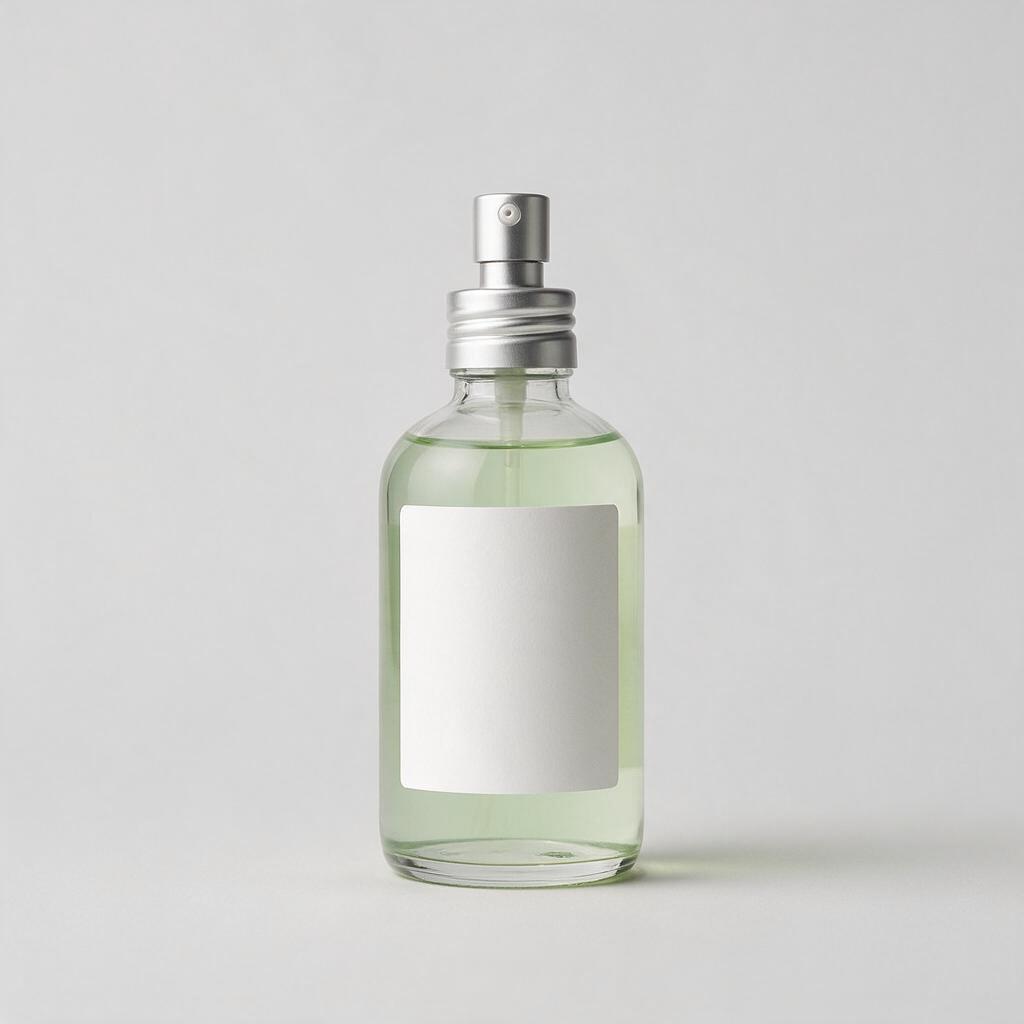 | 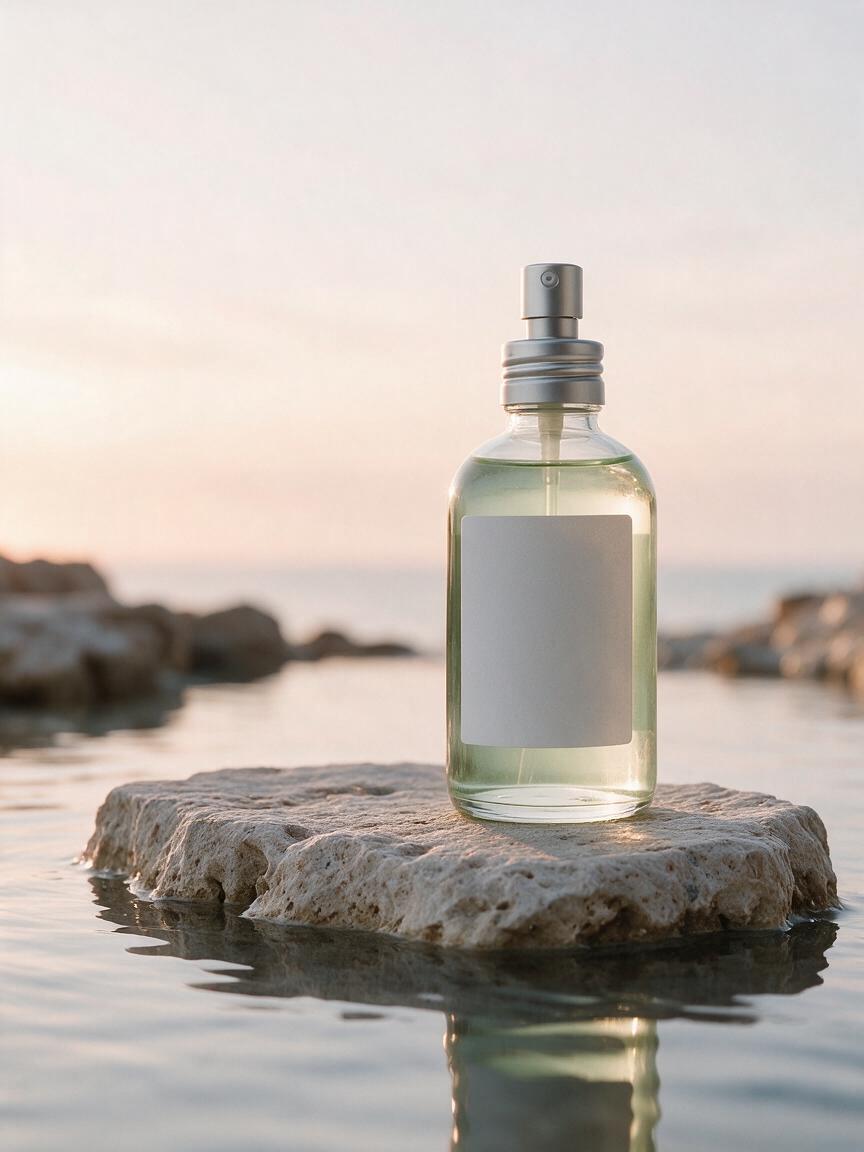 |
The silhouette, silver pump, pale-green liquid, and label placement survived the move into a new scene. Comparing the two side by side also shows the bottle running slightly taller in the output — exactly the kind of drift worth catching before publishing.
For commercial work, compare the output against the real product before publishing — small drifts in logos or dimensions can make an image unusable in a listing.
Style Reference Without Copying the Subject
A style reference can guide color palette, contrast, film grain, brushwork, lighting mood, rendering technique, or graphic design language.
The prompt should clearly say that the style — not the original subject or composition — should be borrowed.
Use Image 1 as the product reference. Use Image 2 only as a style reference for its muted earth-tone palette, soft film grain, and diffused highlights. Create a new product campaign image in a minimalist studio. Do not copy the objects, people, text, or composition from Image 2.
Style reference | Output |
|---|---|
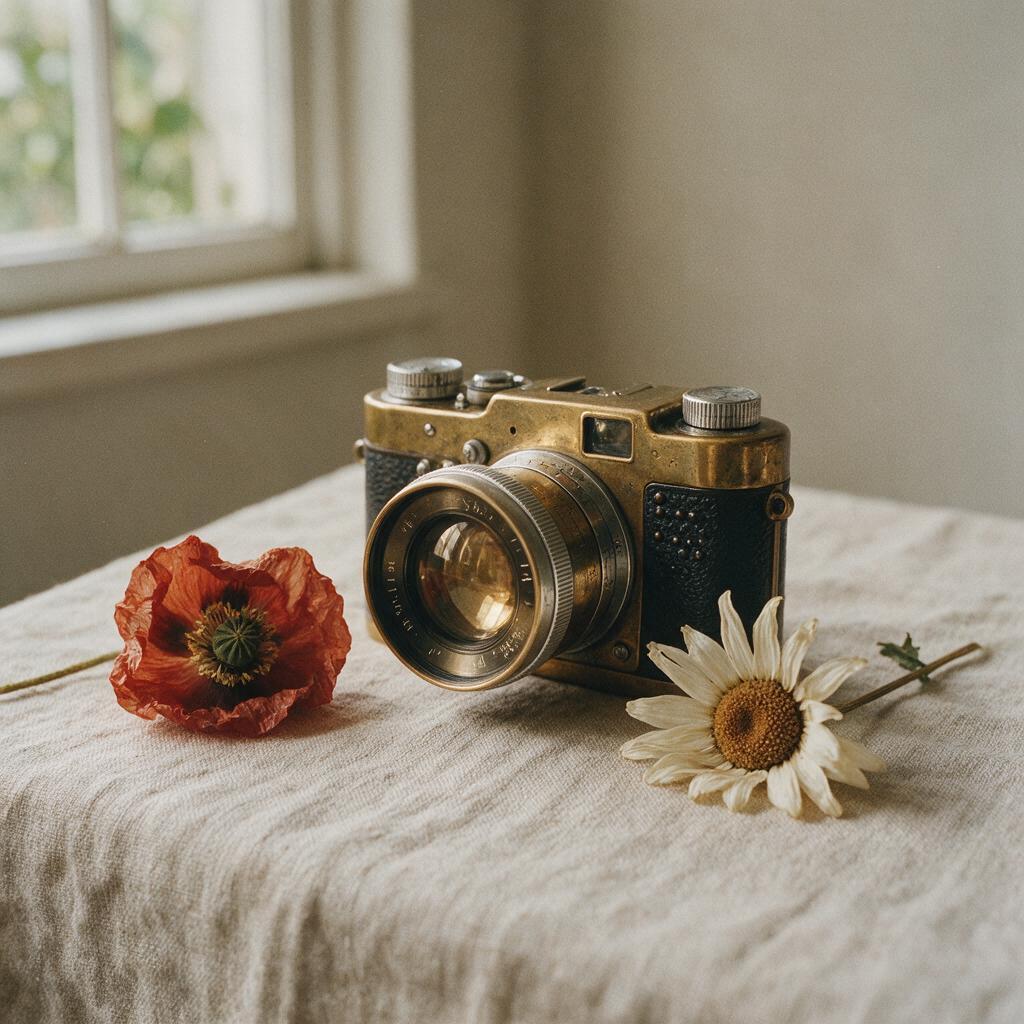 |  |
The palette, film grain, window light, and linen texture transferred cleanly — but the poppy and daisy came along too.
Avoid vague instructions like “make it look like Image 2” — name the style characteristics that matter.
One caveat from our testing, because it contradicts the usual advice: we ran this prompt twice, with and without the negative clause, and both results imported objects from the style reference. A single “do not copy the subject” sentence did not stop the leak. What worked better was stating exhaustively what the frame should contain — “a single bottle on an empty surface, no flowers, no props.” Treat negative clauses as a supplement to a complete positive description, not a substitute.
Multi-Image Fusion With Seedream 5.0 Pro Reference Images
Multi-image fusion combines several references into one coherent result — group portraits, product bundles, lookbooks, campaign collages, packaging families. Coherent output still depends on clear role assignment and compatible source images.
Use Images 1, 2, and 3 as identity references for three different people. Place all three shoulder to shoulder in a professional studio portrait. Preserve each person’s facial identity, hairstyle, approximate age, and skin tone. Coordinated dark-neutral business clothing, consistent soft overhead lighting, one unified color grade. Do not blend facial features between subjects.
 |  |  |  |
|---|
All three faces stayed recognizable under one unified light. Note that the clothing instruction only partly landed — the subject on the right kept her original top rather than the requested business wear.
The unified lighting clause matters more than people expect: without it, composites keep each source’s original lighting and read as a collage rather than a photograph.
That miss is a pattern: in fusion, identity attributes hold far more reliably than wardrobe instructions. If an outfit change is essential, give it its own reference image rather than words.
Annotated Seedream 5.0 Pro Reference Images for Precise Editing
Annotated Seedream 5.0 Pro reference images are source-image copies marked with arrows, boxes, circles, or rough sketches.
The XMK feature page describes support for spatial annotations and sketch-based guidance, useful when “move it slightly left” is not precise enough. Confirm what your workspace exposes before building a process around it.
Use Image 1 as the original source. Image 2 is an annotated copy. Move the product to the position marked by the red arrow. Replace the object inside the blue box with the lamp in Image 3. Preserve all unmarked areas including wall, table, shadows, and camera perspective. Remove the annotation marks from the final image.
Annotated references work best when marks use contrasting colors, each has one purpose, the prompt explains what every symbol means, the unmarked original is uploaded alongside, and the final instruction removes the marks.
Seedream 5.0 Pro Reference Images for Consistent Campaigns
A campaign needs images that look related without repeating a composition. Build a stable reference system:
Fixed block — keep unchanged across the campaign: the main character or product, brand palette, materials, lighting direction, typography style, contrast, and background treatment.
Variable block — change only: location, pose, supporting props, product arrangement, headline, aspect ratio, and seasonal detail.
Copy the fixed block verbatim between assets — rephrasing it, even swapping a synonym, shifts how the model weighs the reference and the set drifts with it. This makes Seedream 5.0 Pro reference images reusable across ads, listings, social posts, and localized designs.
Common Seedream 5.0 Pro Reference Image Problems
Two Faces Get Mixed Together
Cause: Multiple people are visible, but identity priority is unclear.
Fix:
Image 1 is the only identity reference. Use Image 2 only for pose. Do not copy or blend the face from Image 2.
The Product Shape Changes
Cause: The prompt emphasizes the new scene but does not protect product geometry.
Fix:
Preserve the exact silhouette, dimensions, controls, openings, logo placement, and packaging structure from Image 1.
The Background From a Reference Is Copied
Cause: The prompt says “use Image 2 as inspiration” without defining which feature matters.
Fix:
Use Image 2 only for lighting. Do not copy its background, objects, people, or composition.
Seedream 5.0 Pro Ignores One Reference Image
Cause: Too many references or weak role descriptions.
Fix: remove unnecessary images, put critical references first, state priorities explicitly, and repeat the protected feature once in the final restriction sentence.
What the Test Runs Changed About Our Advice
Two results above cut against widely circulated advice.
The first is the leak problem. Negative clauses are usually presented as the fix for style references bringing their own subject matter along, but in our runs they were not sufficient alone. The reliable pattern was a complete positive description of the target frame, with the negative clause as reinforcement. If your output keeps inheriting props, add detail to what the scene should contain before adding another prohibition.
The second is attribute hierarchy. In the fusion test, facial identity held firmly while a wardrobe instruction only partly applied. Identity and product geometry are what references protect best; clothing, props, and secondary styling slip first. When a secondary attribute matters, promote it from a prompt sentence to its own labelled reference image.
Neither finding makes references less useful. They just clarify where the control actually sits.
A Reliable Seedream 5.0 Pro Reference Images Workflow
Follow this process for more consistent results:
Define the final image’s purpose and channel.
Select only references that carry necessary information, strongest identity or product reference first.
Assign one clear role to every image, and state the priority when references conflict.
Describe the final scene, then add preservation and exclusion rules.
Generate several directions and select the strongest structure.
Fix one inconsistency at a time rather than rewriting the prompt.
Review faces, logos, hands, and text at full size before publishing.
The goal is not one overloaded generation, but a strong base that you protect through each revision.
Build your reference workflow in Seedream 5.0 Pro
Frequently Asked Questions
How many Seedream 5.0 Pro reference images can I upload on XMK?
The current XMK interface supports up to 10. You do not need all ten — choose only images carrying useful identity, product, pose, clothing, style, lighting, or composition information.
Can Seedream 5.0 Pro keep the same character across images?
Yes, when the facial reference is clear and given priority. Protect face shape, eyes, nose, mouth, hairstyle, age, and skin tone, and prevent pose or style references from contributing a different identity.
How do I keep a product accurate?
Use clear product references and protect the silhouette, dimensions, logo, label, controls, materials, and colors. Compare the output with the original before using it in a listing.
Can I use a reference image only for style?
Yes. Name the style properties to borrow — palette, contrast, grain, brushwork, lighting — and tell the model not to copy the original subject, objects, text, or composition.
Why does the model copy the reference background?
The role assigned to that reference image may be too broad. Replace “use this image as inspiration” with a narrower instruction such as “use Image 2 only for lighting; ignore its background and objects.”
How do I use an annotated reference image?
Upload the original image and a marked-up copy as two separate references. Explain what each mark means, identify any replacement reference, and ask the model to preserve unmarked areas and remove the annotation marks.
Do more Seedream 5.0 Pro reference images always improve the result?
No. Extra images introduce conflicting identities, styles, and perspectives. A smaller set of clearly assigned references gives better control than a large unstructured collection.
Can I use reference images for commercial projects?
Seedream 5.0 Pro reference images can support advertising, ecommerce, branding, and campaign production. Before publishing or selling an output, confirm you hold the rights to the uploaded images, faces, products, logos, and trademarks.
Final Seedream 5.0 Pro Reference Images Checklist
Before generating, confirm that your project answers these questions:
What is the final image for, and which channel?
Which image controls identity, and which controls the product?
Which image controls clothing, pose, style, lighting, or composition?
Which reference has the highest priority if they conflict?
Which details must remain unchanged, and which parts should be ignored?
Should the final image contain one subject or several?
Which inconsistency will you correct first?
The most effective way to use Seedream 5.0 Pro reference images is to treat them as organized visual instructions, not an inspiration board. Give every upload one role, define priorities, protect essential details, and revise one problem at a time. With that method, Seedream 5.0 Pro reference images support consistent characters, accurate product visuals, reusable campaign systems, and precise edits without forcing the model to guess what each image means.