The clearest upgrade in Kling 4.0 is creative control. Kuaishou says it officially launched on October 15, 2026, and the headline changes are about time: one generation now runs up to 30 seconds, and you can steer it with up to 10 keyframes instead of a single start and end frame. The resolution ceiling is unchanged, so resolution alone is not a reason to upgrade.
That makes the Kling 4.0 vs 3.0 decision less obvious than the version number suggests. Kling 3.0 already outputs 4K, already generates native audio, and costs less per second. Kling 4.0’s main advantages are longer runtime and additional controls; whether it improves short shots depends on the brief.
Quick verdict: choose Kling 4.0 for 15-to-30-second multi-beat shots and for briefs that exceed 3.0’s reference limits. Stay on Kling 3.0 for short, single-action clips where its existing controls already meet the brief.
Want to test it on your own brief?
Updated October 30, 2026. We ran five paired text-to-video tests on XMK, ten clips in total, at 720p and 16:9. Visual observations come from sampled frames, and audio was measured rather than judged by ear. We did not test reference inputs, keyframes, or multiple seeds. Specs come from Kling’s official user guides and Kuaishou’s launch release, and features still labeled “coming soon” are marked as such.
Kling 4.0 vs 3.0 at a Glance
The biggest gaps are duration, keyframes, and reference capacity; resolution is the same.
Capability | Kling 3.0 / 3.0 Omni | Kling 4.0 | 4.0 status |
|---|---|---|---|
Clip length per generation | 3–15 seconds | 3–30 seconds | Shipped |
Video extension | Not listed in the 3.0 guide | Up to 2 minutes | Coming soon |
Resolution | 720p, 1080p, 4K (added April 2026) | 720p, 1080p, 4K | Shipped; platform-dependent |
Aspect ratios | 16:9, 9:16, 1:1 | Adds 21:9 and Auto | Shipped |
Dynamic range | SDR (no HDR listed) | 10-bit HDR at 1080p and 4K | Coming soon |
Frame control | Start and end frame only | Up to 10 keyframes | Shipped |
References | 3.0 Omni: up to 7 images or elements, or 1 video (3–10s) + 4 images or elements | Up to 15 assets: 10 images, 5 videos (30s total), 7 elements, 3 voice profiles | Shipped |
Audio | Native audio, single channel | Two-channel stereo, more accurate lip sync | Shipped |
Speech languages | Chinese, English, Japanese, Korean, Spanish | Adds Portuguese, German, French, Hindi, plus regional accents and dialects | Shipped |
Prompt length | Not stated in the 3.0 guide | Up to 8,000 tokens | Shipped |
Video editing | Available in 3.0 Omni | Up to 5 input clips, 30s total | Shipped |
Source: official Kling 4.0, 3.0, and 3.0 Omni user guides.
Compare Kling 4.0 against 3.0 Omni, not text-only 3.0. Omni already handles image, video, and element references, voice-bound characters, and editing, so a text-only comparison exaggerates the gap.
What Did Not Change: 4K Is Not New in Kling 4.0
Both models top out at the same resolution. Kling added native 4K output to the 3.0 line on April 23, 2026, five months before Kling 4.0 was announced, and both list 720p, 1080p, and 4K. A higher ceiling is not what 4.0 adds. Whether its frames look better at the same resolution is a separate question that a spec sheet cannot answer.
A model spec is also not a setting every platform exposes. During our October 30 check, the XMK Kling 4.0 generator offered 720p and 1080p, and the XMK Kling 3.0 generator offered 720p Standard and 1080p Pro. Confirm the live selector before promising a client 4K.
Kling 4.0 vs 3.0 Hands-On: Same Prompt, Two Models
Neither model won every test. Kling 3.0 matched the literal brief more closely in two tests; Kling 4.0 covered more of the long sequence in a single generation, kept the product surface clean, and matched the requested two-person framing. The soundtracks also measured differently: Kling 3.0’s left and right channels were identical in every clip, while Kling 4.0’s differed.
Tests 1, 3, 4, and 5 matched duration and settings (Kling 3.0 Standard, Kling 4.0 Text to Video, no references), so only the model changed. Test 2 is a workflow comparison: Kling 4.0 produced a single 25-second generation, while Kling 3.0 used its 15-second maximum with Multi-Shot. We kept the first successful output per model and prompt, flaws included, and checked each clip against the prompt’s specific requirements. The ten clips used 6,220 credits.
Test 1: Single-action product shot (10 seconds)
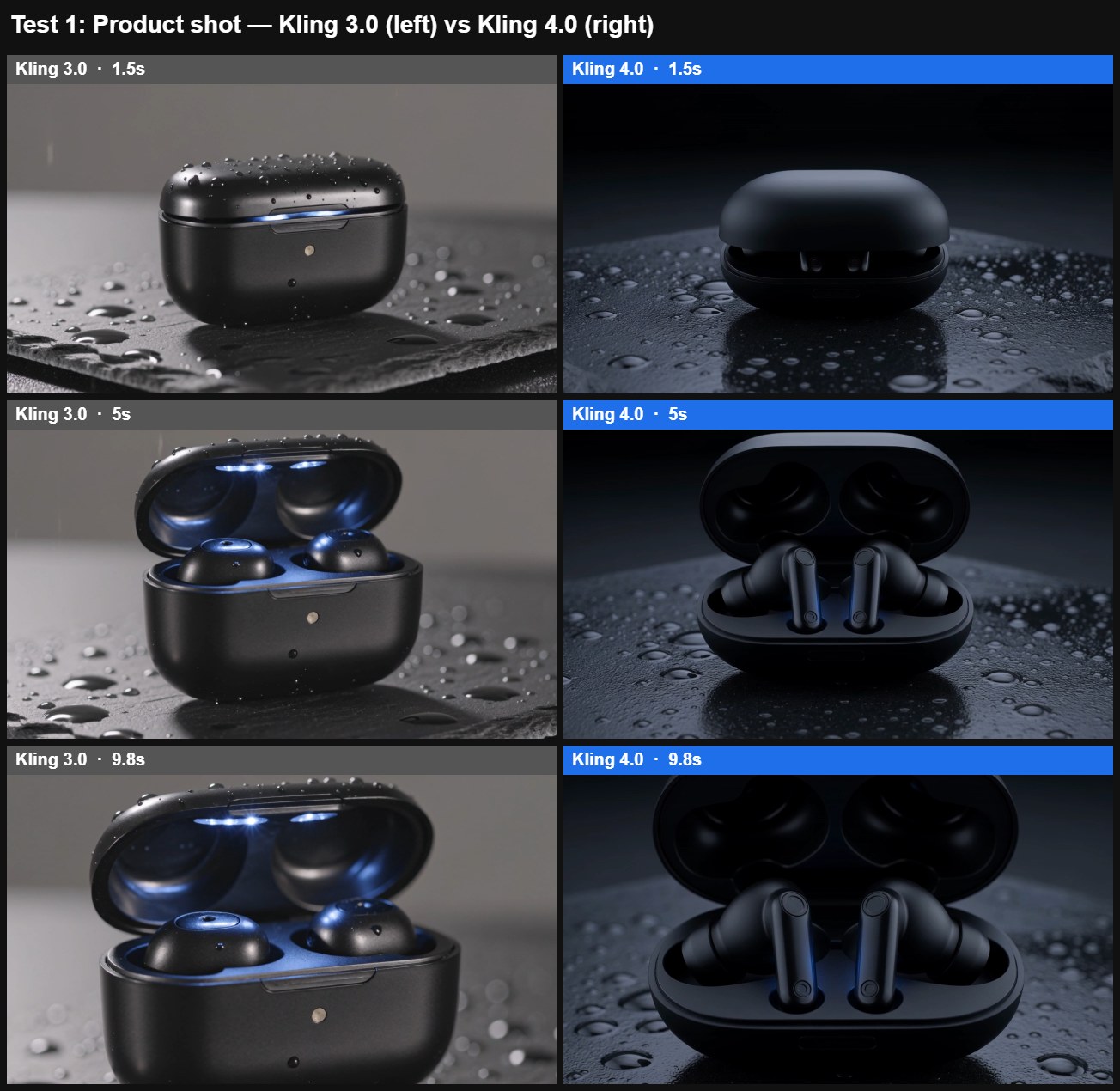
A matte black wireless earbud case sits on a wet slate surface. The lid slowly opens, a soft blue light glows from inside, and the camera pushes in slowly to a close-up of the earbuds. Studio lighting, shallow depth of field, gentle rain ambience.
Kling 3.0 | Kling 4.0 |
|---|---|
Result: both clips were usable on the first try. Kling 3.0 followed the brief more literally: the lid opens, a clear blue glow fills the case, and the push-in ends on the earbuds. Kling 4.0 used darker, moodier studio lighting with sharper reflections on the wet slate, but its blue glow is only a faint accent on the earbud stems.
Measured audio differed too: Kling 3.0’s rain ambience was very quiet, while Kling 4.0’s average RMS level across the clip was about 24 dB higher. That is a measurement, not a judgment that one sounds better.
Test 2: Multi-beat coffee ad (Kling 4.0 at 25 seconds, Kling 3.0 at 15 seconds)
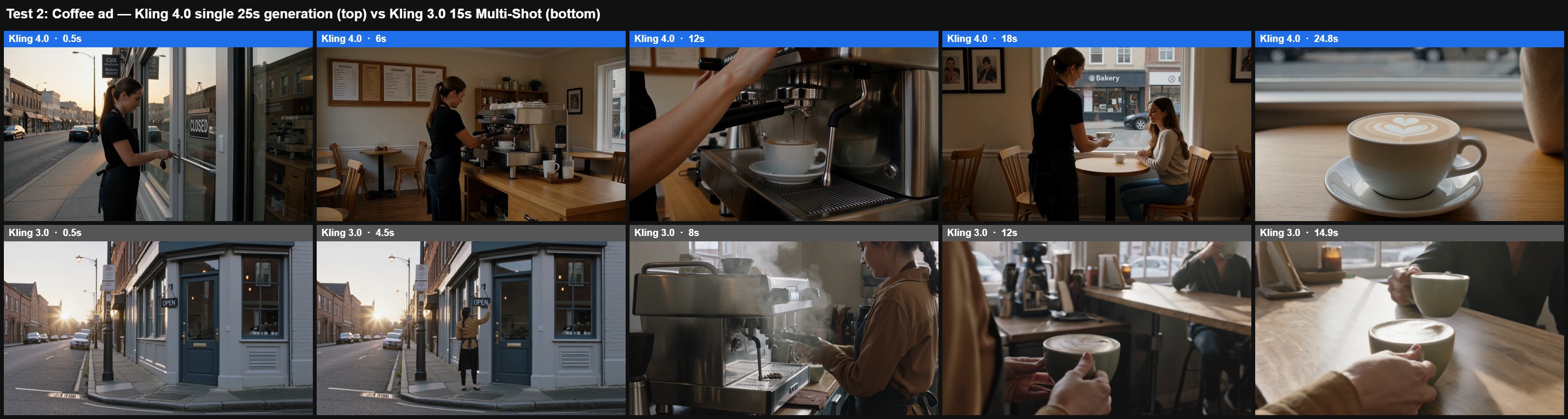
A cinematic coffee commercial in one continuous sequence. Open on a wide shot of a quiet city street at sunrise. A barista unlocks a small corner cafe and flips the sign to OPEN. Inside, she grinds beans and steam rises from the espresso machine. The camera follows a finished latte across the counter to a customer by the window, who takes a first sip and smiles. End on a slow push-in to the cup with morning light on the foam.
Kling 3.0 | Kling 4.0 |
|---|---|
This is a workflow comparison, not a same-settings test. It checks whether a single 25-second Kling 4.0 generation holds six beats, while Kling 3.0 gets the same prompt at its 15-second maximum with Multi-Shot on.
Result: Kling 4.0 covered the main stages of the story in order across 25 seconds, but missed some explicit actions. The generation includes several cuts between camera setups, so it is not one continuous shot. Visible: the barista at the door with keys, the espresso machine pouring, the latte carried to a customer by the window, the customer holding the cup near her face, and a closing push-in to latte art, with the same barista in every shot. Not shown: a true wide street opening, the sign flipping to OPEN (it stays on CLOSED), beans being ground, and a clear sip and smile.
Kling 3.0 split the prompt into three 5-second shots. Visible: a true wide shot of the corner cafe at sunrise, the barista reaching toward the door late in shot one, strong espresso steam, and a latte handed across a table. Not shown: a clear unlock or sign flip, beans being ground, and the customer’s face, so the sip-and-smile beat never reads. The final shot would need revision to show the customer’s reaction; other omitted actions would require additional changes.
Test 3: Dialogue and lip sync (10 seconds)
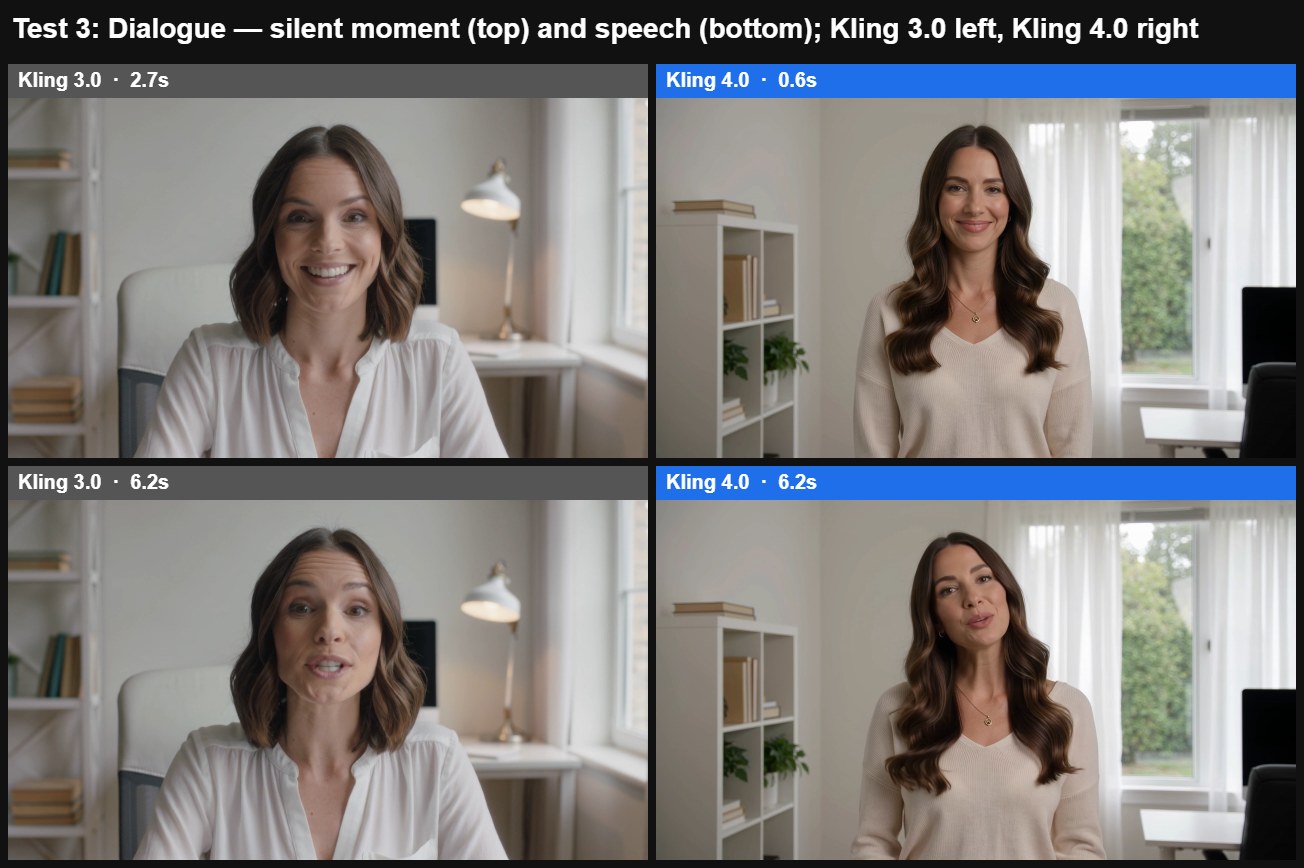
Medium close-up of a woman in her thirties in a bright home office, looking into the camera. She says warmly: “I tried three editing apps this week, and only one saved me real time.” Natural head movement, soft daylight, quiet room tone.
Kling 3.0 | Kling 4.0 |
|---|---|
Result: visually, both clips were usable; we did not verify dialogue accuracy or fine-grained lip sync. Kling 3.0 matched the requested medium close-up and gave a more animated read. Kling 4.0 framed her from the waist up, wider than asked, with a calmer delivery. In both, the mouth is mostly closed during silent stretches and moving during speech, so the timing of mouth movement roughly follows the audio.
Test 4: Unmarked product surface (5 seconds)
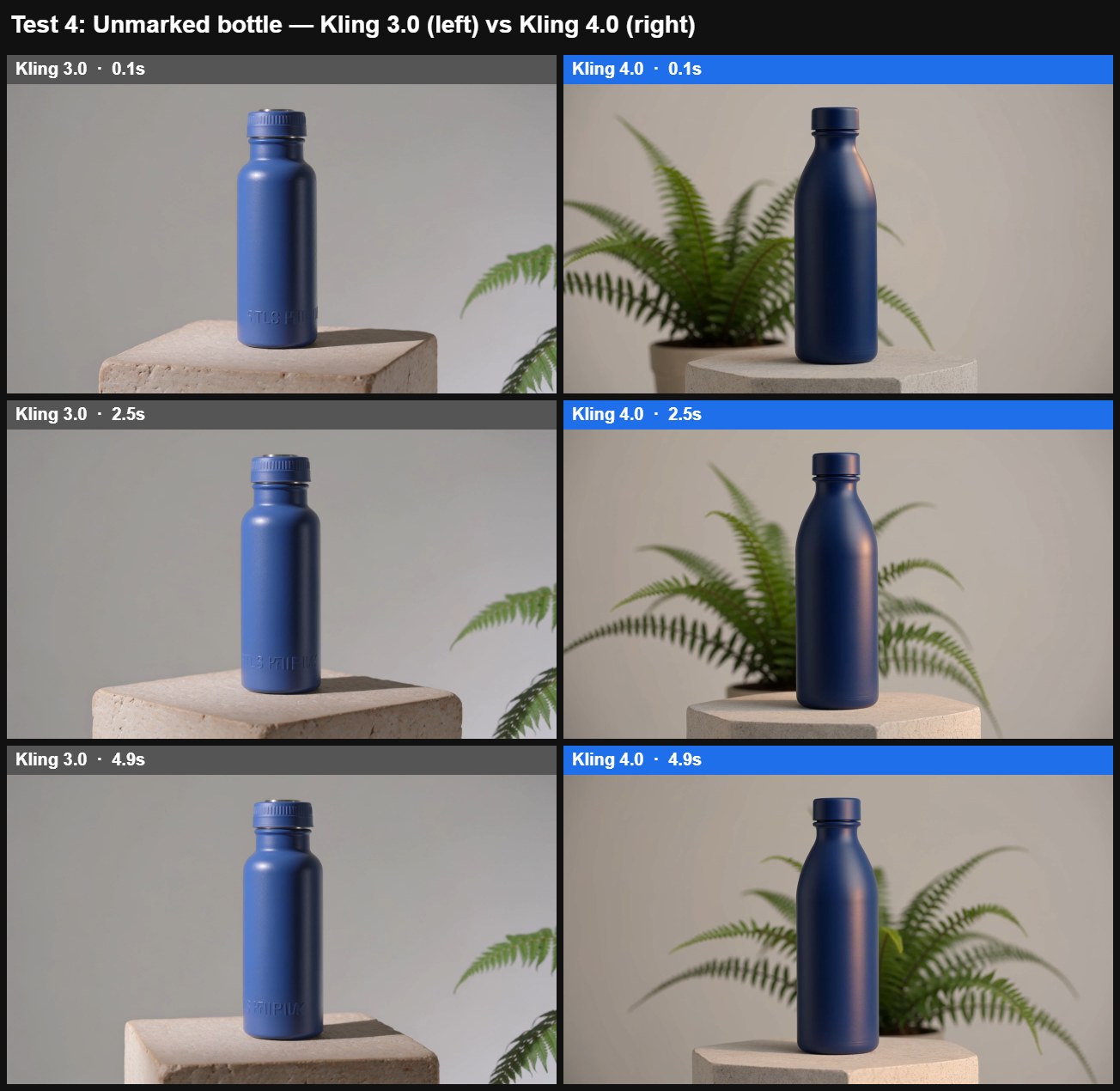
One continuous five-second product shot. A plain matte cobalt-blue reusable bottle stands upright on a pale stone pedestal. The camera slowly moves in a quarter-circle from the front to the right. A soft warm highlight travels across the bottle while a small fern in the background moves gently in a breeze. Preserve the bottle shape and cap throughout. Photorealistic studio lighting, no cuts, no text, no logo. Audio: quiet room ambience.
Result: both clips produced the blue bottle, stone pedestal, and fern, and kept the bottle and cap recognizable throughout. Kling 3.0 added faint lettering-like embossing near the base despite the no-text instruction. Kling 4.0’s bottle stayed unmarked, though its blue rendered closer to navy than cobalt. We did not measure whether either camera completed exactly 90 degrees.
Test 5: Cup handoff between two people (5 seconds)
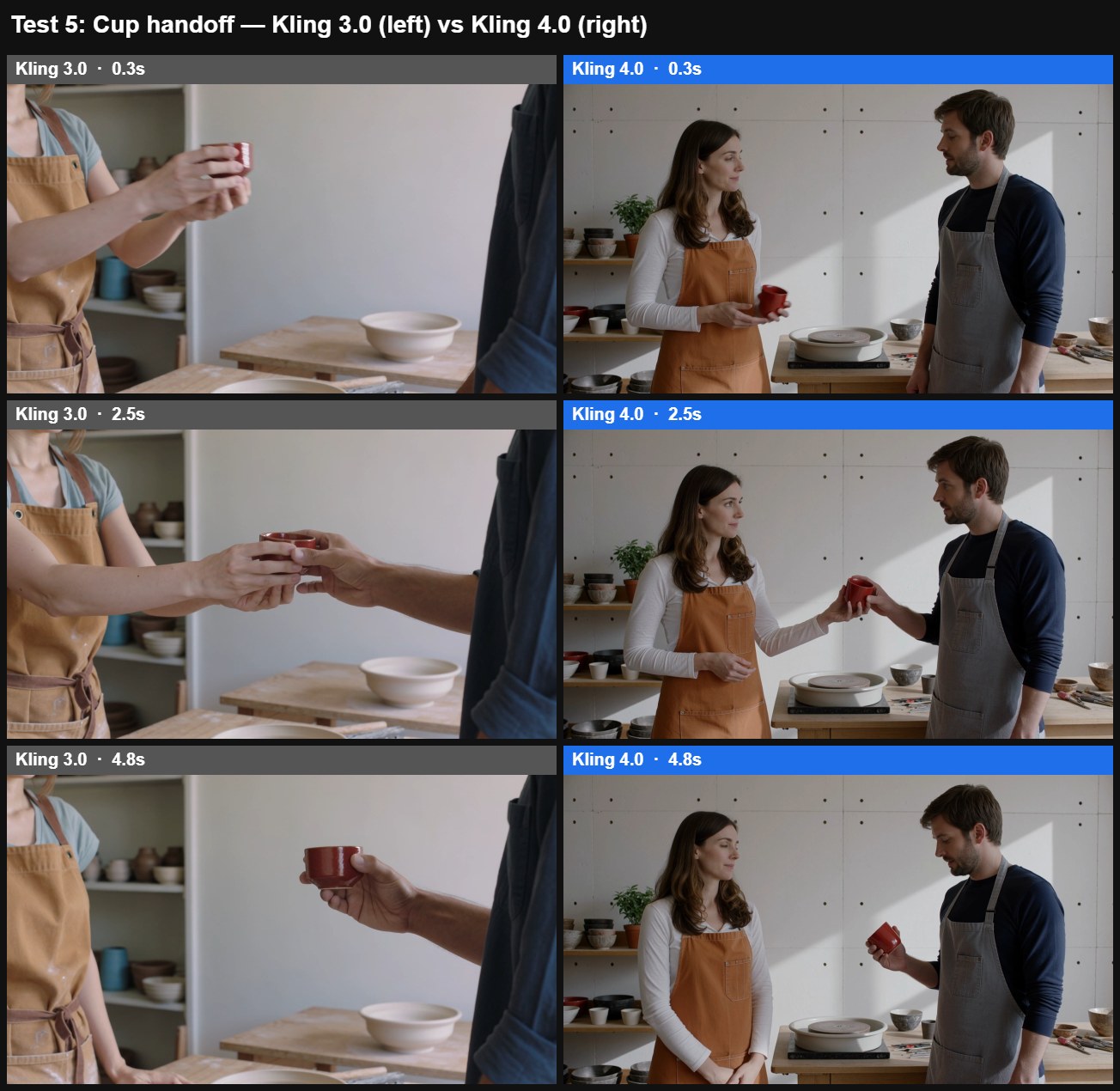
One continuous five-second locked-off medium shot in a pottery studio. A woman in an ochre apron on the left holds one small red ceramic cup. A man in a navy shirt stands on the right. She extends the cup toward him; he takes it with his right hand; she releases it and lowers her empty hand. End with the man holding the same single cup. Both hands and the cup remain visible. Natural daylight, realistic motion. Audio: quiet room ambience, no speech.
Result: both versions completed the handoff in our sampled frames: the red cup moved from the woman to the man, and we saw no duplicated cup. The difference was framing. Kling 3.0 cropped tight on the hands and cup, cutting off most of both heads. Kling 4.0 kept both faces and more of their bodies, closer to the requested medium shot and easier to read as an interaction between two people.
Test results summary
Test | Requirement | Kling 3.0 observation | Kling 4.0 observation | Conclusion |
|---|---|---|---|---|
1. Product shot (10s each) | Lid opens, blue glow from inside, push-in to close-up | All three; glow clearly inside the case | All three; glow only a faint accent on the stems; darker lighting | 3.0 closer to the literal brief |
2. Coffee ad (workflow test: 3.0 at 15s Multi-Shot, 4.0 as one 25s generation) | Wide opening, unlock and sign flip, grinding and steam, latte to customer, sip and smile, push-in on cup | Wide opening, steam, latte handed over; no clear sign flip, grinding, or customer’s face | Door with keys, espresso, latte to customer, cup lifted, push-in on latte art; no wide opening, sign flip, grinding, or clear sip and smile | 4.0 covered more stages in a single generation; both missed explicit actions |
3. Dialogue (10s each) | Medium close-up, one spoken line | Medium close-up as asked; animated delivery | Waist-up framing, wider than asked; calmer delivery | 3.0 closer to the framing brief; dialogue accuracy not verified |
4. Unmarked bottle (5s each) | No text or logo; bottle and cap preserved | Faint lettering near the base | Unmarked surface; blue closer to navy than cobalt | 4.0 met the no-text requirement |
5. Cup handoff (5s each) | Cup changes hands; medium two-person shot | Handoff completes; most of both heads cropped | Handoff completes; both faces kept | Both completed the action; 4.0 closer to the framing brief |
Credits used per pair: 600 and 640 (Test 1), 900 and 1,600 (Test 2), 600 and 640 (Test 3), 300 and 320 (Tests 4 and 5), Kling 3.0 listed first.
These are observations from ten clips, one per model per prompt, not statistically reliable win rates. For brand work, test your actual product references: a plausible generic bottle is not the same as an exact SKU.
Run these prompts yourself: open the Kling 4.0 studio or generate the same shot with Kling 3.0
Audio measurements
Every clip from both models ships with a two-channel audio track, so channel count alone tells you nothing. We decoded each soundtrack and compared the left and right channels sample by sample. In all five Kling 3.0 clips the two channels were identical; in all five Kling 4.0 clips they differed, only slightly in the cup-handoff clip. The correlation figures below are for reference.
Test | Kling 3.0 left vs right | Kling 4.0 left/right correlation |
|---|---|---|
1. Product shot | Identical | 0.81 |
2. Coffee ad | Identical | 0.98 |
3. Dialogue | Identical | 0.99 |
4. Unmarked bottle | Identical | 0.94 |
5. Cup handoff | Identical | 0.95 |
We did not judge speech or sound quality by ear, so treat these figures as format checks, not quality scores.
Kling 4.0 Keyframes vs 3.0 Start and End Frames
Kling 4.0 replaces “describe the shot and hope” with a storyboard you pin to the timeline. Kling 3.0 gives you a start frame and an end frame, and handles longer stories with Multi-Shot, which plans several shots in one generation and cuts between them, as described in the Kling 3.0 user guide.
Kling 4.0 accepts up to 10 keyframe images across a 3-to-30-second generation, so you can mark intermediate states between the opening and the ending, such as a character’s entrance or a product reveal. That is storyboard language, and it changes how you write prompts: the images carry the key moments, and the text describes the motion between them.
Two practical limits from the Kling 4.0 user guide: keyframe mode accepts images only, and it cannot be combined with Omni Reference in the same generation. Choose per shot whether identity (references) or timing (keyframes) matters more.
Keyframes are guidance, not proof the motion between them is correct, so review the transitions as closely as the frames.
Omni Reference: The Fine Print on “15 References”
The 15-reference cap in Kling 4.0 is a shared budget with fixed sub-limits, not 15 of anything you like. Within the total you get up to 10 images, 5 videos totaling 30 seconds, 7 elements, and 3 voice profiles, according to the Kling 4.0 user guide. You cannot spend all 15 slots on images.
Reference-based creation is not new in 4.0. The Kling 3.0 Omni guide already documents image, video, and element references and voice-bound characters. Its limit is tighter in a way that matters for one specific job: one reference video of 3 to 10 seconds plus only four images or elements. In practice:
Kling 3.0 Omni is enough when the brief fits within seven images or elements, or one 3-to-10-second reference video plus four images or elements. A character, a product, a prop, and a location can fit.
Kling 4.0 is needed when the brief goes past those limits: more than seven images or elements, a reference video plus more than four other references, more than one reference video, or longer reference footage.
More references are not automatically better. Assign each asset one job, such as product appearance, character identity, environment, or motion, and resolve conflicts before you submit. If two images disagree about a label or a costume, the model has to guess.
Kling 4.0 Price: Cost per Usable Clip, Not per Second
On UnificAlly, Kling 4.0 costs about 35% to 50% more per second than Kling 3.0 Omni; on XMK the premium is 7% to 13%. Either way, longer unsuccessful generations can increase retry costs when they remain billable.
What Kling 4.0 costs today
Where | Billing unit | 720p | 1080p | Source |
|---|---|---|---|---|
Kling app (official) | Credits per second | 10 credits (reported) | 15 credits (reported) | |
XMK studio | Credits per second | 64 credits | 90 credits | XMK generator, checked October 30, 2026 |
fal API | USD per second | $0.157 | $0.235 | |
UnificAlly API | USD per second | $0.1134 | $0.1701 (stereo audio included) |
Credit values differ by platform, so credit counts are not comparable across services; compare them only within one platform. Kling’s public plan pages do not yet list a per-second Kling 4.0 rate, so the official figures above come from tester reports, not a Kling price sheet (Wireflow).
Kling 4.0 vs 3.0 price on the same platform
On XMK, where we ran our tests, Kling 3.0 costs 60 credits per second at 720p and 80 at 1080p, against 64 and 90 for Kling 4.0. That is a 7% premium at 720p and 13% at 1080p. Our 25-second Kling 4.0 coffee ad cost 1,600 credits as a single generation; the 15-second Kling 3.0 version cost 900 and still missed its final beat.
The reroll math
The number that matters is cost per approved clip: rate per second × seconds × attempts until approved. At UnificAlly’s 1080p rates, one 30-second Kling 4.0 generation approved on the second attempt costs $10.21, while two 15-second Kling 3.0 Omni generations averaging 1.5 attempts each cost $5.67 plus editing time. The attempt counts here are illustrative, not measured.
Kling 4.0 can justify its higher generation cost if it reduces retries or editing time. Drafting at 720p before a 1080p final can save credits, but re-check the result after switching resolution, since the output can change.
Check the live credit estimate before you generate in the Kling 4.0 video studio on XMK.
What Kling 4.0 Still Labels “Coming Soon”
As of October 30, 2026, three announced features had not shipped: 10-bit HDR at 1080p and 4K, video extension up to 2 minutes, and an official enterprise API. Kuaishou’s launch release describes the API as planned, while third-party hosts such as fal and UnificAlly already serve 4.0 endpoints. Do not build a deadline around any of the three until they appear in the interface you use.
Kling 4.0 vs Kling 3.0: Which Should You Use?
Pick by the shape of the shot, not the version number.
Your project | Pick | Why |
|---|---|---|
Social clip, one action, under 15 seconds | Kling 3.0 | Same 4K ceiling, lower rate per second, closer to the brief in our earbud and talking-head tests |
Talking-head clip in a core language | Kling 3.0 | Matched the requested close-up in our test; native lip sync already ships |
A short shot with a 3.0 workflow you already trust | Stay on 3.0 | Upgrade only when a 4.0 control fixes a specific, recurring failure |
Product ad with a wide-to-close reveal over 15–30 seconds | Kling 4.0 | One generation of up to 30 seconds instead of stitched clips |
Clean product mock-up with no text or logo | Test both | 4.0 kept the surface unmarked in our one test; confirm with your own product |
Story with fixed beats at set times | Kling 4.0 | Up to 10 keyframes pin each beat to the timeline |
Brief beyond 3.0 Omni’s reference limits | Kling 4.0 | Up to 15 references, including 5 videos, versus 7 |
Dialogue in French, German, Portuguese, or Hindi | Kling 4.0 | Those languages are new in 4.0 |
Strict 4K or HDR delivery | Verify first | HDR is coming soon, and 4K depends on the platform |
Programmatic batch production | Kling 3.0 for now | Official 4.0 API is still coming soon; verify third-party rates |
If most of your work lands in the top three rows, Kling 3.0 remains the efficient choice. If it lands in the middle rows, Kling 4.0 can remove stitching or reshoots that 3.0’s limits make likely.
Working on short, single-action clips? Start with Kling 3.0 on XMK
Is Kling 4.0 Worth Upgrading?
In the Kling 4.0 vs Kling 3.0 decision, upgrading is worth it when a brief asks for something 3.0 cannot comfortably do: a single generation over 15 seconds, a fixed middle beat, references beyond 3.0 Omni’s limits, or stereo sound. On XMK the premium was 7% to 13% per second during our check. That is small for occasional work but adds up at volume, so high-volume teams should weigh it alongside retry rates and finishing time.
If your current Kling 3.0 workflow already produces acceptable short clips, start by naming one recurring failure, then check whether a 4.0 control addresses it directly. Before your next generation, write down three things: what must stay consistent, which action must complete, and how much correction you can afford. Judge the whole clip against them, including the final seconds.
Ready to direct a 30-second scene?
Try the Kling 4.0 AI video generator on XMK
Kling 4.0 vs 3.0 FAQ
Is Kling 4.0 better than Kling 3.0?
Kling 4.0 is better suited to long, multi-beat, reference-heavy shots: it doubles the single-generation limit to 30 seconds and adds up to 10 keyframes and 15 references. For short single-action clips, Kling 3.0 matches its 4K resolution at a lower cost per second, and in our Kling 4.0 review tests it followed some short briefs more literally.
When was Kling 4.0 released?
Kling 4.0 Flash opened to a limited group on September 28, 2026, and the full Kling 4.0 model became generally available on October 15, 2026.
How much does Kling 4.0 cost?
It depends on the platform. In the Kling app, testers report 10 credits per second at 720p and 15 at 1080p; Kling has not published the rate on its plan pages. On XMK, Kling 4.0 costs 64 credits per second at 720p and 90 at 1080p. Credit values differ by platform, so compare credit counts only within one service.
Is Kling 4.0 free?
Not as a general rule. On XMK, free vouchers cover 720p text-to-video at exactly 5 seconds; longer or 1080p Kling 4.0 clips require paid credits.
Does Kling 4.0 have an API?
Not officially yet. Kuaishou says API access for enterprises and developers is planned. Third-party providers, including fal and UnificAlly, already offer Kling 4.0 endpoints billed per second.
Can I reuse my Kling 3.0 prompts in Kling 4.0?
Yes, text prompts carry over, and Kling 4.0 accepts much longer prompts. Reusing text does not guarantee the same result, though. To use 4.0 well, move multi-shot beats into keyframes and keep the text for motion and timing between them. For help structuring a brief, see the Kling prompt guide.
Does Kling 4.0 support 4K and HDR?
Kling 4.0 supports 4K, as Kling 3.0 already did, and 10-bit HDR is still marked coming soon. On XMK, the generator offered 720p and 1080p during our October 30 check, so verify the live selector before planning a 4K workflow.
Does Kling 3.0 already generate audio?
Yes. Kling 3.0 generates native audio, dialogue, and lip sync. Kling 4.0 adds two-channel stereo, and Kling says its lip sync is more accurate. In our tests, Kling 3.0’s left and right channels were identical in every clip, while Kling 4.0’s differed; we did not judge sound quality by ear.
What is Kling 4.0 Flash?
Kling 4.0 Flash is the faster 4.0 option for frequent drafts. XMK lists it at 3–20 seconds and 720p in 8-bit SDR, with limited early access since September 28, 2026. For fast drafting on a widely available model, Kling 3.0 Turbo is the alternative; move prompts that need more than 15 seconds to the full Kling 4.0.