Seedream 5.5 vs GPT Image 2.6: which model turns a design brief into a usable asset? We tested five practical briefs twice per model to check whether they could spell the offer correctly, keep the required objects in place, and export reusable files. The tasks covered product photography, poster text, an infographic, a packaging edit, and translucent glass on a transparent background.
Both models produced usable product concepts and accurate short English copy. Seedream stayed closer to the reference during our lid edit, while GPT followed the poster styling brief more closely across the two attempts. Transparency exposed a different issue: a glass-looking object is not necessarily a genuinely translucent design asset. Choose by the required deliverable, rather than expecting one model to win every task.
Tested on November 13, 2026, using Seedream 5.5 on XMK and GPT Image 2.6 Sunburst on JXP.
Seedream 5.5 vs GPT Image 2.6: Quick Results
Task | Seedream 5.5 on XMK | GPT Image 2.6 Sunburst on JXP | Our takeaway |
|---|---|---|---|
Coffee product concept | Copy and object count correct in both | Copy and object count correct in both | Both met this concept brief |
Workshop poster | Copy correct; second subtitle made uppercase and extra icons added | Supplied case and copy retained in both | GPT followed this styling brief more closely |
Four-column infographic | Required quantities, order, and arrows retained | Required quantities, order, and arrows retained | Both handled this compact layout |
Tea-tin lid edit | Main change correct; source details closer | Main change correct; more surrounding detail reinterpreted | Seedream preserved source details more closely in this test |
Glass-leaf export | Transparent setting enabled; real alpha background, mostly opaque leaf | Prompt-only transparency request; both downloads had opaque white backgrounds | Neither workflow met the full translucent-glass brief |
We used matching prompts and retained both initial outputs. The main settings were:
Setting | Seedream 5.5 on XMK | GPT Image 2.6 on JXP |
|---|---|---|
Selected preset | 2K, square, one image | Sunburst, 2K, square, High quality, PNG |
Background | Opaque; transparent for glass | No background control shown; transparency requested in prompt |
Other controls | Empty negative prompt; reference strength 0.50 for edits | Default high complexity; no reference-strength control shown |
Download dimensions | 2048 × 2048 | 1920 × 1920 |
Full test notes and repeatable prompts follow the results.
Product Photography: Check the Small Requirements
The brief requested one matte ivory coffee canister with a brushed copper lid, a cream label reading “MORNING FORM,” “FILTER COFFEE,” and “250 g,” exactly two coffee beans on the left, and a sage napkin on the right. Soft left window light and full-object framing completed the brief.
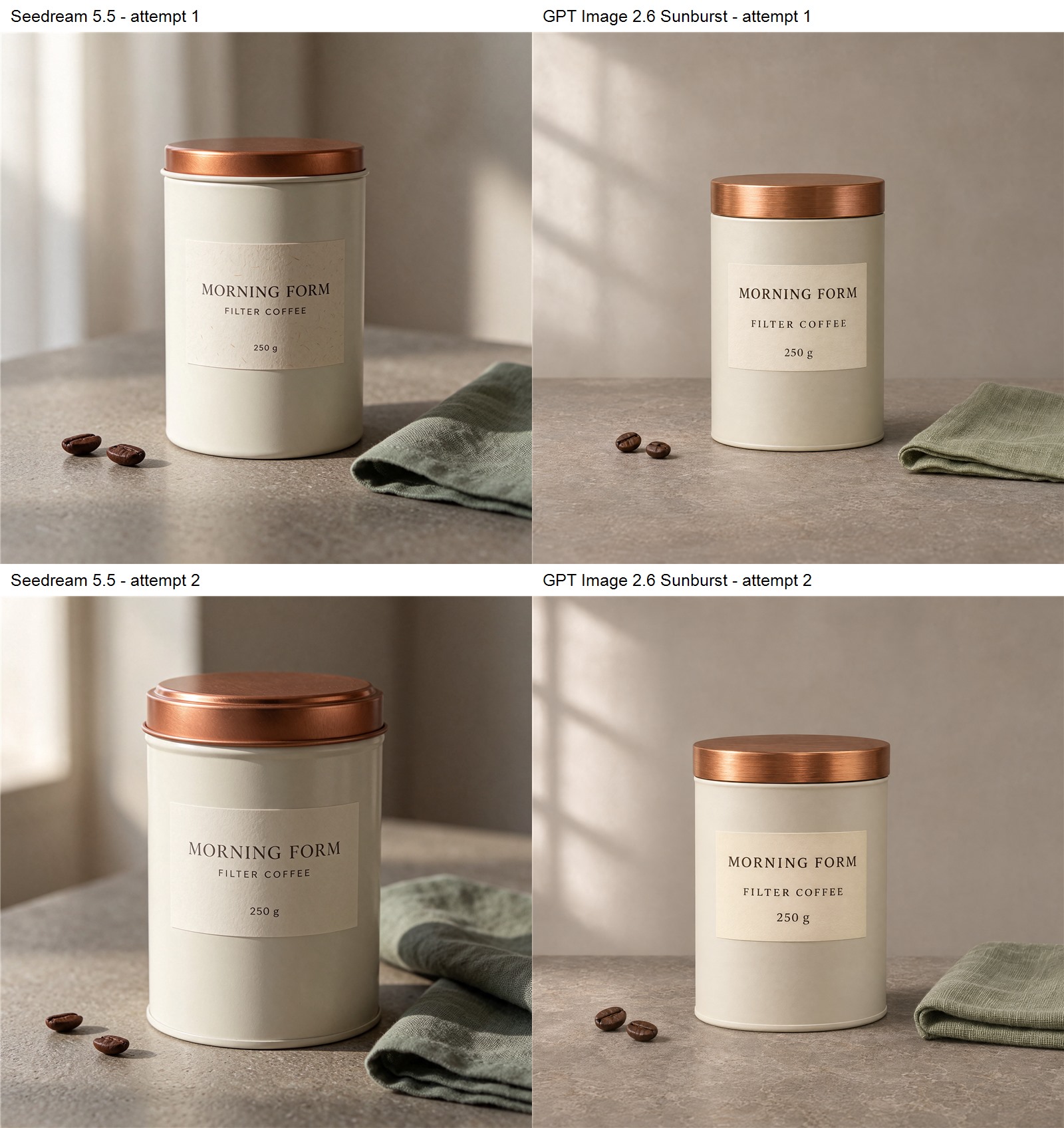
Both attempts are retained. Compare label wording, bean count, material finish, and framing separately from personal style preference.
Both models delivered the three label lines correctly in both initial attempts. All four images included two beans on the left and one sage napkin on the right, with the complete canister inside the frame. The painted body, copper lid, and woven cloth looked plausible enough to use as commercial concepts.
Seedream’s second attempt used a broader canister and a more prominent lid rim. GPT varied the label spacing and window-shadow pattern. Those differences could guide a visual preference, but did not establish a task-compliance winner. For this product photography brief, both were useful starting points.
A convincing concept is not an approved SKU image
There was no real manufactured coffee canister to reproduce here. Different lid profiles, canister proportions, or label styling are concept variations rather than reproduction errors. For ecommerce product image generation, use an approved source when exact packaging matters. Our tea-tin edit below tests preservation against an actual shared input.
Poster Text: Correct Words and Correct Styling Are Separate
Our fictional bookbinding workshop poster required the headline “Make It By Hand,” the subtitle “Weekend Bookbinding,” the date “November 28, 2026,” the time “10:30 AM - 1:00 PM,” the price “$36 per person,” and a complete booking footer. The headline had to remain in title case. We allowed line wrapping, but requested no extra wording or objects beyond one small book drawing.
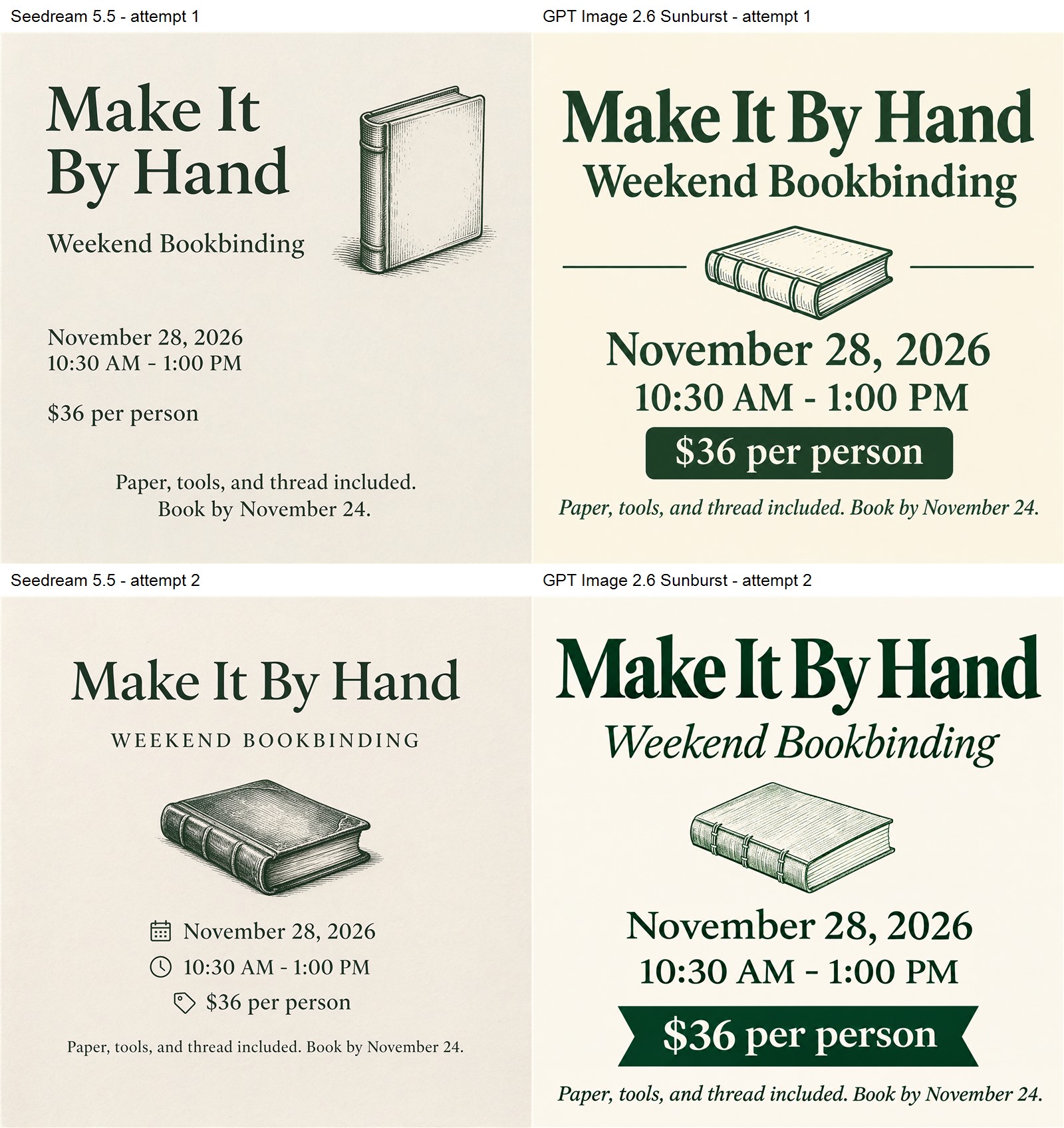
The copy remains readable in all four. Seedream’s second output changes the subtitle case and introduces extra icons.
Both models retained the requested headline wording and title case in both attempts. The dates, times, prices, and footer copy were also correct. For short English event copy, neither demonstrated a spelling advantage in these four examples.
The stricter design check revealed a difference. Seedream’s second poster changed the subtitle to uppercase and added calendar, clock, and price-tag icons. It is a tidy layout, but those additions depart from our supplied subtitle case and one-illustration brief. GPT’s two posters retained the subtitle case and used the requested book drawing, with different price treatments.
That distinction matters when a client has approved copy and a visual system. “Readable” is a lower bar than “matches the brief.” A designer might accept the extra icons or prefer them, but should record that as an editorial choice rather than exact compliance.
Infographic Test: Numbers, Order, and Icons
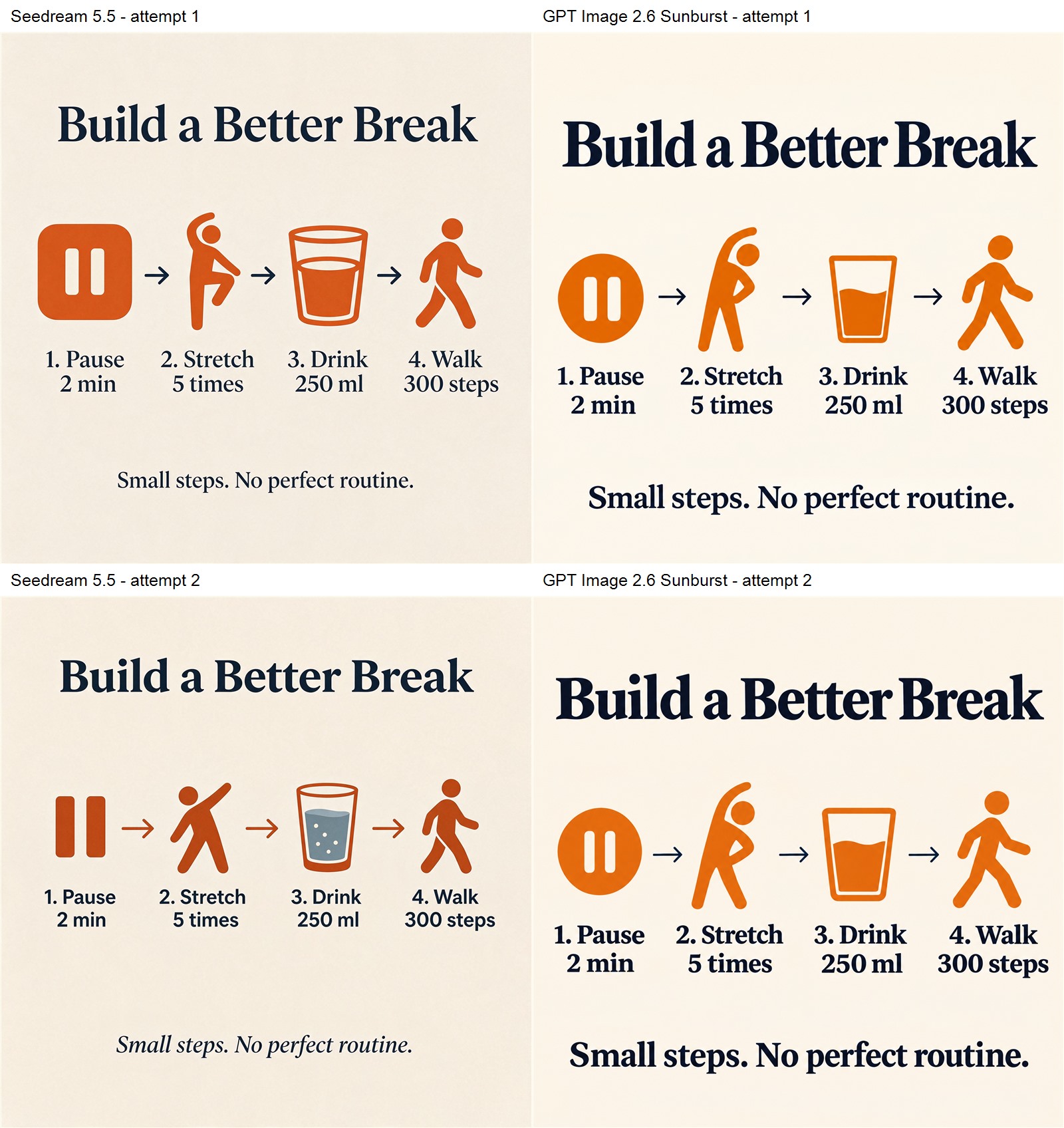
The infographic brief required four equal columns: “1. Pause 2 min,” “2. Stretch 5 times,” “3. Drink 250 ml,” and “4. Walk 300 steps.” Each needed its matching icon, with exactly three connecting arrows. The title and footer also had to match, so this tested relationships and quantities alongside spelling.
Both models retained the four labels and their quantities in both attempts. The title and footer were complete, the columns followed the requested order, and the three right-pointing arrows connected adjacent steps. Their icon styles and typography varied, but the small instructional layout remained understandable.
Seedream’s second water icon introduced blue-gray liquid into the otherwise orange icon system. That is a palette variation worth reviewing if every icon must share one color, rather than a numeric or spelling failure. For this compact infographic, we would choose on style after checking the same required content in either model.
For an instructional graphic, read every number and unit before approving the layout. An attractive icon cannot compensate for a wrong quantity, missing step, or misplaced arrow.
Local Editing: Change the Lid, Protect the Label
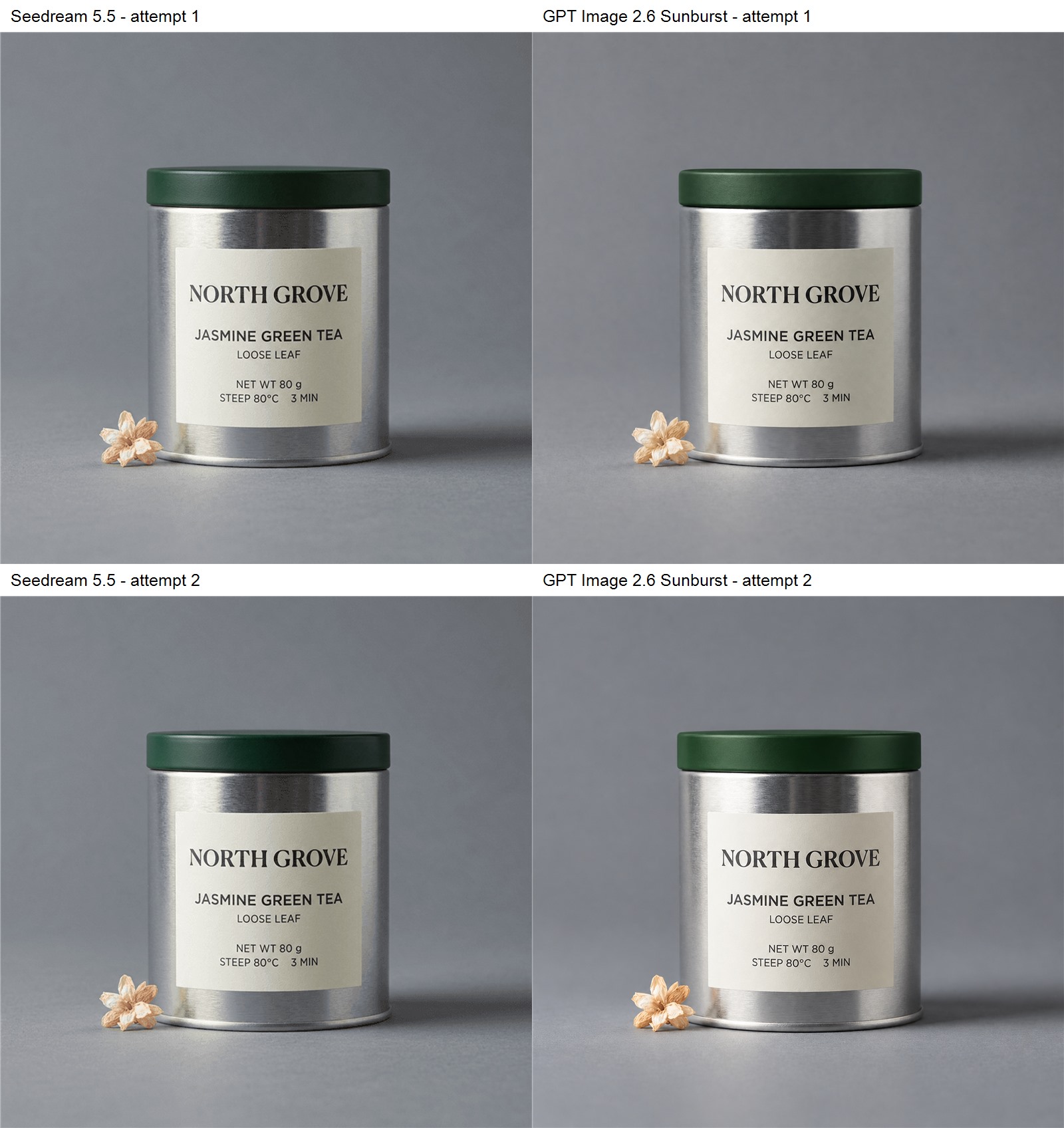
We asked both models to change a copper tea-tin lid to matte dark forest-green paint while protecting the rest of the source. The label included NORTH GROVE, JASMINE GREEN TEA, LOOSE LEAF, NET WT 80 g, and the steeping temperature and time. A dried flower beside the tin made unintended changes easier to spot.
Both models recolored the lid in both attempts and retained the readable label content. The tin remained centered, with its cream label, gray setting, and flower on the left. This was a shared success on the requested main change.
Preservation was less equal. Seedream’s results stayed visually closer to the source’s flower shape and existing surface texture. GPT’s first edit redrew the flower more noticeably, while its results generally cleaned up and reinterpreted the tin’s finish. That can look polished, but our instruction was to change only the lid.
For product packaging edits, inspect the supporting details after confirming the requested recolor. An improved-looking flower is still an unintended revision if its shape was already approved. Seedream preserved those details more closely in this test; neither result should be assumed pixel-identical to the source.
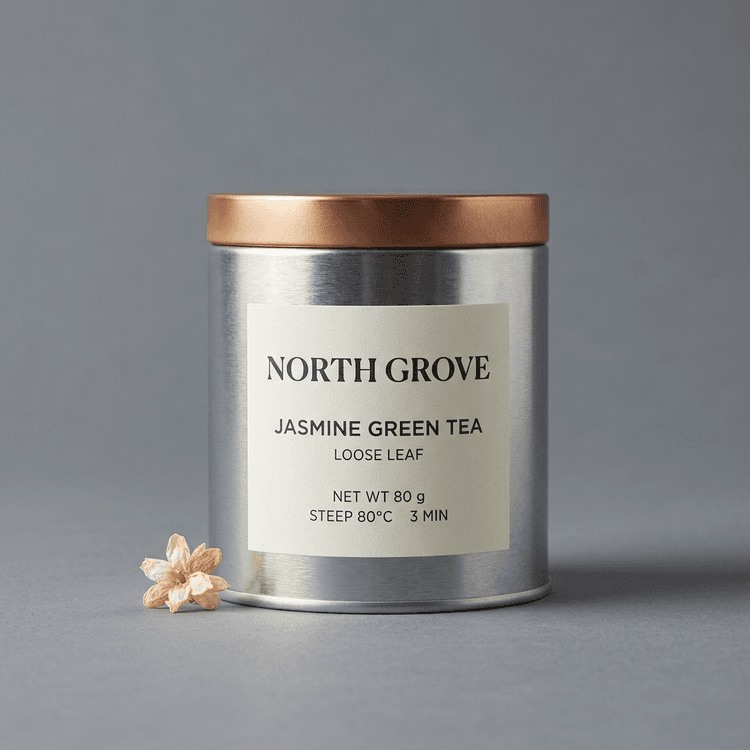
Use the original reference PNG to repeat this edit.
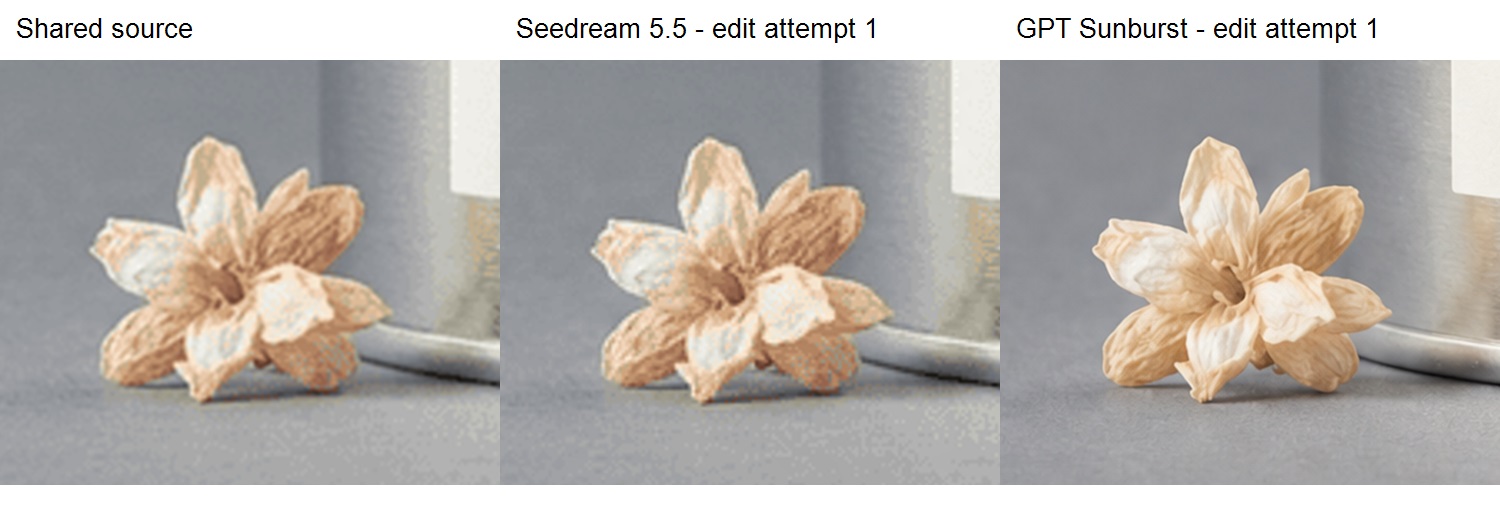
The same normalized region is enlarged in each file. The source is lower resolution; these crops show shape changes, not a native sharpness comparison.
Transparent Glass: The Download Is the Test
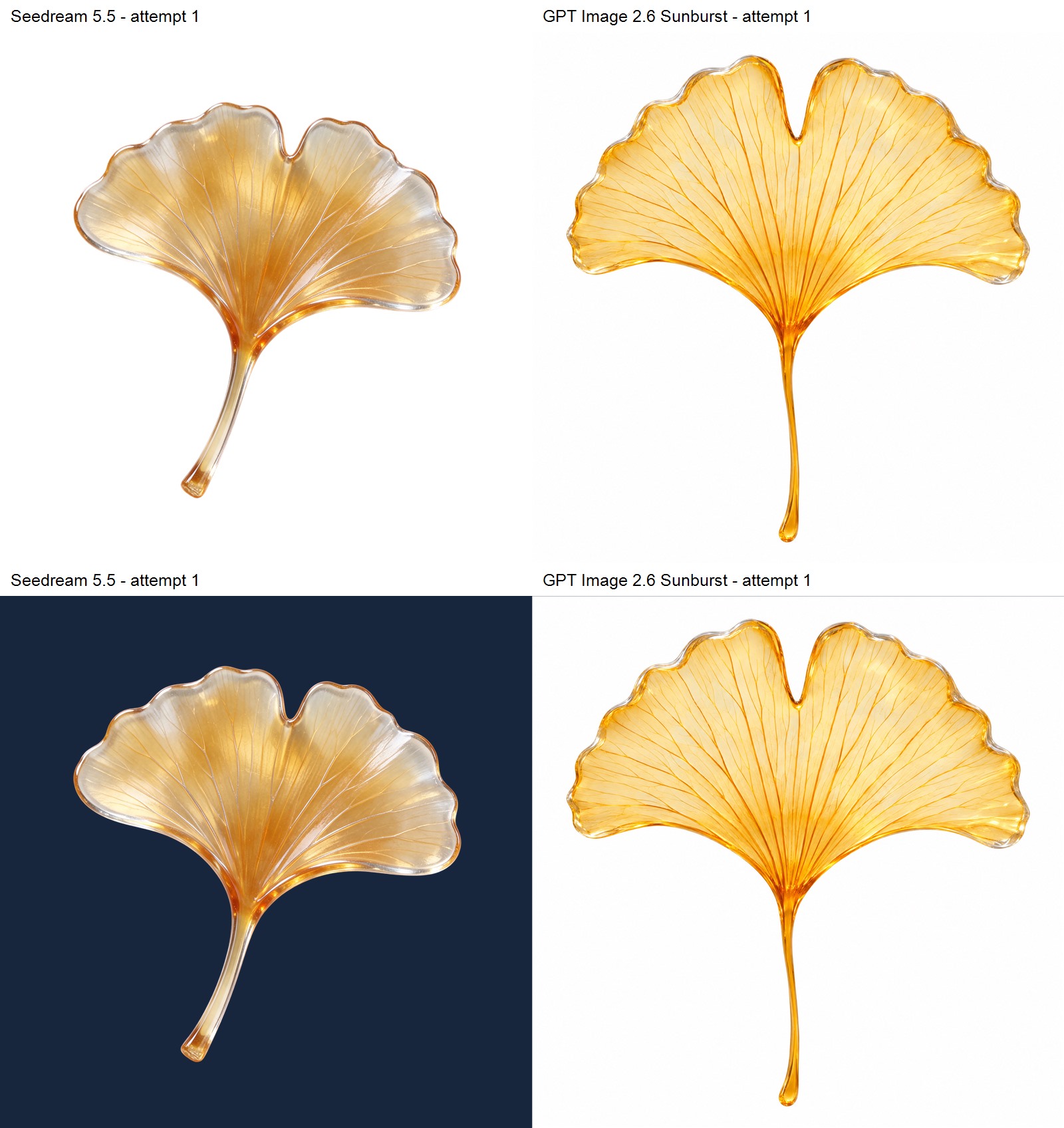
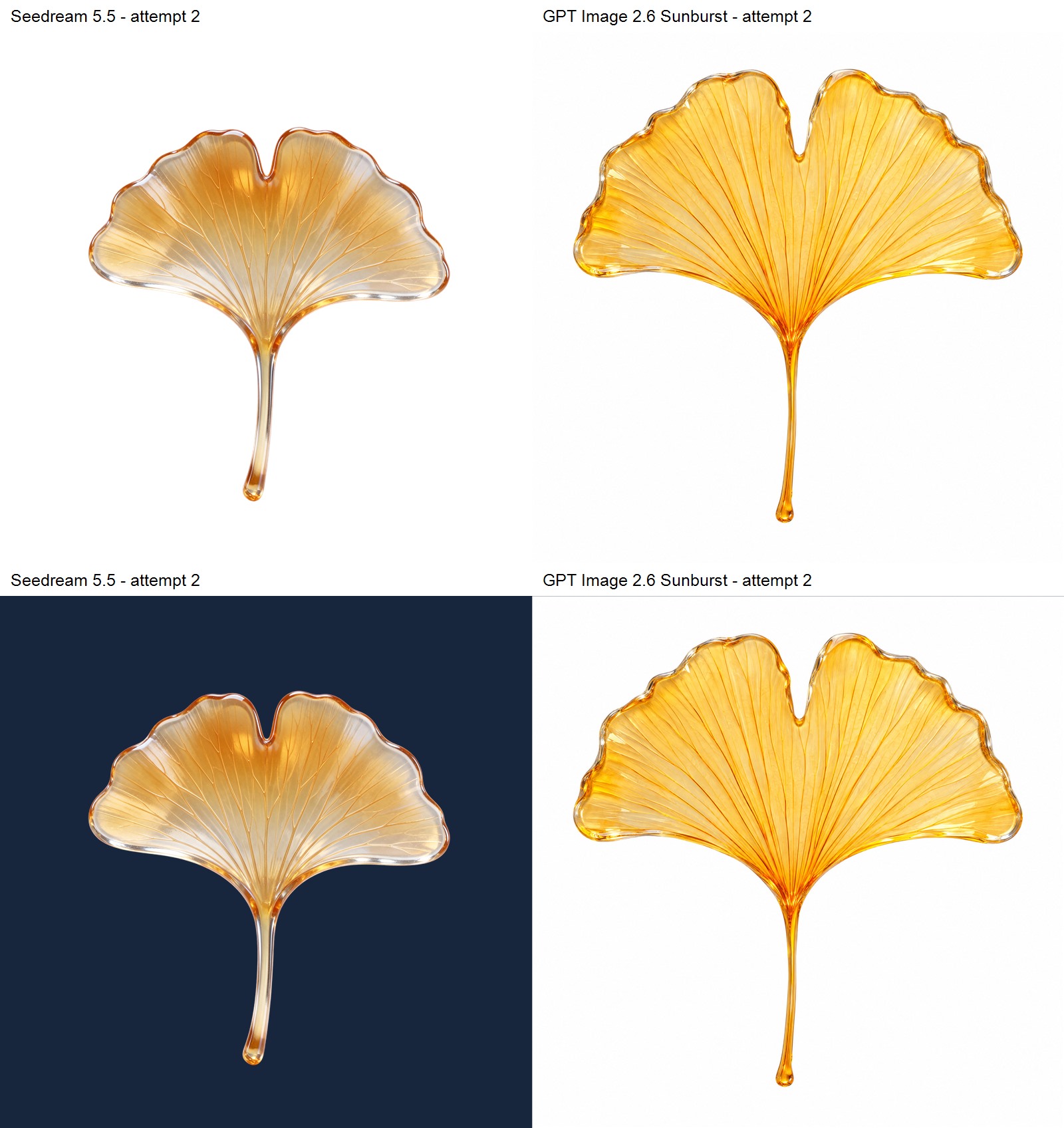
Seedream’s two downloads contained real alpha, with fully transparent backgrounds and the leaf intact inside the canvas. However, both leaf centers had alpha 255, meaning fully opaque. Only about 0.30% and 0.27% of all pixels had intermediate alpha, largely around edges. The pale highlights suggested glass, but a new background did not show through most of the interior.
Both GPT downloads were PNG files with opaque white backgrounds and no alpha channel. They depicted convincing amber glass, but the white canvas remained visible when composited over dark blue. They therefore did not meet the transparent-file requirement through this JXP workflow.
A cutout and translucent glass are different deliverables
Seedream supplied a reusable isolated leaf, but did not meet our full see-through-glass requirement. That distinction matters for layered compositions: painted white reflections remain white when the asset moves to a dark page.
The controls also differed. XMK let us explicitly select transparent background for Seedream. JXP’s GPT form offered PNG and complexity controls, but no background switch. We requested transparency through the prompt only. OpenAI’s image guide documents a separate background output option, so this prompt-only result must not be generalized to GPT’s full API capabilities.
We applied no background removal or alpha cleanup. The panels below composite the actual files over white and dark blue. Neither a PNG extension nor a convincing glass rendering should replace checking the asset in its intended layout.
Platform Credits and Waiting Times
Each tested Seedream request displayed 20 XMK credits; each GPT Sunburst request displayed 5 JXP credits, including edits with one reference. These are interface quotes, not audited account debits, and the platforms use different credit units. Calculate the cash cost for the same task, including corrections, before choosing a cheaper workflow.
Some GPT requests were still pending after about 15 minutes, but all eventually returned. Our observation intervals included time spent reviewing other images, so they cannot support a controlled speed ranking. For a production pilot, measure completion and manual correction time consistently: the useful comparison is the total effort required to reach an approved asset.
Test Notes and Limitations
Five briefs, two attempts each
We submitted each matching prompt twice per model, one image per request, and retained both outputs. The main comparison therefore covers 20 images. Acceptance checks covered exact copy, object counts, layout order, material appearance, source preservation, and exported transparency. Two attempts per task are enough to identify examples worth inspecting, but cannot establish general success rates.
When the second GPT product request remained pending after 15 minutes, we submitted one additional request with the same settings. The original later returned. The main panel uses the original two attempts; the supplementary product result remains separate. All 21 submissions completed, with no confirmed generation failures.
The shared tea-tin input was an older synthetic image generated with Nano Banana 2.1. Every edit started from that same input. We tested independent local edits, not cumulative drift across an editing chain. The glass test separately checked background alpha and whether the subject interior let a new background show through.
What these comparisons can establish
The platforms exposed different controls, and their 2K presets returned different dimensions. Equal display sizes help compare composition, not native resolution. Figures use resizing, labels, detail crops, and background composites; no output received text repair, color enhancement, background removal, or alpha cleanup.
The GPT selection was Sunburst, not Flare. ByteDance’s Seedream page describes editing, transparency, and material capabilities, but this article evaluates only the briefs and interfaces shown here. We did not independently verify backend routing or every vendor claim.
Reproduce the Tests
Use one output per request and repeat the same prompt before rewriting it. For edits, give both models the same source. Keep the complete first outputs and distinguish a style preference from a required correction. Below are the exact product and glass prompts; the complete five-brief prompt record includes the poster, infographic, and edit instructions.
Product photography prompt
Create a square commercial product photograph of one matte ivory metal coffee canister with a flat brushed copper lid. Its cream label reads exactly “MORNING FORM”, “FILTER COFFEE”, and “250 g” on three separate lines. The canister stands on a warm gray stone surface. Place exactly two dark coffee beans on the left and one folded sage linen napkin on the right. Eye-level camera, soft window light from the left, realistic matte paint, brushed metal and woven cloth. Show the full canister with generous margins. No other objects, words, logos or graphics.
Transparent glass prompt
Create one isolated open fan-shaped ginkgo leaf made of translucent amber glass, with a slender stem and fine radiating veins, seen straight on. Entire leaf and stem inside the square canvas with generous margins. The leaf interior must be genuinely see-through, with subtle silver edge highlights. Truly transparent background with a real alpha channel, no checkerboard, no floor, no cast shadow, no text, no other objects.
Which Model Should You Choose?
For product concepts and compact English infographics, both met our content requirements. Choose the visual treatment that fits your campaign, then test your own copy and layout.
For this packaging recolor, Seedream was our preferred starting point because it stayed closer to the reference’s supporting details. Keep the source beside the output; a correct lid does not automatically approve the rest of the packaging scene.
For this poster’s exact styling, GPT Sunburst followed the supplied subtitle case and limited illustration brief more closely across both outputs.
For transparent glass, require a file check before choosing either workflow. Seedream’s explicit background control produced an isolated asset, but the glass interior remained opaque. GPT’s prompt-only JXP downloads retained white backgrounds. Neither workflow met our complete translucent-glass brief in these attempts.
The most useful comparison is a small pilot with your approved copy and assets. Separate essential corrections from optional taste changes, count every request, and inspect the final export before committing to a production workflow.
FAQ
Is Seedream 5.5 better than GPT Image 2.6?
It depends on the deliverable. Seedream preserved our edit source more closely; GPT Sunburst followed the poster styling brief more closely. Both handled the product concepts and compact infographic copy. Our export checks show why a visually convincing preview still needs file-level review.
Which GPT Image 2.6 version was tested?
We selected Sunburst on JXP, with 2K, High quality, PNG, and the default high complexity. Flare was not tested.
Which model is better for English poster text?
Both rendered the workshop headline, date, time, price, and footer correctly in two attempts. Seedream’s second poster changed the subtitle case and added icons. For exact brand layouts, evaluate styling and extra elements alongside spelling.
Does a PNG file always have a transparent background?
No. A PNG can contain an opaque background. A file can also have transparent surroundings while its glass subject remains opaque. Test the original over light and dark backgrounds and inspect its alpha channel when compositing behavior matters.
Can these models preserve packaging text during an edit?
Both retained the readable tea-label content during our lid recolor. Seedream stayed closer to the source’s supporting details, while GPT’s first output redrew the flower. Every attempt started from the original; cumulative drift across multiple edits was not tested.
Which model is cheaper?
The observed quotes use different platform credits, so their raw numbers do not establish a cost winner. Compare your effective cash cost for the same size and task, including references and any additional corrections required for approval.